This Insurance Renewal Premium Forecast Excel workbook helps independent agencies estimate upcoming renewal premiums from recorded current premiums, renewal dates, expected changes, and retention likelihoods. Its renewal premium forecast converts row-level administrative inputs into forecast and weighted amounts for a defined planning horizon.
The XLSX includes Summary, Renewal Forecast, and Assumptions worksheets. It applies editable line-of-business defaults or manual changes, while the weighted amount reflects an entered retention likelihood rather than a predictive model. Agency staff should verify every record before using the results for planning or client follow-up.
How this workbook can help
- Provides a consistent method for estimating upcoming renewal premiums from recorded policy values and editable assumptions.
- Separates full forecast premium from the retention-weighted amount so staff can interpret each figure appropriately.
- Identifies incomplete records through forecast-readiness results and row-level review alerts.
- Summarizes premium exposure by forecast horizon, line of business, renewal status, and due-soon timing.
What is in the file
How to get started
1. Review the planning assumptions
Open the Assumptions worksheet and confirm the as-of date, 180-day forecast horizon, 45-day due-soon window, line-of-business change percentages, alert threshold, owner list, and status list. Replace the fictional defaults with approved agency planning inputs.
2. Enter the renewal records
Use the shaded input cells on the Renewal Forecast worksheet to record the forecast ID, client alias, policy reference, line of business, current premium, renewal date, retention likelihood, owner, status, and notes.
3. Choose an adjustment basis
Select Default by Line to apply the configured change for the chosen line of business, or select Manual and enter an Expected Change %. Then review the calculated applied change, forecast premium, weighted forecast, and days to renewal.
4. Resolve exceptions and review the summary
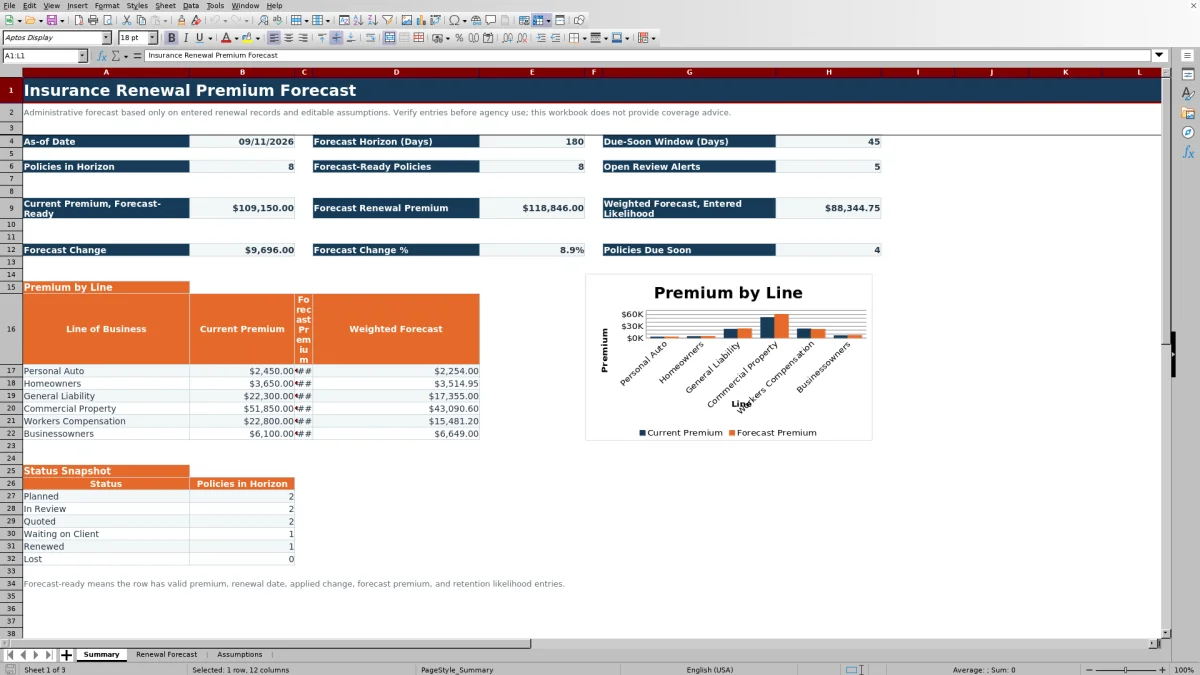
Address each Review Alert and confirm that Forecast Ready shows Yes before relying on that record in premium totals. Use the Summary worksheet to review horizon counts, due-soon policies, premium changes, line-level results, status counts, and the current-versus-forecast chart.
How the Insurance Renewal Forecast Workflow Operates
The situation begins with renewal records that have current premiums and future renewal dates but no consistent forward estimate. Staff act by entering each record, choosing Default by Line or Manual, and supplying a retention likelihood. The workbook calculates the resulting forecast premium, weighted forecast, days to renewal, readiness result, and review message. Staff then interpret those outputs on the Summary worksheet and decide which records need correction, follow-up, or closer review before renewal.
Interpreted Practical Example
Situation: the fictional General Liability example has a $12,500 current premium, an October 1, 2026 renewal date, an 85% retention likelihood, and Default by Line selected. The configured as-of date is September 11, 2026, and the General Liability default change is 8%. Action: the workbook applies 8% because the selected basis uses the line assumption. Result: it calculates a $13,500 forecast premium and an $11,475 weighted forecast. Interpretation: the 20 days to renewal place the record inside the configured 45-day due-soon window, while the weighted figure reflects the entered 85% likelihood and is not a premium discount. Next decision: verify the expected renewal pricing, address any open review message, and update the record's status as the renewal progresses.
Common Entry Errors and Solutions
Missing current premium: enter a positive amount within the configured maximum. Missing renewal date: enter a valid date within the allowed range of September 11, 2025 through September 10, 2029, or revise the assumption bounds first. Manual basis with no Expected Change %: enter a change within the configured range of -100% through 500%. Default by Line with no valid line: select one of the six configured lines so the lookup can return a default. Missing retention likelihood: enter a value from 0% through 100%. After correcting an entry, check Forecast Ready and the review message again rather than assuming that the row is complete.
Comparison With External Renewal Tracking Alternatives
Taken as one complete operational method, this workbook combines controlled data entry, assumptions, calculations, review indicators, and summary reporting. The alternatives below may be more suitable when their stated operating conditions apply.
| Method | More suitable when | Operational trade-off |
|---|---|---|
| Insurance Renewal Premium Forecast Excel workbook | More suitable when an agency needs an editable, locally managed forecast for up to 100 records with consistent assumptions and readiness checks. | Requires verified manual inputs and does not replace carrier pricing or an agency system of record. |
| Blank spreadsheet | More suitable when the task is a small, one-time list and the user is prepared to design and test all formulas, validation, and reporting. | Offers flexibility but does not begin with the workbook's prepared calculation and review structure. |
| CRM or agency management system | More suitable when centralized workflows, user permissions, activity histories, integrations, or multiuser record control are required. | Forecast fields and calculation options depend on the specific product and configuration. |
| Carrier-provided renewal report | More suitable when staff need carrier-issued renewal information for the policies represented in that carrier's report. | May not combine records across carriers or support the agency's own retention-weighted planning assumptions. |
The appropriate choice depends on record volume, integration needs, control requirements, and whether the purpose is internal planning or confirmation of carrier-provided terms.
Reading the Summary Metrics Correctly
Policies in Horizon counts populated forecast IDs with renewal dates from the as-of date through the end of the selected horizon. Forecast-ready premium totals use records marked Yes within that date range. Forecast Change is forecast premium minus current premium, and Forecast Change % compares those two totals. Weighted Forecast applies each row's entered retention likelihood. Open Review Alerts counts populated review messages across the prepared renewal rows, while Policies Due Soon excludes records marked Renewed or Lost. These measures answer different operational questions and should not be treated as interchangeable totals.
Assumptions, Validation, and Prepared Capacity
The Assumptions worksheet includes six lines of business, six statuses, two adjustment bases, editable owners, date boundaries, premium limits, expected-change limits, an alert threshold, and timing settings. The Renewal Forecast worksheet contains formulas across 100 prepared rows, eight data-validation rules, four conditional-formatting rules, frozen headers, and an autofilter. These controls help standardize entries, but they cannot confirm that a premium, date, status, or likelihood is factually correct.
From Interpretation to the Next Renewal Decision
Use the full forecast premium to understand the amount implied by the entered change assumption, and use the weighted forecast to view that amount through the entered retention likelihood. A large difference between the figures signals the effect of likelihood, not an alternative carrier quote. When a record is due soon, not forecast-ready, or carrying a review message, the next decision is to verify its source data, obtain updated renewal information, assign follow-up, or revise the planning assumption before relying on the portfolio total.
Frequently asked questions
What does Forecast Ready mean?
Forecast Ready shows Yes when a populated row contains numeric current premium, renewal date, applied change, forecast premium, and retention likelihood values. It confirms calculation completeness, not the accuracy or approval of the entries.
How does Default by Line differ from Manual?
Default by Line looks up the percentage configured for the selected line of business on the Assumptions worksheet. Manual uses the Expected Change % entered directly on that renewal record.
What does the weighted forecast represent?
The weighted forecast equals the calculated forecast premium multiplied by the retention likelihood entered for that record. It is an administrative planning figure and not a predictive probability generated by the workbook.
Which records contribute to the main Summary premium totals?
The current premium, forecast premium, and weighted forecast totals use forecast-ready records with renewal dates between the configured as-of date and the end of the forecast horizon.
Does this Excel workbook replace a carrier renewal quote or coverage review?
No. The workbook estimates premiums from recorded values and editable assumptions. Agency staff should confirm carrier information, policy terms, coverage details, and client-specific decisions through their normal review process.
Editorial responsibility

Maya ChenClient and policy workflows

Ethan BrooksWorkbook structure and formula QA