This Excel workbook tracks renewal-linked upsell opportunities for independent insurance agencies. It brings each account’s renewal date, existing policy type, candidate product, owner, stage, contact activity, and planning values into one structured tracker.
Formula-driven statuses help staff identify the next administrative follow-up, distinguish open opportunities from closed records, and review pipeline totals on the Summary sheet. Candidate products are administrative sales entries rather than coverage recommendations, and estimated premium or commission amounts are planning values only.
How this workbook can help
- Keeps additional-product opportunities connected to specific account renewal dates and assigned owners.
- Surfaces opportunities that are in the renewal window or have follow-ups due today or overdue.
- Calculates estimated annual commission from the entered premium and commission rate for planning purposes.
- Flags missing information, duplicate opportunity IDs, and candidate products that match the existing policy type.
What is in the file
How to get started
1. Assess the situation
Open Lists & Assumptions and confirm the as-of date, 90-day renewal window, 30-day urgent threshold, and 14-day stale-contact threshold before reviewing the pipeline.
2. Record the opportunity
Enter the opportunity ID, account, owner, renewal date, existing policy type, candidate product, source, and stage in Renewal Upsell Tracker. Add contact dates, planning values, notes, and a closed date when applicable.
3. Review the calculated result
Check Days to Renewal, Renewal Window Status, Follow-Up Status, Estimated Annual Commission, and action priority. These calculated fields convert the entered facts into an operational queue.
4. Interpret the record
Determine whether the row needs outreach, a scheduled follow-up, corrected data, or no further open-pipeline action because it is Won, Declined, or Deferred.
5. Make the next decision
Update the next follow-up date or stage, resolve any Data Alert, and then use the Summary sheet to review open workload, due activity, commission estimates, and stage counts.
Organize the renewal upsell situation
The tracker is designed for additional-product opportunities tied to a recorded insurance renewal. Each row connects an opportunity ID and account name with an owner, renewal date, existing policy type, candidate product, source, stage, contact history, next follow-up, planning values, notes, and closed date. This keeps the operational sales record focused on renewal timing without treating the candidate product as a coverage recommendation.
Turn renewal dates into an action queue
Days to Renewal is calculated from the renewal date and the as-of date maintained on Lists & Assumptions. Renewal Window Status then categorizes an open record as Past Renewal, In Window, or Future, while Won, Declined, and Deferred records are treated as Closed. Follow-Up Status evaluates scheduled dates, due-today and overdue activity, missing contact dates, and stale contact activity. Staff can use these results to decide which administrative action belongs next.
Use commission estimates as planning values
When Estimated Annual Premium and Estimated Commission Rate are both entered, the workbook calculates Estimated Annual Commission. The Summary sheet totals estimated commission for open opportunities and separately totals won estimated commission. These figures support pipeline planning; they do not document payment, binding, or a policy change.
Practical renewal upsell example
Situation: the fictional Blue Kite Bakery LLC record has a September 18, 2026 renewal, a Cyber candidate product, a Contact Planned stage, a September 14 follow-up, a $1,200 estimated annual premium, and a 12% commission rate. Action: with the workbook’s as-of date set to September 10, staff reviews the calculated timing and follow-up fields. Result: the renewal is eight days away, the opportunity is In Window, the follow-up is Scheduled, and the calculation produces $144 estimated annual commission. Interpretation: this is an open, near-term planning opportunity with a future follow-up already recorded, not a due-today or overdue task. Next decision: complete the planned outreach on schedule, then update the contact date, next follow-up, and stage based on the outcome.
Common errors and solutions
The Data Alert field identifies issues such as a missing opportunity ID, duplicate ID, missing account, missing owner, missing renewal date, missing existing policy type, missing candidate product, or a candidate product that matches the existing policy type. Resolve the alert by correcting the indicated input rather than overwriting the formula. If Excel rejects an entry, use a date between January 1, 2000 and December 31, 2100, enter a nonnegative premium within the validated range, keep the commission rate between 0% and 100%, or select an allowed list value. If a row appears in the wrong renewal category, verify both its renewal date and the as-of date.
Comparison with manual and system-based alternatives
The workbook functions as one complete operational method: staff records the opportunity, monitors renewal and follow-up timing, reviews calculated priority, checks data quality, and summarizes the pipeline in the same XLSX. The comparison below describes when each approach is more suitable.
| Method | What it provides | More suitable when | Operational limitation |
|---|---|---|---|
| Insurance Renewal Upsell Tracker workbook | Structured opportunity rows, controlled lists, calculated renewal and follow-up statuses, data alerts, commission planning, and a summary view. | More suitable when an agency needs a focused Excel process for up to 120 renewal-linked opportunities without configuring another system. | Requires staff to maintain entries and does not bind coverage, process payments, or record policy changes. |
| Paper or manual notes | A flexible place to record account observations and reminders. | More suitable when the volume is very small and no calculated status or consolidated reporting is needed. | Does not automatically calculate renewal timing, follow-up status, commission estimates, or data alerts. |
| Blank spreadsheet | An open grid that can be adapted to a custom process. | More suitable when the agency intends to design and maintain its own fields, formulas, validations, and reports. | Requires setup and ongoing formula governance before it offers the same type of structured workflow. |
| CRM or agency management system | Broader account records, activities, permissions, integrations, and potentially multiuser workflow. | More suitable when the agency requires systemwide automation, shared activity history, access controls, or integration with existing client records. | May require configuration to isolate renewal-specific additional-product opportunities and reproduce this workbook’s exact operating view. |
| Carrier-provided report | Carrier-specific policy or renewal information for business placed with that carrier. | More suitable when staff needs source reporting for one carrier’s book. | May not consolidate opportunities, products, owners, and follow-ups across multiple carriers or agency-generated sources. |
The workbook can support a defined renewal sales routine, but it is not a substitute for the agency’s policy administration, coverage review, compliance, or client-record systems.
Interpret results and choose the next decision
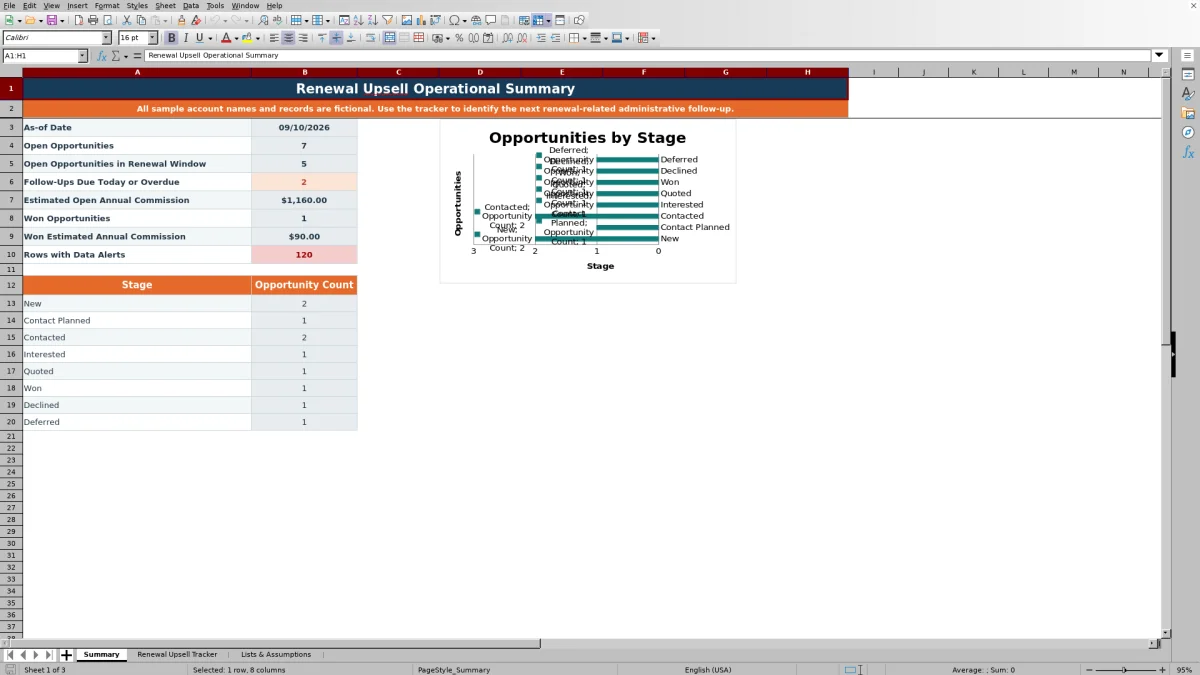
Use the Summary sheet to review open opportunities, open records in the renewal window, follow-ups due today or overdue, estimated open annual commission, won opportunities, won estimated commission, rows with alerts, and counts by stage. Treat those totals as prompts for workload review rather than proof that outreach or placement occurred. The next decision should be made at the row level: schedule contact, complete a due follow-up, correct an alert, advance the stage, or document closure.
Frequently asked questions
What does the insurance renewal upsell tracker record?
It records renewal-linked additional-product opportunities, including the account, owner, renewal date, existing and candidate product types, source, stage, contact and follow-up dates, planning values, notes, closed date, and calculated operating statuses.
How many opportunities can the workbook hold?
The Renewal Upsell Tracker provides 120 entry rows, running from row 6 through row 125 inside the RenewalUpsellTable.
How does the workbook identify urgent follow-up work?
It evaluates the next follow-up date, last contact date, stage, as-of date, and configured timing thresholds. The resulting Follow-Up Status and Action Priority fields help distinguish overdue, due-today, scheduled, stale, missing, closed, and other timing conditions.
Can I change the renewal-window assumptions?
Yes. Lists & Assumptions contains editable values for the as-of date, renewal window days, urgent renewal days, and stale contact days. Validations require the urgent threshold to remain no greater than the overall renewal window.
Are the premium and commission figures final accounting values?
No. Estimated Annual Premium, Estimated Commission Rate, and Estimated Annual Commission are planning values only. The workbook does not record payment, binding, coverage approval, or policy changes.
Editorial responsibility

Maya ChenClient and policy workflows

Ethan BrooksWorkbook structure and formula QA