
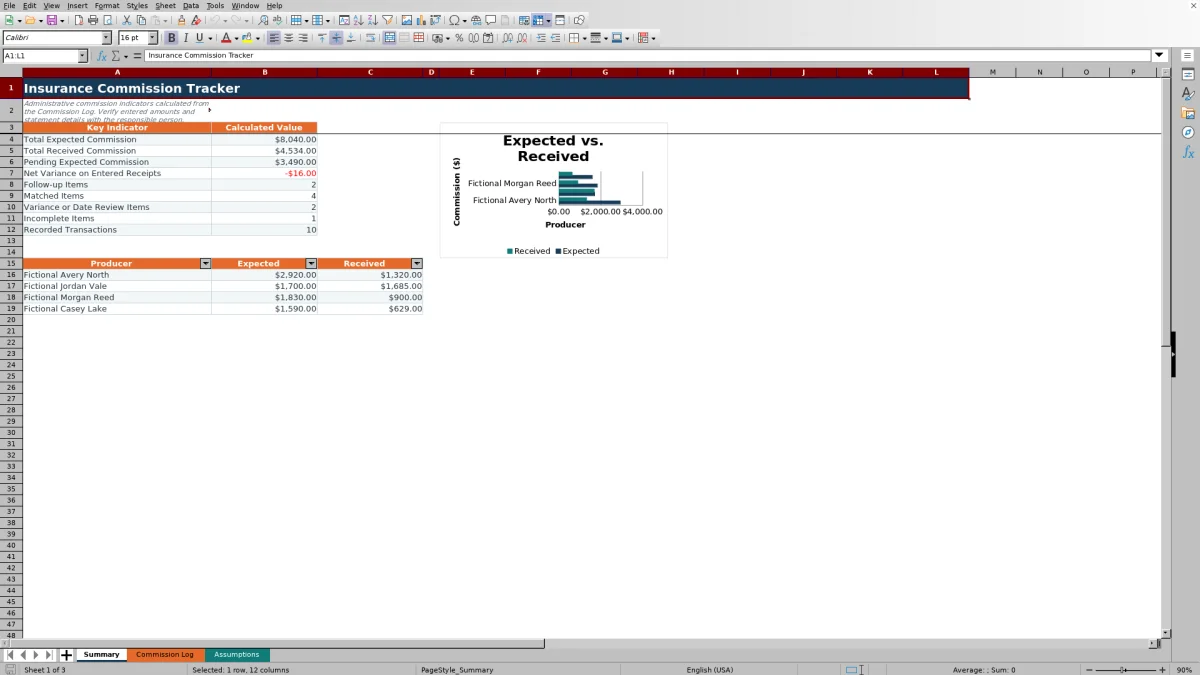
The insurance commission tracker is an Excel workbook for recording expected and received commissions by policy, producer, carrier, and statement. It gives independent insurance agencies one administrative record for reviewing commission amounts, receipt dates, variances, and follow-up responsibility.
The XLSX includes a 200-row Commission Log, a Summary sheet with key indicators and a producer chart, and an Assumptions sheet for workflow thresholds and validation lists. Editable inputs capture statement and policy details, while formulas calculate expected commission, variance, and a review status.
How this workbook can help
- Keeps policy, client, carrier, producer, statement, and commission details in one operational log.
- Identifies pending receipts, incomplete entries, date issues, and commission variances that need agency review.
- Summarizes expected and received commission totals and compares results for the four producers listed on the Assumptions sheet.
- Uses validation rules and editable workflow controls to support more consistent data entry.
What is in the file
How to get started
1. Review the assumptions
Open the Assumptions sheet and confirm the 30-day receipt review age, $1 match tolerance, amount limits, commission-rate ceiling, and allowed date range. Replace the fictional producers, carriers, transaction types, and follow-up owners within the available list cells.
2. Enter each commission transaction
Use rows 5 through 204 of the Commission Log. Enter the transaction ID, statement date and reference, producer, carrier, policy reference, client, transaction type, commissionable premium, commission rate, and follow-up owner. Add notes when they will help another agency team member understand the item.
3. Record the carrier receipt
When commission is received, enter the received date and amount. Do not overwrite the formulas in Expected Commission, Variance, or Status; those columns calculate the expected amount, compare it with the receipt, and provide an administrative review prompt.
4. Review results and decide what to address
Filter the Status column for incomplete records, pending receipts, follow-up items, date concerns, or variance reviews. Then use the Summary sheet to review totals, item counts, and producer-level expected and received amounts before checking exceptions against the relevant carrier statement and agreement.
Situation: Commission Records Arrive From Multiple Sources
Independent agencies may need to connect a carrier statement line with a producer, policy, client, premium, rate, receipt, and follow-up owner. When those details remain in separate emails or reports, it can be difficult to see which commissions are pending or require review. This workbook creates one working situation in which each transaction is associated with its statement and policy references.
Action: Enter Controlled Transaction and Receipt Data
Start by reviewing the editable controls and lists on the Assumptions sheet. Then record each transaction in the Commission Log and add the receipt date and received commission when available. The workbook applies controlled inputs for listed producers, carriers, transaction types, owners, date boundaries, amount limits, and commission rates. Expected Commission, Variance, and Status are formula columns and should remain unchanged.
Result: See Expected, Received, and Pending Amounts
Expected commission is calculated as commissionable premium multiplied by commission rate. Once a received amount is entered, variance is calculated as received commission minus expected commission. The Summary sheet turns those row-level calculations into a visible result: total expected commission, total received commission, pending expected commission, net variance on entered receipts, record counts, and producer-level totals.
Practical Example: Interpret a Short Receipt
One fictional sample transaction records an $8,000 commissionable premium at a 10% commission rate. The calculated expected commission is $800, while the entered received commission is $760, producing a variance of -$40. With the Assumptions sheet match tolerance set to $1, the interpreted result is that the receipt is outside tolerance and should not be treated as matched. The next action is to compare the carrier statement, policy reference, premium, and commission rate before deciding whether the amount is correct or requires follow-up.
Interpretation: Use Statuses as Review Cues
The Status formula evaluates administrative completeness, receipt timing, dates, and variance. A transaction with required details but no received date or amount is initially awaiting receipt and moves to follow-up when the statement date exceeds the configured review age. A partially entered receipt is incomplete, a received date before the statement date prompts date review, and a variance within tolerance is matched. These are review cues, not accounting conclusions; agency staff should verify each exception against source records.
Common Errors and Solutions
If a transaction shows Incomplete, fix missing inputs by checking the statement details, producer, carrier, policy, client, transaction type, premium, rate, and follow-up owner. If a date or amount is rejected, check the assumptions for the allowed date range, maximum amounts, and rate ceiling; enter 10% as 0.10. If calculated columns stop working, restore the formulas in Expected Commission, Variance, and Status from an untouched corresponding row rather than entering calculated values manually. If a dropdown lacks the needed choice, update an available list cell on the Assumptions sheet and confirm that the Commission Log accepts the revised entry.
Comparison and Next Decision
The appropriate tracking method depends on transaction volume, system access, and the level of integration the agency needs. The table compares this workbook as a complete operational method with realistic external alternatives.
| Method | Operating approach | More suitable when |
|---|---|---|
| Insurance Commission Tracker workbook | Combines a structured transaction log, input validation, formulas, review statuses, summary indicators, and a producer chart in one XLSX. | More suitable when an agency needs a lightweight process for up to 200 commission entries and can manage file access and formula protection. |
| Blank spreadsheet or manual log | Records only the columns and calculations created by the user, without the workbook's existing controls and status logic. | More suitable when the task is temporary, highly customized, or limited to a small one-time reconciliation. |
| Carrier-provided report | Presents commission activity in the carrier's format and generally covers that carrier's own statement data. | More suitable when the immediate task is validating source details for one carrier rather than maintaining a cross-carrier agency workflow. |
| Agency management or accounting system | May connect commission activity with broader policy, producer, permission, or accounting processes, depending on the system configuration. | More suitable when the agency requires multiuser controls, system integrations, audit history, or transaction capacity beyond this workbook. |
The next decision is whether the agency needs a standalone reconciliation workbook or an integrated system of record. If this XLSX is used, assign ownership for updating receipts, reviewing exceptions, and confirming totals against carrier statements.
Frequently asked questions
What does the insurance commission tracker calculate?
It calculates expected commission from commissionable premium and commission rate, variance from received commission minus expected commission, and an administrative status based on completeness, receipt timing, dates, and the configured match tolerance.
How many commission transactions can the workbook hold?
The Commission Log provides 200 prepared entry rows, from row 5 through row 204. The expected commission, variance, and status formulas are present throughout those rows.
How does the workbook identify commission follow-up items?
If a complete transaction has neither a received date nor a received amount, it is treated as awaiting receipt. Once the statement date is older than the receipt review age on the Assumptions sheet, the status changes to Follow up.
Can the producers, carriers, and workflow settings be changed?
Yes. The Assumptions sheet contains editable cells for four producers, four carriers, five transaction types, three follow-up owners, and seven workflow controls. The Summary producer section uses the four producer entries from that sheet.
Does this Excel workbook replace carrier statements or accounting records?
No. It is an administrative tracking and reconciliation aid. Verify rates, expected amounts, receipts, dates, and policy references against carrier statements, commission agreements, and the agency's applicable accounting records.
Editorial responsibility

Maya ChenClient and policy workflows

Ethan BrooksWorkbook structure and formula QA