This insurance territory sales planner is an Excel workbook for independent agencies that need to allocate prospects, assign producers, establish territory goals, and monitor capacity across defined sales areas.
Agency operators enter planning assumptions and prospect details, while the XLSX calculates weighted pipeline, goal progress, capacity use, unassigned territories, and records that require a human follow-up decision. Its three worksheets support planning for up to 100 territories and 100 prospects using fictional sample data as a guide.
How this workbook can help
- Distribute prospects across territories while keeping ownership, premium opportunity, stage, and follow-up dates visible.
- Compare weighted prospective premium with each territory’s annual premium goal.
- Identify unassigned prospects, missing next actions, overdue actions, and target dates that need review.
- Evaluate prospect volume against stated territory capacity before making the next allocation decision.
What is in the file
How to get started
1. Set the planning boundaries
Open Assumptions and update the planning controls, including the as-of date, maximum estimated annual premium, permitted date range, maximum territory goal, and maximum prospect capacity.
2. Configure the territories
Enter each territory, default owner, annual premium goal, prospect capacity, and Yes or No active status. These entries supply the territory and owner lists used in the prospect plan and the allocation rows shown on Summary.
3. Enter and maintain prospects
On Prospect Plan, add a prospect ID, organization, created date, territory, owner, stage, estimated annual premium, win probability, target close date, next action date, and planning notes. Weighted Premium and Planning Status are calculated fields.
4. Review the results and decide
Use Summary to review territory goal percentage, capacity percentage, premium totals, unassigned records, and action checks. Investigate the underlying prospect rows before reallocating an account, changing a goal, or revising a follow-up date.
The Territory Planning Situation
An independent insurance agency may have several producers pursuing accounts across geographic or operational territories, but the raw prospect count does not reveal whether those areas carry comparable premium opportunity. This workbook frames the situation through annual premium goals, prospect capacity, estimated annual premium, and win probability. It also distinguishes open prospects from Won and Lost records so closed opportunities do not inflate the open pipeline count.
Build the Allocation Method
The action begins on Assumptions, where the agency defines each territory’s default owner, annual premium goal, prospect capacity, and active status. Active goals feed the overall active territory goal, while the territory roster supplies selectable values on Prospect Plan. A prospect’s territory and owner remain editable, allowing an operator to document an exception instead of assuming that every account follows the default ownership pattern.
Record Prospect Actions and Timing
Each prospect row can hold an organization name, created date, assigned territory, owner, stage, premium estimate, win probability, target close date, next action date, and notes. The calculated planning status returns Closed for Won or Lost records. For other entered prospects, it identifies a missing next action, an overdue action, a target date that needs review, or a currently planned record. These statuses are planning prompts and do not represent emails, calls, carrier updates, or other outside activity.
Read the Territory Results
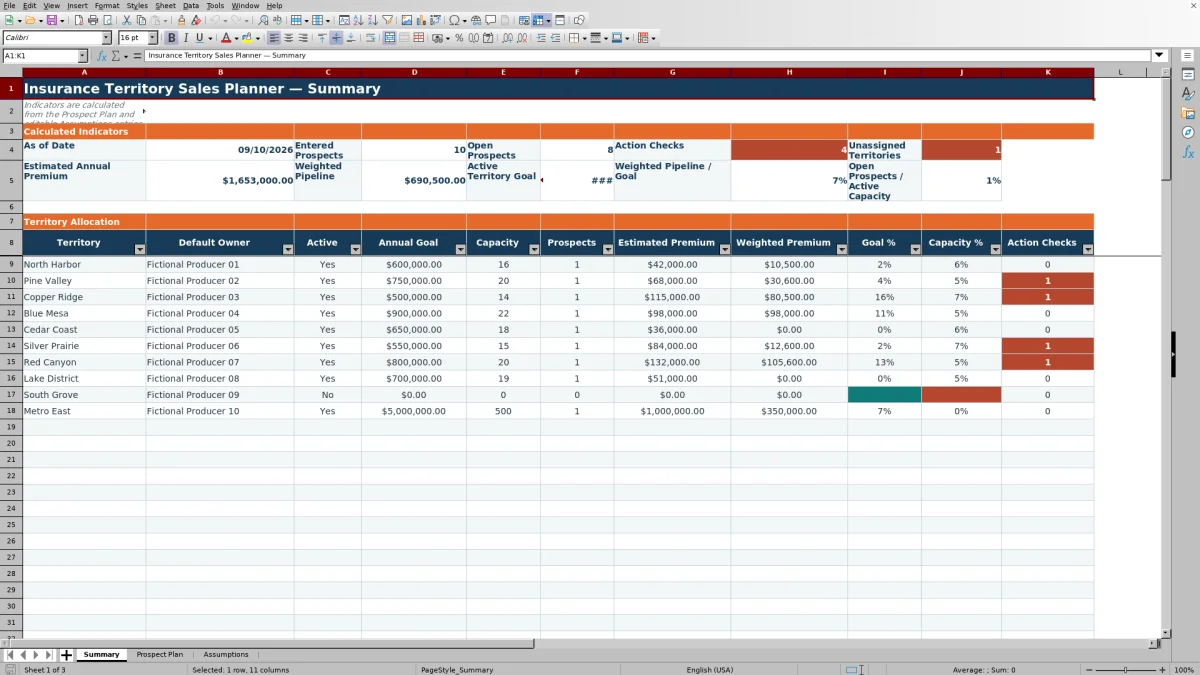
Summary consolidates entered prospects, open prospects, estimated annual premium, weighted pipeline, active territory goals, action checks, and unassigned territories. Its allocation section shows prospect count, estimated premium, weighted premium, goal percentage, capacity percentage, and action-check count by territory. A high goal percentage indicates substantial probability-adjusted pipeline relative to the configured goal; it does not confirm written premium or policy issuance. Capacity percentage measures record count against the planning capacity rather than producer hours or service workload.
Interpreted Practical Example
Situation: North Harbor is marked active with a $600,000 annual premium goal and capacity for 16 prospects, while the visible fictional sample prospect has $42,000 of estimated annual premium and a 25% win probability. Action: assign the prospect to North Harbor, retain the Contacted stage, and enter future target and next-action dates. Result: that record contributes $10,500 of weighted premium and receives a Planned status; if it were the territory’s only entry, it would represent 1.75% of the goal and 6.25% of capacity. Interpretation: the territory would show low current loading and limited probability-adjusted coverage, not confirmed underperformance. The capacity pressure is also low. Next decision: review prospect availability and producer readiness before assigning additional opportunities or changing the annual goal.
Common Errors and Solutions
A blank territory increases the unassigned-territory count; select a configured territory or intentionally leave it unassigned for later review. A blank next action date produces Next action needed; enter a planned date when a follow-up is known. A next action before the as-of date produces Check overdue action; confirm completion or schedule a new date. A past target close date can produce Check target date when no earlier status condition takes precedence; update the date, stage, or notes after reviewing the account. Entries outside the configured premium, probability, capacity, or date limits may be rejected by validation; correct the value or revise the relevant planning limit on Assumptions when the agency has approved a broader range.
Comparison With Other Planning Methods
The workbook functions as one complete operational method: assumptions define the territory structure, prospect rows capture planned opportunities, formulas evaluate status and weighted value, and Summary supports the next allocation decision. The alternatives below serve different operating conditions.
| Method | More suitable when | Operational consideration |
|---|---|---|
| Insurance Territory Sales Planner Excel workbook | More suitable when an agency wants a controlled, visible planning process for up to 100 prospects and 100 territories without macros. | Includes formulas, validation, territory goals, capacity measures, and follow-up checks, but it does not synchronize external sales activity or provide charts. |
| Blank spreadsheet | More suitable when the need is limited to a small custom list and the agency is prepared to design and maintain its own formulas and controls. | Offers layout flexibility, but consistent status logic, validation, weighted calculations, and summary reporting must be built and tested. |
| CRM or agency management system | More suitable when the agency needs live activity history, automated workflows, user permissions, integrations, or substantially larger record volumes. | May require configuration, licensing, training, and custom reporting to reproduce territory-specific goals and capacity measures. |
| Carrier-provided report | More suitable when the immediate task is reconciling results or submissions reported by a particular carrier. | May not provide a cross-carrier view of early prospects, agency-defined territories, next actions, or probability-weighted opportunity. |
The next decision should reflect the operating need: use the Excel method for structured internal allocation, retain carrier reports for carrier-specific reconciliation, or move the process into a CRM or agency management system when synchronization and workflow automation become necessary.
Frequently asked questions
How is weighted premium calculated?
Weighted Premium equals Estimated Annual Premium multiplied by Win Probability when the prospect ID, premium estimate, and probability are present. For example, a $42,000 estimate at 25% produces $10,500 of weighted premium. This is a planning value, not confirmed written premium.
What counts as an open prospect?
An entered prospect is counted as open when its stage is not Won and not Lost. Deferred records therefore remain in the open count under the workbook’s current formula.
Does the workbook assign the default owner automatically?
No. Assumptions stores a default owner for territory reporting and provides the owner list used on Prospect Plan, but the operator selects or edits the owner on each prospect row. This allows documented ownership exceptions.
What causes an action check?
Summary counts prospect statuses beginning with Check as well as Next action needed. These can result from a missing next action date, an overdue next action, or a target close date that is earlier than the configured as-of date. Won and Lost records return Closed instead.
Can this Excel workbook replace a CRM or agency management system?
It can support a defined internal territory-planning process, but it does not record external activity automatically, synchronize contacts, manage policies, or run automated workflows. A CRM or agency management system is more suitable when those capabilities are required.
Editorial responsibility

Maya ChenClient and policy workflows

Ethan BrooksWorkbook structure and formula QA