This insurance nonrenewal tracker is an Excel workbook for managing operational nonrenewal work from the initial notice through replacement placement, withdrawal, or closure. Independent agency teams can record policy details, ownership, action deadlines, marketing status, and premium information in one structured file.
The XLSX includes 100 case-entry rows, calculated timing alerts, data-entry controls, and a summary of open cases, expiring premium, replacement progress, and items requiring review. Alerts support internal follow-up but do not independently verify carrier notices, policy status, coverage, or regulatory requirements.
How this workbook can help
- Keeps carrier- and client-initiated nonrenewals in a consistent case-level record.
- Helps agency staff identify overdue actions, approaching deadlines, expired policies, and incomplete records.
- Connects replacement-marketing progress with expiring and replacement premium information.
- Gives managers a concise view of open workload, premium exposure, placement activity, and timing alerts.
What is in the file
How to get started
1. Confirm the tracking assumptions
Open the Assumptions sheet and verify the reporting date, due-soon window, allowed date range, and maximum premium entry. The reporting date drives days-to-expiration calculations and timing alerts.
2. Enter each nonrenewal case
Use one row per case on the Nonrenewals sheet. Complete the editable yellow fields, including the Case ID, client or account, policy reference, policy line, nonrenewal source, notice date, expiration date, premium, and owner.
3. Record the next agency action
Select the current action status, describe the next action, and enter its due date. Use the Timing Alert column to find missing dates, overdue work, approaching deadlines, expired policies, and other records requiring review.
4. Update replacement results and review the summary
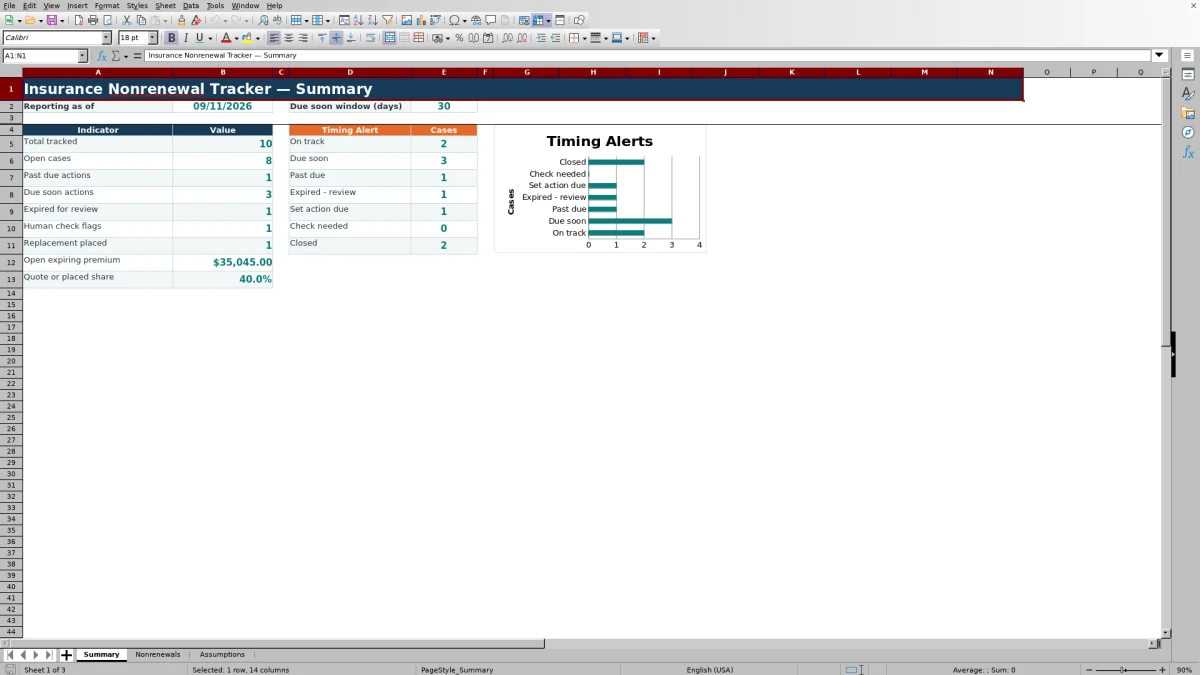
As marketing progresses, update the replacement status, policy reference, and premium. Review the Summary sheet for open cases, expiring premium, quote-or-placed share, replacement placements, and the distribution of timing alerts.
Centralized Nonrenewal Case Tracking
The Nonrenewals sheet combines account details, notice and expiration dates, stated reasons, ownership, action status, replacement activity, and premiums in one row per case. The workbook uses the configured reporting date to calculate days to expiration and classify records for agency review, helping operators move from a notice to a documented next decision without relying on scattered notes.
Deadline and Replacement-Marketing Oversight
The tracker separates the policy expiration date from the agency's next-action due date. This distinction helps a producer or account manager see both the coverage timeline and the immediate task timeline. Replacement statuses include Not Started, Marketing, Quote Received, Client Reviewing, Declined, and Placed, while action statuses cover New, Reviewing, Marketing, Awaiting Carrier, Awaiting Client, and Closed.
Practical Example: Interpreting an Open Case
Situation: a fictional commercial account has an October 1, 2026 expiration date, a September 10 action due date, a $4,860 expiring premium, and a replacement quote of $5,215. Action: the owner records Quote Received and enters the replacement premium. Result: using the September 11 reporting date, the workbook shows 20 days to expiration, a $355 premium increase, and a Past due timing alert because the action date has passed. Interpretation: obtaining a quote represents progress, but it does not resolve the overdue follow-up task. Next decision: review the quote with the client, document the next action, and assign a current due date or close the case when the disposition is complete.
Common Entry Errors and Solutions
The calculated review prompts help operators find several common issues. “Check expiration date” indicates that an active row lacks an expiration date; confirm the policy record and enter the date. “Check date order” indicates that expiration precedes notice receipt; compare both source dates and correct the inaccurate entry. “Check replacement ref” appears when the replacement status is Placed but no replacement policy reference is recorded; add the issued policy reference or correct the status. “Set action due” indicates that an open record lacks a follow-up deadline; assign the next action and due date. Duplicate nonblank Case IDs are blocked by validation, while date and premium entries must remain within the limits configured on the Assumptions sheet.
Comparison With External Tracking Alternatives
This Excel workbook functions as a single operational method for recording cases, assigning actions, monitoring deadlines, and documenting replacement outcomes. The comparison below distinguishes that complete workflow from common external alternatives rather than merely comparing worksheets.
| Method | More suitable when | Operational consideration |
|---|---|---|
| Insurance nonrenewal tracker workbook | More suitable when an agency needs a structured, portable register for up to 100 cases with formulas, validations, alerts, premiums, and summary reporting. | It requires manual updates and does not synchronize with carriers or verify external policy status. |
| Blank spreadsheet | More suitable when a team needs a temporary, unstructured list with fields that change frequently. | Users must design their own controls, formulas, alerts, and reporting process. |
| CRM or agency management system | More suitable when an organization requires integrated client records, automated activities, permissions, audit history, or multiuser workflows. | Configuration, licensing, and implementation may be more involved than maintaining a standalone XLSX. |
| Carrier-provided report | More suitable when staff are reviewing only the cases and status information supplied by one carrier. | It may not combine client-requested nonrenewals, internal action dates, or replacement activity across markets. |
| Paper or manual task list | More suitable when case volume is minimal and digital access is unavailable. | Aggregation, deadline review, premium comparison, and management reporting remain manual. |
The practical choice depends on case volume, integration needs, staffing, and whether the agency requires a standalone register or a system-based workflow.
Reading the Summary Indicators
The Summary sheet counts total tracked and open cases, past-due and due-soon actions, expired records, human-check flags, and placed replacements. It also totals open expiring premium and calculates the share of tracked cases with a Quote Received or Placed replacement status. These indicators describe the entries in the workbook; they do not measure coverage adequacy, legal compliance, or final carrier acceptance.
Validation Scope and Agency Review
Dropdown lists standardize selected policy lines, nonrenewal sources, owners, action statuses, and replacement statuses. Date validation applies to notice, expiration, and action-due fields, while premium validation restricts entries to nonnegative amounts within the configured maximum. Because the workbook cannot inspect external documents or systems, agency staff should still confirm notices, effective dates, issued replacement coverage, and any jurisdiction-specific obligations before making a final disposition.
Frequently asked questions
How many nonrenewal cases can the workbook track?
The Nonrenewals sheet provides 100 case-entry rows, running from row 5 through row 104.
How does the due-soon alert work?
The workbook compares each open action due date with the reporting date and the configurable due-soon window. The default window shown in the Assumptions sheet is 30 days and accepts whole-number settings from 1 through 365.
Does the tracker verify that a policy has been nonrenewed or replaced?
No. Its alerts and statuses reflect workbook entries and prompt internal agency review. Staff must confirm carrier notices, client instructions, policy issuance, effective dates, and coverage through the appropriate source records.
Can the dropdown choices be adjusted?
The validation choices are stored on the Assumptions sheet and feed the dropdowns used on the Nonrenewals sheet. Changes should be made carefully so the lists continue to match the agency's operating terminology and validation ranges.
How is the premium change calculated?
When both values are present, the workbook subtracts the expiring premium from the replacement premium. A positive result indicates a higher replacement premium, a negative result indicates a lower replacement premium, and the field remains blank when either amount is missing.
Editorial responsibility

Maya ChenClient and policy workflows

Ethan BrooksWorkbook structure and formula QA