The Insurance Cross-Sell Opportunity Tracker is an Excel workbook for recording account-level cross-sell opportunities tied to existing insurance accounts. It captures the current and opportunity products, relevant dates, estimated annual premium, commission rate, owner, stage, next follow-up, last contact, and an opportunity note in a filterable 100-row register.
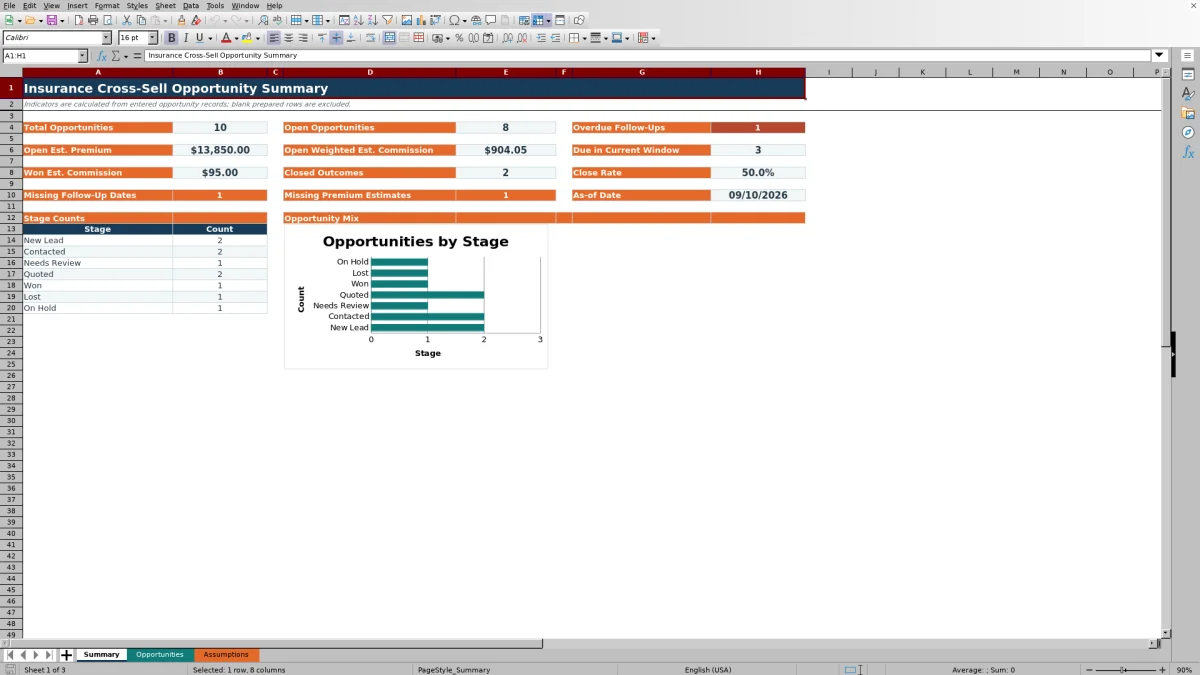
Calculated columns turn those entries into estimated commission, opportunity age, follow-up status, and weighted estimated commission. The Summary sheet consolidates pipeline, outcome, timing, and data-quality indicators for agency review. Its alerts are administrative prompts rather than coverage advice or official policy records.
How this workbook can help
- Creates a consistent account-level record of each identified cross-sell opportunity and the specific product under consideration.
- Helps producers prioritize overdue, due-soon, undated, and aging follow-ups without treating an alert as coverage advice.
- Connects premium and commission estimates to pipeline stages so managers can review both unweighted and stage-weighted values.
- Makes missing follow-up dates and premium estimates visible alongside stage counts, closed outcomes, and close rate.
What is in the file
How to get started
Step 1: Review the assumptions
Set the as-of date, due-soon window, contact-review threshold, stage weights, product choices, and owner choices on the Assumptions sheet. These timing assumptions control several calculated alerts.
Step 2: Enter each opportunity
Use one prepared row per opportunity on the Opportunities sheet. Record the account and policy references, current product, opportunity product, dates, estimated annual premium, commission rate, owner, stage, and notes.
Step 3: Plan and document follow-up
Add the next follow-up and last-contact dates, then review the calculated follow-up status. Update the stage and note after each material interaction so the record reflects the current situation.
Step 4: Review results and decide priorities
Use filters to isolate records by owner, product, stage, or status. Then check the Summary sheet for open values, overdue items, due-soon work, missing inputs, closed outcomes, close rate, and stage distribution before assigning the next action.
What the Excel Tracker Organizes
The Opportunities sheet serves as the operating register. Each row can connect an existing account and current policy reference with the current product and the additional product being considered. Producers can also record when the opportunity was identified, its target date, estimated annual premium, commission rate, owner, pipeline stage, next follow-up, last contact, and a concise note.
The prepared range runs from rows 5 through 104. Filters cover the operational columns, making it possible to narrow the list by owner, stage, product, date, or calculated status. Pale-gold cells identify editable inputs, while calculated cells are designed to update when the workbook recalculates.
Configure Assumptions Before Use
The Assumptions sheet supplies the as-of date used by age and status formulas. It also holds a seven-day default due-soon window, a 30-day default contact-review threshold, stage weights, product choices, and three fictional owner choices. Agencies can review these entries before using the register and revise them to match an appropriate internal review cadence.
The default stage weights are 10% for New Lead, 25% for Contacted, 40% for Needs Review, 60% for Quoted, 100% for Won, 0% for Lost, and 20% for On Hold. These percentages are pipeline assumptions used to weight estimated commission; they do not predict or promise an outcome.
Understand the Pipeline Calculations
Estimated commission is annual premium multiplied by the entered commission rate. Weighted estimated commission then multiplies that result by the weight assigned to the selected stage. The Summary sheet reports open weighted estimated commission for entered records that are not marked Won or Lost.
Opportunity age is the nonnegative difference between the as-of date and the identified date. Open opportunity count excludes Won and Lost records, while close rate divides Won records by the combined count of Won and Lost records. Won estimated commission uses the unweighted estimated commission for records in the Won stage.
Interpreted Practical Example
Situation: the fictional FIC-1002 account has Homeowners as its current product and Flood as the recorded opportunity product. The opportunity was identified on August 21, 2026, with a target date of September 24, 2026, and the workbook as-of date is September 10, 2026.
Action: the producer records an estimated annual premium of $850, a 10% commission rate, the Contacted stage, and a next follow-up of September 10. Result: the workbook calculates $85 in estimated commission, an age of 20 days, a Due Soon status, and $21.25 in weighted estimated commission based on the 25% Contacted weight.
Interpretation: Due Soon means the scheduled date falls within the configured follow-up window; it does not indicate the likelihood of a sale. The $21.25 value is a stage-weighted pipeline estimate, not earned commission. Next decision: complete or reschedule the discussion, then update the last-contact date, next follow-up, stage, and note according to what actually occurred.
Common Errors and Solutions
The workbook exposes several entry and maintenance issues so they can receive human review. Common errors and their practical solutions include:
- Missing next follow-up: the status becomes Needs Date for an open record. Add a valid date in the Next Follow-Up column.
- Past next follow-up: the status becomes Overdue. Review the record, complete or reschedule the activity, and document the latest contact.
- Missing premium estimate: the Summary sheet counts the gap, and commission calculations remain blank. Enter a supported estimate when available rather than guessing.
- Unexpected blank weighted value: confirm that premium, commission rate, and stage are present and that the stage matches an Assumptions-sheet option.
- Statuses based on an old reporting date: update the as-of date on the Assumptions sheet before interpreting overdue, due-soon, age, or contact-review results.
Won and Lost records are classified as Closed before follow-up-date checks are applied. If a closed record still appears operationally active, verify that its stage reflects the agency’s intended classification.
Comparison with Other Tracking Methods
This workbook is one complete operational method: a structured register, configurable assumptions, calculated review statuses, pipeline values, and a summary view in one XLSX file. The appropriate method depends on record volume, collaboration needs, existing systems, and reporting scope.
| Method | What it provides | More suitable when | Important limitation |
|---|---|---|---|
| This Excel workbook | A 100-row register, validated inputs, formulas, review alerts, summary metrics, and a stage chart. | A small agency or team needs a self-contained file for consistent opportunity review without system integration. | It does not contact outside systems, create official policy records, or provide multiuser workflow controls. |
| Blank spreadsheet | An unrestricted grid that can be shaped for a custom list. | The process is very simple and users do not need prepared calculations, validations, alerts, or dashboard metrics. | Consistency and calculation logic must be designed and maintained manually. |
| CRM or agency management system | Centralized records, permissions, shared activities, and potentially integrated communications or policy data. | Multiple users require concurrent access, audit history, automated workflows, or links to operational systems. | Configuration, licensing, permissions, and implementation may be required. |
| Carrier-provided report | Carrier-specific policy, production, or account information within that carrier’s reporting scope. | The review concerns one carrier’s data and carrier-defined opportunities or production results. | It may not combine opportunities across carriers or reflect agency-owned follow-up notes and stages. |
| Paper or manual list | A quick record that requires no spreadsheet access. | A temporary offline note is needed and aggregation or calculation is not yet necessary. | Filtering, status calculation, shared review, and summary reporting require manual work. |
The workbook is an administrative tracking option rather than a replacement for an agency management system, CRM, carrier source, or licensed coverage analysis.
From Review to the Next Decision
A practical review starts with the situation shown by the Summary sheet: open pipeline volume, estimated values, overdue work, upcoming follow-ups, missing dates, missing premium estimates, and stage counts. The action is to filter the Opportunities sheet to the records responsible for the indicator and verify the underlying entries.
The result is a smaller work queue tied to owners and dates. Interpretation should consider the limits of each measure: stage weights are assumptions, financial values are estimates, and status labels reflect dates and entered stages. The next decision is operational—contact the account, assign an owner, add a missing date, obtain a supportable estimate, update the stage, place the item on hold, or close the record as Won or Lost based on the documented outcome.
Frequently asked questions
What is the Insurance Cross-Sell Opportunity Tracker designed to track?
It tracks specific product opportunities associated with existing insurance accounts, including the current product, opportunity product, owner, stage, dates, estimated premium, estimated commission, follow-up activity, and notes.
How is weighted estimated commission calculated?
The workbook multiplies estimated annual premium by the entered commission rate to calculate estimated commission, then multiplies that amount by the weight assigned to the selected stage on the Assumptions sheet.
What determines the follow-up status?
The formula considers whether the stage is Won or Lost, whether a next follow-up exists, how that date compares with the as-of date and due-soon window, whether a last-contact date exists, and whether the contact-review threshold has been exceeded.
Can this Excel workbook replace a CRM or agency management system?
No. It is a self-contained administrative tracker and does not contact outside systems, create official policy records, manage integrated communications, or provide the shared workflow controls commonly available in a CRM or agency management system.
How many opportunity records are prepared in the workbook?
The Opportunities sheet contains 100 prepared rows, from row 5 through row 104. The Summary formulas reference the same range, so expanding beyond it would require corresponding workbook changes.
Editorial responsibility

Maya ChenClient and policy workflows

Ethan BrooksWorkbook structure and formula QA