This Excel insurance lapse prevention tracker helps an independent agency organize policy records that may need lapse-prevention review before a recorded lapse or cancellation date. It brings policy dates, amounts due, owners, statuses, calculated action flags, and administrative notes into one XLSX workflow.
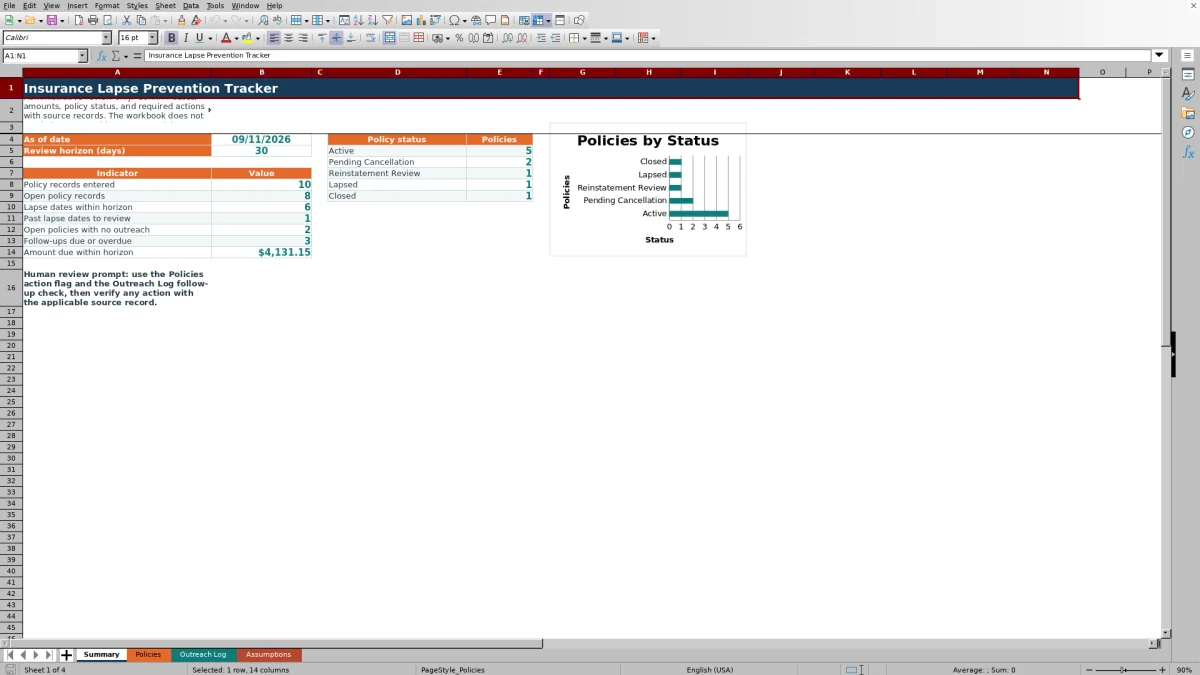
The workbook also supports documented outreach through a separate log that records contact dates, methods, outcomes, notes, and next follow-up dates. Its Summary sheet provides operational counts and a policy-status chart, while reminding users to verify dates, amounts, policy status, and required actions against source records.
How this workbook can help
- Creates a consistent administrative process for identifying policy records that may need attention before or after a recorded lapse date.
- Connects policy records with outreach history so agency staff can see contact counts, the latest outreach date, and the next follow-up date.
- Provides summary indicators for open records, near-term lapse dates, past lapse dates, policies without outreach, and follow-ups that are due or overdue.
- Keeps editable statuses, policy types, outreach methods, owners, outcomes, and review settings in a dedicated assumptions area.
What is in the file
How to get started
1. Review the assumptions
Open the Assumptions sheet and confirm the policy statuses, policy types, outreach methods, owners, outcomes, 30-day near-term review horizon, and 7-day stale outreach threshold. Adjust editable values to match the agency’s administrative process.
2. Enter verified policy records
Replace the fictional examples on the Policies sheet with information from applicable source records. Enter a unique policy reference, client and carrier, policy type, effective date, lapse or cancellation date, amount due, owner, status, and administrative notes.
3. Review calculated priorities
Use Days to Lapse, Outreach Count, Last Outreach, Next Follow-Up, and the Action Flag to identify records requiring human review. Check the Summary sheet for policy-status counts and workload indicators, but do not treat calculated results as confirmation of coverage or cancellation.
4. Document outreach and decide the next action
Add completed contact attempts to the Outreach Log in chronological order, placing newer entries below older entries for the same policy. Record the outreach date, method, owner, outcome, next follow-up date, and notes; then review the Follow-Up Check and verify the next action against the source record.
When Policy Records Become At Risk
Independent agencies may receive policy information from notices, carrier portals, billing records, emails, or internal follow-up. When those details remain scattered, it can be difficult to identify which open records have an approaching lapse or cancellation date, which dates have already passed, and which policies have no documented outreach. This Excel tracker creates a central administrative view without representing that coverage, cancellation, or reinstatement has been confirmed.
Turn Verified Dates Into an Action Queue
Agency staff enter the policy reference, fictional client and carrier fields, policy type, effective date, lapse or cancellation date, amount due, owner, policy status, and notes on the Policies sheet. The workbook then calculates days to lapse and connects each policy to matching Outreach Log entries. The resulting action flag can direct attention to a missing lapse date, a past date, a due follow-up, needed outreach, or another status produced by the workbook formulas. Each flag is a review prompt rather than an automated insurance decision.
Read Summary Results in Context
The Summary sheet reports how many policy records have been entered, how many remain open, how many lapse dates fall within the configured horizon, how many recorded dates are in the past, and how many open policies have no outreach. It also counts follow-ups marked Due today or Overdue and totals amounts due for qualifying policies within the horizon. These results help organize workload, but their meaning depends on complete records, current statuses, valid dates, and correctly linked policy references.
Practical Example: Pending Cancellation Follow-Up
Situation: the fictional record DEMO-POL-001 has a Pending Cancellation status, a recorded lapse or cancellation date of September 13, 2026, and an amount due of $482.75. Action: staff log outreach on September 6 and September 10, with a next follow-up date of September 12. Result: if the workbook is reviewed on September 12, the record falls within the 30-day review horizon, the Outreach Log shows the follow-up as Due today, and the policy action flag identifies a follow-up as due. Interpretation: the calculations show that an administrative task needs attention; they do not prove whether payment was received or coverage remains in force. Next decision: verify the carrier or policy source record, complete the appropriate follow-up, document the outcome, and update the policy status or next follow-up date as supported by that record.
Common Errors and Solutions
A missing or incorrect policy reference can prevent the Outreach Log from retrieving the client and policy status; correct it by selecting the matching reference used on the Policies sheet. Entering newer outreach above older entries can cause the latest-entry calculations to return an unintended record; add newer entries below older ones for each policy. A blank lapse date produces a review prompt rather than a useful countdown; check the applicable notice or source record and enter the verified date. An outdated status can keep a record in open-policy counts or suppress active follow-up when marked Lapsed or Closed; confirm and update the status. Treat source-record verification as the solution whenever a workbook result conflicts with carrier, billing, or policy documentation.
Comparison With Other Tracking Methods
The workbook functions as a complete operational method by combining policy intake, calculated review flags, outreach documentation, follow-up checks, configurable lists, and summary indicators. The alternatives below may be more suitable when different operational conditions apply.
| Method | What it provides | More suitable when | Important limitation |
|---|---|---|---|
| Insurance Lapse Prevention Tracker for Excel | One structured workbook for policy details, lapse timing, outreach history, follow-up dates, action flags, and summary counts. | More suitable when an agency needs a transparent, file-based administrative process that staff can review in Excel. | It does not send alerts, contact clients, synchronize with carriers, or confirm policy status. |
| Paper checklist or manual notes | A simple physical record with minimal setup. | More suitable when the record volume is very small and only one person handles the process. | Cross-referencing outreach, recalculating dates, and producing current totals require manual work. |
| Blank spreadsheet | Flexible rows and columns designed from scratch by the user. | More suitable when the agency needs a highly customized structure and can build and test its own formulas and controls. | It does not begin with the validated policy, outreach, follow-up, and summary structure provided here. |
| CRM or agency management system | Potentially broader client records, assigned activities, communication tools, and system integrations, depending on the product and configuration. | More suitable when the agency requires multiuser workflows, automated reminders, permissions, or integration with existing production systems. | Capabilities vary, and implementation, configuration, access, or subscription costs may apply. |
| Carrier-provided report | Carrier-specific policy or billing information generated from that carrier’s records. | More suitable when the immediate task is to review authoritative information for policies issued by one carrier. | It may not consolidate multiple carriers or maintain the agency’s complete outreach history. |
Administrative Controls and Human Review
The workbook applies dropdowns for policy status, policy type, owner, outreach method, and outcome; date limits for policy and outreach entries; and a nonnegative amount range. Filters, frozen headings, and conditional formatting support review across the entry areas. These controls improve consistency but cannot determine whether an entered fact is correct. Staff should confirm dates, amounts, notices, payment information, status changes, and required actions with the applicable source record before making a client-facing or coverage-related decision.
Frequently asked questions
Does the Excel tracker send lapse alerts or outreach messages?
No. The workbook calculates administrative flags and follow-up checks, but it does not send alerts, emails, text messages, letters, or other communications. Staff must review the workbook and complete outreach through the agency’s approved channels.
How does the workbook connect outreach entries to policies?
The Outreach Log uses the selected policy reference to retrieve the matching fictional client and policy status from the Policies sheet. The Policies sheet counts matching outreach entries and returns the latest applicable outreach and follow-up values based on the order of the log.
Can the review horizon and dropdown choices be changed?
Yes. The Assumptions sheet contains editable lists for policy status, policy type, outreach method, owner, and outreach outcome. It also includes a near-term review horizon set to 30 days and a stale outreach threshold set to 7 days in the supplied workbook.
What should staff do when an action flag appears?
Review the policy record, related outreach entries, and applicable source documents. Confirm the lapse or cancellation date, amount due, current policy status, and required action before contacting the client or updating the record.
Does a calculated result confirm that a policy has lapsed or remains active?
No. Results depend on the information entered, the current date used by Excel, and the workbook assumptions. A flag, count, or follow-up status is an administrative review aid and is not confirmation of coverage, cancellation, payment, lapse, or reinstatement.
Editorial responsibility

Maya ChenClient and policy workflows

Ethan BrooksWorkbook structure and formula QA