This Insurance Partner Referral Tracker Excel workbook helps an independent insurance agency record received and sent referrals, assign each record to an agency owner, monitor follow-up dates, and document outcomes. It connects referral records with named professional partners such as legal, mortgage, real estate, accounting, and auto dealer contacts.
The XLSX includes a referral log, a partner directory, editable operating assumptions, and a formula-driven summary. It can track up to 150 referral rows and 100 partner rows while calculating days open, follow-up alerts, partner referral counts, monthly direction totals, estimated premium indicators, and review flags. The alerts are administrative prompts, so agency staff should verify source records before contacting a referred party or partner.
How this workbook can help
- Keeps referrals received from and sent to professional partners in one structured log with ownership, dates, status, and reference details.
- Surfaces overdue and upcoming follow-ups based on an editable as-of date and due-soon window, helping staff identify records that need human review.
- Links each referral to a partner ID so the corresponding partner name and total referral count can be calculated consistently.
- Supports management review with 12 months of referral direction totals, outcome indicators, estimated premium totals, partner activity, and aging information.
What is in the file
How to get started
1. Establish the situation
Open Assumptions and confirm the as-of date, due-soon window, stale-open threshold, and future-planning limit. Review the choice lists for direction, referral status, partner status, line of business, organization type, and agency owner before entering live records.
2. Take action in the partner and referral records
Add or update each professional relationship on Partners using a unique partner ID, partner name, organization type, primary contact, agency owner, status, start date, and next review date. Then enter each exchanged referral on Referrals using a unique referral ID and an existing partner ID. Record whether it was received or sent, the referred party, line of business, owner, status, follow-up due date, estimated annual premium, and quote or policy reference as applicable.
3. Review the calculated result
Confirm that the partner name populates from the selected partner ID. Review the calculated days open and follow-up alert, and check the partner directory for referral counts and review flags. Closed records should also have a closed date that is on or after the referral date.
4. Interpret the summary
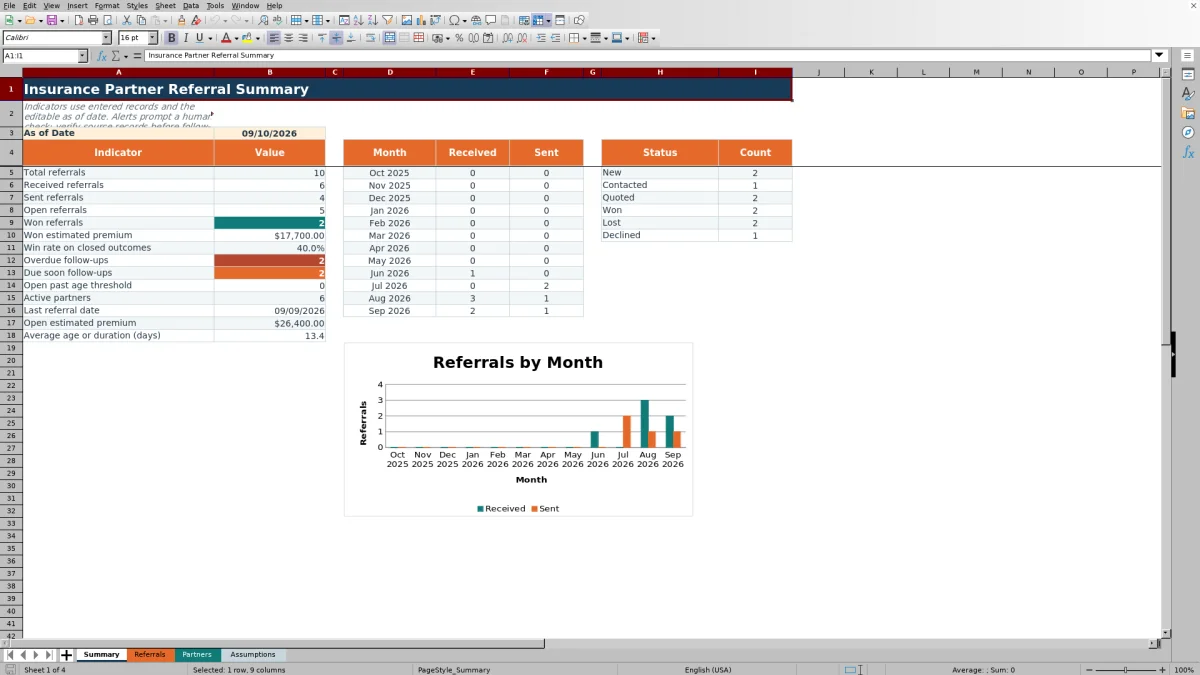
Use Summary to compare received and sent activity across the 12-month period and review total, open, won, overdue, due-soon, stale, partner, premium, win-rate, last-date, and average-duration indicators. Treat changes in these figures as signals to inspect the underlying referral rows rather than as standalone conclusions.
5. Make the next decision
Prioritize overdue records, then due-soon items and open referrals beyond the selected age threshold. Verify the source record, contact the appropriate party when authorized, and update the follow-up date, status, closed date, or reference field so the next review reflects the agency's latest information.
How the referral tracking method is organized
The workbook treats the referral process as a connected operating method rather than a standalone contact list. Partners stores the professional relationship and responsible agency owner, while Referrals records each exchange and its outcome. Assumptions supplies the dates, thresholds, and choice lists used by both sheets. Summary then converts those records into counts, premium totals, aging measures, monthly direction totals, and follow-up indicators.
This structure lets an agency answer related questions without maintaining separate notes: who the partner is, whether the referral was received or sent, who owns the next action, when follow-up is due, what happened, and how that activity contributes to the current summary.
Data controls that support consistent records
Referral and partner IDs use custom validation intended to prevent duplicates within their respective entry ranges. Referral dates begin no earlier than January 1, 2016 and cannot extend beyond the workbook's as-of date. Follow-up and closed dates are checked against the referral date and planning limits, while estimated annual premium accepts values from zero through $10,000,000.
List validation standardizes direction, partner ID, line of business, agency owner, referral status, organization type, and partner status. These controls reduce inconsistent wording, but they do not independently verify whether an entered contact, date, premium estimate, quote reference, or policy reference is accurate.
Interpreted practical referral example
Consider fictional referral FIC-R-1003. The situation is a received commercial auto referral dated August 21, 2026 from partner FIC-P-003, with Jordan Lake assigned as agency owner. The action recorded is a Quoted status, a September 8 follow-up due date, and $12,600 in estimated annual premium.
With the workbook's as-of date set to September 10, 2026, the calculated result is 20 days open, and the follow-up date is already past. The interpretation is that the referral remains open and requires attention, but it has not yet crossed the 30-day stale-open threshold. The next decision is for the assigned owner to verify the source record, complete the appropriate follow-up, and update the due date, status, closed date, or quote reference. The estimated premium remains an administrative input and does not indicate that coverage was quoted, bound, or recommended.
Common errors and practical solutions
If Partner Name displays Check partner ID, compare the referral's partner ID with the IDs in Partners and correct the mismatch or add the missing partner record. If a follow-up alert says Set date, enter a valid follow-up date for the open referral. If a formula reports Check assumptions, confirm that the as-of date and relevant day limits on Assumptions contain valid numeric date or whole-number values.
A rejected referral or partner ID may duplicate an existing ID, so search the applicable ID column before assigning a replacement. A rejected date may precede the referral or partner start date, exceed the permitted planning range, or fall after the as-of date where that restriction applies. A rejected premium may be negative or above $10,000,000. Correct the source entry instead of removing the validation or replacing calculated cells with typed values.
Comparison with manual and system alternatives
The workbook functions as a complete operating method by combining partner records, referral entries, controlled choices, follow-up calculations, summary measures, and review prompts. The comparison below distinguishes that method from realistic external alternatives.
| Method | Structure and visibility | Follow-up and outcome handling | More suitable when |
|---|---|---|---|
| This Excel workbook | Connects up to 100 partner rows with up to 150 referral rows and provides a formula-driven summary. | Calculates days open, referral alerts, partner review flags, status counts, premium indicators, and monthly received-versus-sent totals. | More suitable when an agency needs a defined, locally maintained referral process centered on named professional partners. |
| Paper or manual notes | Allows free-form documentation but requires staff to locate and reconcile records manually. | Depends on calendars, memory, or separate task lists; no workbook calculations or validation are available. | More suitable when referral volume is very low and staff only need temporary notes rather than recurring measurement. |
| Blank spreadsheet | Offers flexible rows and columns, but fields, formulas, validations, and reporting must be designed and maintained by the user. | Follow-up logic and outcome reporting depend on whatever the agency builds. | More suitable when the agency needs a substantially different data model and has staff available to create and test it. |
| CRM or agency management system | May connect referral activity with broader customer, sales, communication, and policy workflows, depending on configuration. | Tasks and reporting depend on the system's available modules, permissions, and agency setup. | More suitable when the agency already manages partner referrals inside a configured system and needs broader workflow integration. |
| Carrier-provided report | Usually reflects activity available to that carrier rather than the agency's full cross-partner process. | Outcome definitions and timing are determined by the report provider. | More suitable when the immediate task is reconciling activity for one carrier rather than managing referrals across all professional partners. |
The practical choice depends on referral volume, existing systems, reporting scope, staff ownership, and whether the agency needs cross-partner follow-up in one controlled Excel file.
How to interpret summary indicators
Total, received, and sent referral counts describe activity volume, while open, won, and status counts describe the recorded stage or outcome. Won estimated premium and open estimated premium aggregate administrative estimates entered on referral rows; they are not booked revenue, commission, or proof of coverage. Win rate is based on closed outcomes represented by the workbook's status logic, so status definitions should remain consistent with Assumptions.
Overdue and due-soon counts describe follow-up timing relative to the editable as-of date. Open-past-threshold and average-age measures help identify aging work, while active-partner count, last-referral date, partner referral counts, and review flags support relationship review. A rising count should lead to source-row review before management draws conclusions about staff performance or partner quality.
Operating boundaries and ongoing maintenance
The supplied ranges support 150 referral rows and 100 partner rows. Filters and frozen headings help staff navigate those fixed ranges, but users should avoid typing over formula columns for partner name, days open, follow-up alert, referral count, and review flag. Choice lists should also remain aligned with the formulas that classify open, closed, and partner-status conditions.
Review the as-of date regularly, maintain next-review dates for active partners, and retire or update fictional examples before operational use. Because the file contains referred-party and partner details, the agency should store and share it according to its own privacy, access, retention, and recordkeeping procedures.
Frequently asked questions
What information can the Insurance Partner Referral Tracker record?
Each referral can include a unique ID, referral date, received or sent direction, partner ID and calculated partner name, referred party, line of business, agency owner, status, follow-up due date, closed date, estimated annual premium, and quote or policy reference. The workbook also calculates days open and a follow-up alert.
How does the workbook connect referrals to professional partners?
The user selects or enters a partner ID on the Referrals sheet, and a VLOOKUP formula returns the corresponding name from Partners. The partner directory separately counts how many referral rows use each partner ID.
How are overdue and due-soon referrals determined?
For an open referral, the follow-up due date is compared with the editable as-of date. A date before the as-of date is overdue, while a date within the configured due-soon window is due soon. Closed statuses return a closed alert, and a missing follow-up date prompts the user to set a date.
Can the status lists and timing thresholds be changed?
Yes. Assumptions contains the as-of date, due-soon window, stale-open threshold, future-planning limit, and the choice lists used by validation and formulas. Edit them carefully because changing status meanings or list positions without reviewing dependent formulas can alter summary and alert results.
Are the included partner and referral examples real?
No. The sample organizations, contacts, referred parties, agency owners, and identifiers are labeled fictional. Replace or remove those examples before using the workbook for agency operations, and follow the agency's privacy and access procedures when entering actual information.
Editorial responsibility

Maya ChenClient and policy workflows

Ethan BrooksWorkbook structure and formula QA