This Excel workbook helps an independent insurance agency turn annual producer goals into monthly targets for written premium, commission, new policies, quotes, client contacts, and selling hours.
Producers or managers can adjust monthly allocations, enter administrative sales records, and compare planned production with completed activity. Formula-driven summaries show actual results, remaining goals, attainment, monthly variances, and items that warrant human review.
How this workbook can help
- Connects six annual production and activity goals to editable monthly targets.
- Separates planned work from completed results so open or canceled records do not inflate actuals.
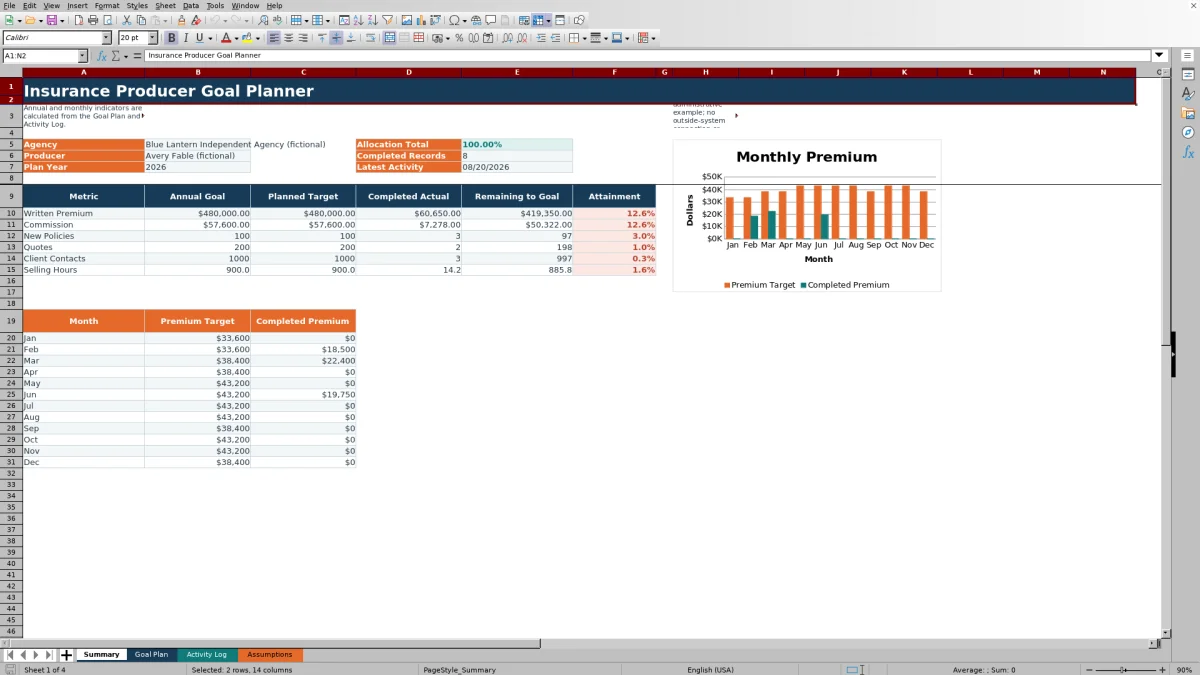
- Shows annual progress, monthly premium performance, variances, attainment, and review indicators in one planning method.
- Uses date, percentage, list, financial-value, and hour validations to reduce common entry mistakes.
What is in the file
How to get started
1. Set the annual plan
Open Assumptions and update the planning assumptions, including the plan year, agency name, producer name, six annual goals, premium review threshold, and maximum hours per activity.
2. Allocate goals by month
Review the dates and monthly allocations in Goal Plan. Adjust the percentages for seasonality or expected sales cycles, then confirm the Allocation Total on Summary matches the annual share you intend to distribute.
3. Record producer activity
Enter each administrative record in Activity Log with an ID, date, producer, activity type, description, transaction reference, applicable premium or commission credit, hours, and status. Mark a row Completed only after verifying that it should count toward actual results.
4. Review results and decide
Use Goal Plan to compare monthly targets with actuals and examine variances, premium attainment, and review flags. Then use Summary to evaluate annual remaining amounts, completed-record volume, the latest activity date, and the monthly premium chart before choosing the next production or activity adjustment.
Annual Producer Goal Structure
The workbook organizes annual targets for written premium, commission, new policies, quotes, client contacts, and selling hours. These measures give an agency operator both outcome goals, such as premium and commission, and activity goals that can help explain whether the producer is building enough sales opportunities.
Monthly Allocation and Target Calculations
Goal Plan applies each monthly allocation percentage to the annual assumptions. Premium, commission, and selling-hour targets retain calculated values, while policy, quote, and contact targets are rounded to whole counts. The prefilled 2026 allocations range from 7% to 9% and total 100%, but users can revise them to reflect seasonality, renewal patterns, staffing, or expected prospecting periods.
Completed Activity Counting Rules
Activity Log supports Client Contact, Quote, and New Policy records with Planned, In Progress, Completed, or Canceled statuses. Only rows marked Completed contribute to actual results. Premium, commission credit, and hours are summed from those rows, while policy, quote, and contact actuals are counted by activity type and month. Because the workbook has no outside-system connection, users remain responsible for entering and verifying each record.
Interpreted Practical Example
Situation: January has a 7% allocation against the sample annual goals of $480,000 in written premium, $57,600 in commission, 100 new policies, 200 quotes, 1,000 client contacts, and 900 selling hours. Action: the workbook calculates January targets of $33,600 in premium, $4,032 in commission, 7 new policies, 14 quotes, 70 contacts, and 63 hours. Result: if the two visible January sample rows are the only completed January records, the month records one quote, one client contact, 2.5 hours, and $0 in written premium. Interpretation: after January closes, 0% premium attainment falls below the 75% review threshold, so the flag indicates Review progress rather than treating the missing production as an alert from an external system. Next decision: the producer and manager can inspect the pipeline, verify that no completed premium record was omitted, and decide whether to increase later activity, move resources, or revise future allocations.
Common Errors and Solutions
If annual targets appear too high or low, check whether the Goal Plan allocation percentages total the intended annual share and correct the editable allocation cells. If actuals are missing, confirm that the activity date falls within the plan year, the activity type matches the available list, and the status is Completed. If a month is rejected, enter the first day of a month in the selected plan year. If hours fail validation, compare the entry with Maximum Hours per Activity in Assumptions. A negative premium or commission variance means actual production is below target because those variance columns calculate actual minus target.
Comparison With External Tracking Alternatives
The workbook is one complete operational method for setting annual goals, allocating them by month, recording activity, and reviewing calculated performance. The alternatives below serve different operating conditions rather than functioning as worksheet substitutes.
| Method | What it provides | More suitable when | Practical limitation |
|---|---|---|---|
| Insurance Producer Goal Planner workbook | Annual assumptions, monthly allocations, activity entry, completed-result calculations, review flags, and a summary chart | More suitable when an agency wants a self-contained Excel planning process for one producer and can maintain records manually | Does not connect to carrier, CRM, accounting, or agency management systems and includes 100 plan rows and 100 activity rows |
| Blank spreadsheet | An unrestricted grid for a custom design | More suitable when the agency needs a structure substantially different from the supplied metrics and has time to build and test formulas | Requires the user to create counting rules, validation, summaries, and review logic |
| CRM or agency management system | Shared records, workflow controls, integrations, permissions, and potentially broader reporting | More suitable when multiple users need live operational data, automated workflows, or system integrations | May require configuration, licensing, training, and separate goal-planning setup |
| Carrier-provided report | Carrier-specific production results | More suitable when the immediate question concerns verified production reported by one carrier | May not combine activity goals or results across all carriers and agency sales work |
An agency can also use the workbook alongside an operational system, provided staff reconcile entries and avoid treating manually entered figures as independently verified source data.
From Monthly Review to the Next Decision
A practical review begins with the current situation shown by target, actual, variance, and attainment values. The producer or manager then checks the underlying completed records, interprets whether a gap reflects missing data, timing, low activity, or low conversion, and chooses the next action. That decision might involve increasing client contacts, advancing quotes, checking incomplete new-policy records, reallocating future targets, or leaving the plan unchanged when timing explains the variance.
Frequently asked questions
What does the insurance producer goal planner track?
It tracks annual and monthly goals for written premium, commission, new policies, quotes, client contacts, and selling hours. It also reports completed actuals, remaining annual goals, selected variances, premium attainment, and monthly review flags.
Which Activity Log rows count toward actual results?
Only rows with a status of Completed count. Planned, In Progress, and Canceled rows remain available for administrative tracking but are excluded from actual premium, commission, activity-count, and hour results.
How are monthly producer targets calculated?
Each monthly allocation is multiplied by the corresponding annual goal in Assumptions. New-policy, quote, and client-contact targets are rounded to whole numbers, while premium, commission, and selling-hour targets use their calculated values.
Does the Excel workbook connect to a CRM, carrier portal, or agency management system?
No. The workbook has no outside-system connection, so activity and production data must be entered and verified manually. It should not be treated as a source-system replacement or an independently confirmed carrier report.
What do the premium review flags mean?
Future months are labeled Future month, the active month is labeled Current month - review, and closed months are evaluated against the premium review threshold. A closed month below the threshold shows Review progress; a qualifying month shows On pace. These are prompts for human review, not automated notifications or coverage, legal, tax, regulatory, or compliance advice.
Editorial responsibility

Maya ChenClient and policy workflows

Ethan BrooksWorkbook structure and formula QA