This insurance renewal calendar Excel workbook gives independent agency teams one place to schedule policy renewals by date and owner. Its renewal dates, owners, and preparation milestones connect each record to a working calendar instead of leaving critical dates in notes or inboxes.
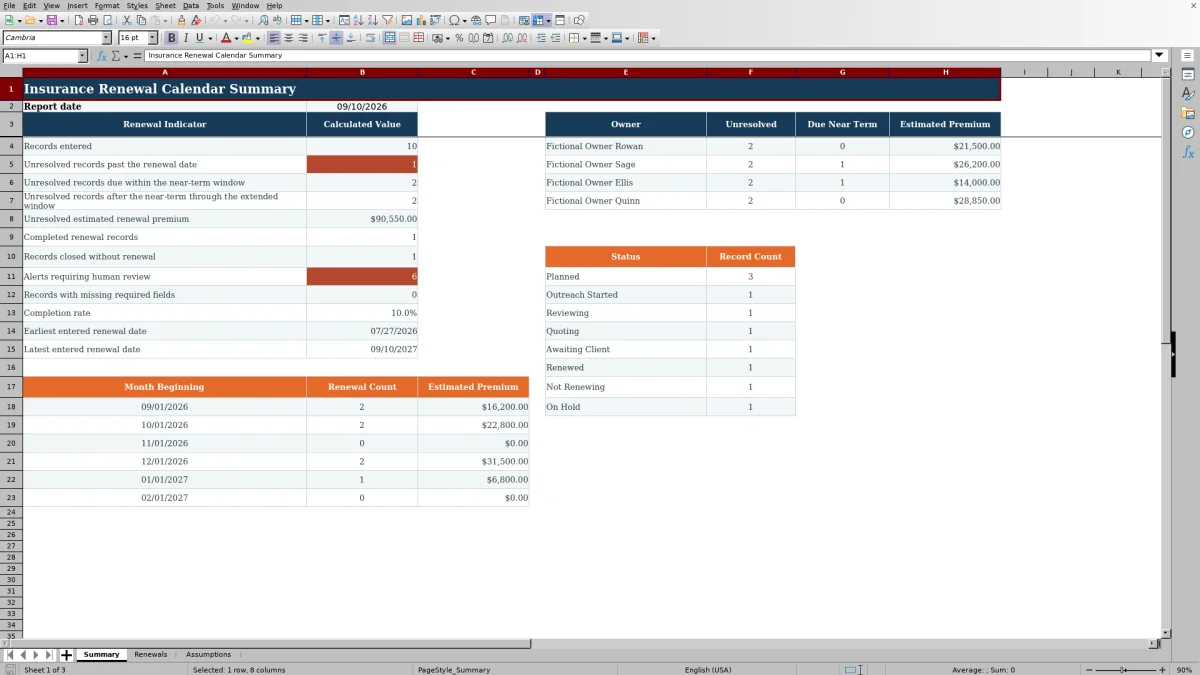
The XLSX includes Summary, Renewals, and Assumptions worksheets. It supports 100 renewal records, calculates four milestone dates, groups recognized statuses, and summarizes open work by timing and owner. The included client, carrier, policy, and owner entries are fictional examples, and all calculated alerts remain prompts for human review.
How this workbook can help
- Creates a consistent administrative record for renewal dates, assigned owners, statuses, next actions, last contacts, and estimated premiums.
- Turns each valid renewal date into preparation, review, quote, and client-decision milestones using editable lead-time assumptions.
- Helps agency operators distinguish overdue unresolved records from renewals inside near-term and extended planning windows.
- Provides owner, status, premium, alert, completion, and monthly renewal summaries without requiring a separate manual tally.
What is in the file
How to get started
1. Review the planning assumptions
Open the Assumptions worksheet and confirm the lead times for preparation start, internal review, quote review, and client decision. Also review the near-term and extended summary windows. The supplied values are 90, 45, 21, and 7 lead days, with 30-day and 90-day reporting windows.
2. Maintain the available choices
Review the status-to-status-group mappings, lines of business, and owners on the Assumptions worksheet. These lists supply the dropdown choices used by the Renewals worksheet, so update them before entering live agency records.
3. Enter and review renewal records
Use the yellow editable cells on the Renewals worksheet. Enter one policy renewal per row, including its record ID, client, policy reference, line of business, carrier, renewal date, owner, and status. Add the estimated premium, next action, and last contact date when available. Review the calculated milestone dates, days to renewal, status group, and milestone alert rather than typing over formula cells.
4. Decide what requires follow-up
Filter the register by owner, status, line of business, or renewal date, then use the Summary worksheet to review overdue work, upcoming renewals, estimated unresolved premium, missing-field alerts, completion results, and owner workload. Confirm the underlying record before changing a status or treating a renewal as complete or closed.
Situation: renewal work is spread across dates and owners
An independent agency may have renewal dates in policy records while preparation tasks, last contacts, and owner assignments remain in separate notes. That makes it difficult to see which unresolved renewals are already past due, which are approaching, and how much estimated premium is attached to the open workload. This Excel renewal calendar brings those administrative details into one row per policy while retaining the renewal date as the central scheduling point.
Action: establish a repeatable renewal calendar
Agency operators first set the planning intervals and stable dropdown choices on the Assumptions worksheet. They then enter each policy on the Renewals worksheet. A valid renewal date drives the preparation start, review due, quote due, and client decision due dates. Status mappings separate open work from records categorized as complete or closed, while the next-action and last-contact fields preserve the immediate follow-up context.
Result: read the workload without rebuilding a report
The Summary worksheet counts entered records, unresolved renewals before the report date, unresolved renewals inside the near-term window, and unresolved renewals after that window through the extended horizon. It also reports completed and closed records, estimated unresolved premium, missing required fields, completion rate, entered date range, owner workload, status counts, and month-based renewal totals. Because the report date uses TODAY(), time-sensitive results can change whenever Excel recalculates the workbook.
Practical example: interpret a fictional renewal record
Situation: the fictional Cedar Kite Design record has a September 10, 2026 renewal date, a $3,800 estimated premium, an owner of Fictional Owner Sage, a Quoting status, and a September 8, 2026 last contact date. Action: using the supplied assumptions, the workbook calculates June 12 for preparation start, July 27 for review, August 20 for quote review, and September 3 for the client decision. Result: the row places the policy in an Open status group and presents the milestone sequence beside the current next action. Interpretation: the last recorded contact occurred after both the quote and decision milestones, so the schedule appears compressed even though the policy had not yet reached its renewal date on the contact date. Next decision: the assigned operator should confirm the quote position, document the current client response, and then update the next action or status based on verified information rather than inferring the coverage outcome from the calculated dates.
Common errors and practical solutions
An incomplete row can produce a missing-required-fields alert; complete the record ID, client, policy reference, line of business, carrier, renewal date, owner, and status before relying on the summary. A renewal date stored as text can prevent milestone calculations; replace it with a valid Excel date accepted by the worksheet validation. A future or non-date value in Last Contact Date can trigger review; enter the actual contact date, which cannot be later than TODAY() under the validation rule. A pasted status that is absent from the mapping can return Check status; select a listed status or add and map the intended status on the Assumptions worksheet. If the extended summary window is less than or equal to the near-term window, the second upcoming period may not be useful; revise the day settings so the extended horizon follows the near-term horizon.
Comparison with external renewal tracking alternatives
The workbook functions as one complete operational method: operators maintain assumptions and controlled choices, enter renewal records, review calculated milestones and alerts, filter the working register, and read summary results. The alternatives below may be more suitable when their stated conditions apply.
| Option | Operational approach | More suitable when |
|---|---|---|
| This Excel renewal calendar | Combines a 100-row register, configurable milestone calculations, validation, filters, alerts, and summary reporting in one XLSX. | More suitable when an agency wants a structured, locally managed calendar without implementing an integrated system. |
| Paper calendar or manual checklist | Records dates and tasks manually without formula-based milestones, validation, or consolidated premium reporting. | More suitable when renewal volume is very small, offline access is essential, and calculated reporting is unnecessary. |
| Blank spreadsheet | Allows a completely custom layout but requires the agency to design formulas, controls, status logic, and reports. | More suitable when the agency needs a substantially different data model and has the time to build and test its own controls. |
| CRM or agency management system | May connect renewal activity with client records, workflows, permissions, communications, and automated reminders. | More suitable when the agency requires multiuser workflow, system integrations, audit history, or automated notifications. |
| Carrier-provided report | Shows business associated with a particular carrier using that carrier's available fields and reporting cycle. | More suitable when the immediate task is to review only that carrier's renewal book rather than coordinate renewals across carriers. |
The Excel workbook does not send notifications, synchronize with carrier systems, or provide CRM-style workflow history. Those limitations should influence the agency's choice when renewal volume, collaboration, or integration requirements increase.
Next decision: turn the report into a review cycle
After reading the Summary worksheet, decide which owner and timing segment needs attention first. Open the supporting rows, verify the renewal date, status, next action, last contact, and calculated milestones, and resolve any alert before acting on the total. Then record the confirmed follow-up in the editable fields. Complete and Closed status groups leave unresolved calculations, so status changes should reflect a verified administrative outcome rather than a desire to remove an item from the open count.
Frequently asked questions
What does the insurance renewal calendar Excel workbook track?
It tracks record IDs, clients, policy references, lines of business, carriers, renewal dates, owners, statuses, estimated renewal premiums, next actions, and last contact dates. It also calculates preparation start, review due, quote due, client decision due, days to renewal, status group, and a milestone alert.
How many renewal records can the workbook hold?
The prepared entry area contains 100 renewal rows, running from row 5 through row 104 on the Renewals worksheet.
Can an agency change the preparation schedule?
Yes. The Assumptions worksheet contains editable lead-day settings for preparation, internal review, quote review, and client decision milestones. It also contains editable near-term and extended summary windows.
Does the workbook send renewal reminders or notifications?
No. The validated XLSX provides calculated dates, alerts, filters, and summary metrics, but it does not include email, messaging, or automated notification functionality.
How does the workbook decide whether a record is unresolved?
A recognized status is mapped to a status group on the Assumptions worksheet. Summary calculations treat a populated renewal record as unresolved unless its status group is Complete or Closed. Operators should verify the record before changing its status because the mapping supports administrative reporting rather than determining coverage.
Editorial responsibility

Maya ChenClient and policy workflows

Ethan BrooksWorkbook structure and formula QA