This Excel workbook is an insurance endorsement request log for independent agency teams that need to record requested policy changes from receipt through completion or withdrawal. The Request Log provides 120 request rows for account, policy, change, priority, queue, activity, follow-up, closure, reference, and note details.
The XLSX also calculates days open, assigns follow-up indicators, checks entry quality, and summarizes workload by status. Its purpose is administrative tracking: it does not submit an endorsement to a carrier, approve a requested change, authorize coverage, or determine whether a request is acceptable.
How this workbook can help
- Creates a consistent administrative record of each requested policy change, including the account, policy reference, dates, details, status, and completion reference.
- Helps agency staff identify overdue, due-soon, missing-follow-up, and aging requests using configurable calendar-day settings.
- Provides summary counts for total, open, completed, and status-specific requests without requiring staff to build separate calculations.
- Flags duplicate request IDs, missing required entries, missing settings, and values that do not match the configured lists.
What is in the file
How to get started
1. Configure the tracking settings
Open the Lists sheet and confirm the as-of date, due-soon window, and aging threshold. The supplied validation permits a due-soon window from 0 to 30 calendar days and an aging threshold from 1 to 365 calendar days.
2. Prepare the request rows
Review the fictional examples, then clear sample values only from the entry cells in columns A through P. Keep the formulas in columns Q through S because they calculate Days Open, Follow-Up Indicator, and Data Check for rows 2 through 121.
3. Record and maintain each request
Assign a unique request ID and enter the account name, policy reference, change type, received date, requested effective date, request details, priority, work queue, last activity date, and status. As work progresses, update the processing date, next follow-up date, closed date, completion reference, and notes.
4. Review exceptions and decide the next action
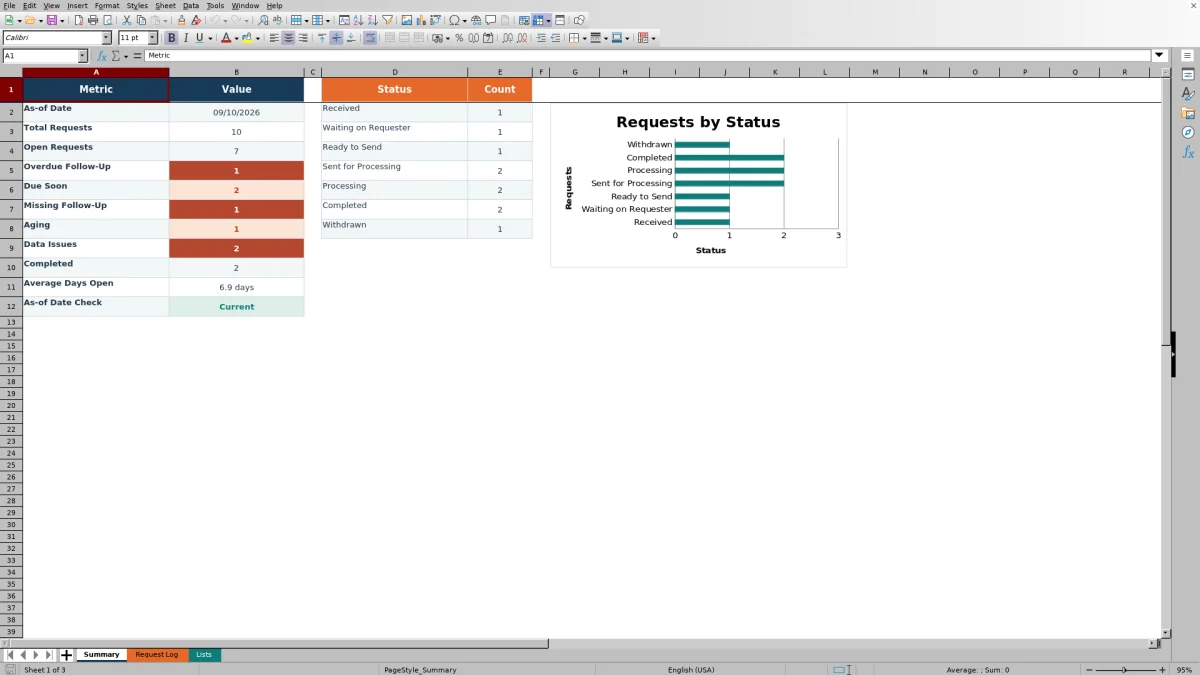
Filter the log by status, priority, work queue, change type, follow-up indicator, or data check. Use the Summary sheet to assess open work, overdue follow-ups, aging items, completed requests, average days open, and the distribution across the seven configured statuses.
What the Insurance Endorsement Request Log Tracks
The log records a request ID, account name, policy reference, change type, date received, requested effective date, request details, priority, and work queue. It also provides fields for the date sent for processing, last activity date, current status, next follow-up date, closed date, completion reference, and notes. These fields create an administrative trail from initial receipt through completion or withdrawal without representing carrier submission or approval.
How Follow-Up and Aging Calculations Work
Days Open is calculated from the Date Received field. For a completed or withdrawn request, the calculation uses the Closed Date; for an open request, it uses the as-of date stored on the Lists sheet. The Follow-Up Indicator can return Closed, Set As-of Date, Set Due-Soon Window, Set Aging Threshold, Missing Follow-Up, Overdue, Due Soon, or an aging-related result based on the dates, status, and configured thresholds. Calendar days are used throughout.
Practical Example: Interpreting an Overdue Request
Situation: an open vehicle-change request was received several days ago, and its next follow-up date is earlier than the workbook’s as-of date. Action: the account manager reviews the row, confirms that the request is still processing, and filters the Follow-Up Indicator to overdue. Result: the request appears among the items requiring follow-up and contributes to the Summary count for overdue follow-up. Interpretation: the indicator signals that the scheduled contact date has passed; it does not mean the endorsement was declined or mishandled. Next decision: contact the appropriate party, document the new activity date and notes, and set a revised follow-up date if the request remains open.
Common Entry Errors and Their Solutions
The Data Check column helps identify administrative problems before they distort reporting. A “Missing Request ID” result is addressed by assigning an ID; “Duplicate Request ID” requires reviewing repeated values and correcting the unintended duplicate; “Missing Required” calls for completion of required fields; and a missing as-of date is resolved on the Lists sheet. If an entry does not match an allowed change type, priority, work queue, or status, select a valid list value rather than typing a variation. For completed or withdrawn work, confirm that the Closed Date is present so Days Open can be calculated.
Comparison with Other Tracking Methods
The workbook functions as a complete operational method combining structured entry, validation, calculated monitoring, filters, summary metrics, and a status chart. The comparison below addresses when each method is more suitable; it does not imply that one approach fits every agency.
| Method | Structure and monitoring | More suitable when |
|---|---|---|
| This Excel workbook | Uses predefined request fields, validated lists, calculated days open, follow-up indicators, data checks, summary counts, and a status chart. | More suitable when a team needs a standalone, repeatable log with visible follow-up controls and does not require direct carrier or agency-system integration. |
| Paper or email-based manual process | Relies on individual notes, inbox searches, calendars, or folders, with no built-in consolidated calculations. | More suitable when request volume is very low and the agency accepts manual review and reconciliation. |
| Blank spreadsheet | Allows flexible columns but requires the agency to design validation, formulas, exception checks, and reporting. | More suitable when the agency needs a highly customized structure and has staff available to build and maintain it. |
| CRM or agency management system | May connect tasks and activity records to client or policy records, depending on the system’s configuration. | More suitable when integrated workflows, permissions, audit history, automation, or multiuser controls are operational requirements. |
| Carrier-provided report | Reflects information available from a particular carrier and may not consolidate requests across markets. | More suitable when the review is limited to that carrier’s records and reporting cycle. |
Using the Summary for Workload Decisions
The Summary reports the as-of date, total requests, open requests, overdue follow-up, due-soon items, missing follow-up dates, aging items, data issues, completed requests, average days open, and an as-of-date check. It also counts requests in Received, Waiting on Requester, Ready to Send, Sent for Processing, Processing, Completed, and Withdrawn status. Agency operators can use these results to decide which exceptions need immediate review, which queues carry open work, and whether the as-of date needs to be updated before interpreting the metrics.
Operational Boundaries and Record Maintenance
The workbook should be maintained as an administrative tracker rather than treated as evidence that a policy change was submitted, accepted, bound, or completed by a carrier. Keep request statuses, activity dates, follow-up dates, closure details, and references current; preserve the formulas in columns Q through S; and review the Summary after changing the as-of date. Access controls, retention practices, and any transfer of information into an agency management system remain agency decisions outside the workbook.
Frequently asked questions
How many endorsement requests can the workbook track?
The Request Log provides 120 prepared rows, from row 2 through row 121. Each row includes input fields in columns A through P and formulas in columns Q through S.
Which policy change types are included in the dropdown?
The configured list includes Address Change, Add/Remove Vehicle, Add/Remove Driver, Named Insured Change, Lienholder/Mortgagee Change, Coverage Change Request, Classification/Exposure Change, Cancellation Request, Reinstatement Request, and Other.
How does the workbook determine whether follow-up is due?
It compares the Next Follow-Up Date with the as-of date and due-soon window on the Lists sheet. It can identify missing follow-up dates, dates earlier than the as-of date, and dates within the configured upcoming window. Closed requests are classified separately.
Does this Excel log submit or approve policy changes?
No. It records administrative activity only. It does not send a request to a carrier, authorize coverage, approve an endorsement, or determine whether a requested change is acceptable.
What should I do before replacing the fictional sample entries?
Confirm the settings and allowed list values, then clear only the sample inputs in columns A through P. Preserve the formulas in Days Open, Follow-Up Indicator, and Data Check so new entries continue to calculate correctly.
Editorial responsibility

Maya ChenClient and policy workflows

Ethan BrooksWorkbook structure and formula QA