This Excel workbook provides policy document control for applications, quotes, binders, issued policies, and related records. Independent insurance agency staff can track whether each document is required, when it was requested and due, when it arrived, who owns the task, and its current review status.
The XLSX calculates days open and timing classifications, displays attention prompts, and summarizes required-document completion and exceptions. These indicators support human review; they do not verify a document against carrier systems, external records, coverage requirements, or legal standards.
How this workbook can help
- Keeps document requests, due dates, receipt dates, owners, statuses, and notes together in a structured register.
- Helps agency staff identify required documents that remain open, are due soon, are overdue, or need follow-up.
- Provides calculated completion and timing indicators without requiring users to build formulas for each record.
- Supports consistent data entry through dropdown lists, date limits, and a duplicate-ID validation rule.
What is in the file
How to get started
1. Set the operating rules
Review the Assumptions sheet before entering live administrative records. Confirm the seven-day Due Soon Window, accepted date range, and available transaction types, document types, review statuses, required choices, and owners.
2. Add one document record
Use one row per document on the Checklist sheet. Enter a unique checklist ID, client or account, policy or transaction reference, transaction type, document type, required flag, and owner.
3. Update dates and review status
Record the requested date and due date, then add the received date when the item arrives. Select the review status that reflects the agency's current administrative handling and add relevant notes.
4. Interpret the calculated result
Read Days Open, Timing, and Attention together. Timing distinguishes received, open, due-soon, overdue, non-required, and not-applicable records, while Attention identifies missing or inconsistent inputs that need review.
5. Decide the next action
Use the Summary counts and Checklist filters to choose what happens next: request a missing required document, correct a date, complete a review, contact the assigned owner, or retain the completed record according to agency procedure.
What the Insurance Policy Document Checklist Tracks
The Checklist sheet records a unique checklist ID, client or account, policy or transaction reference, transaction type, document type, required flag, requested date, due date, received date, review status, owner, and administrative notes. Visible document choices include Application, Quote, Binder, Issued Policy, Signed Disclosure, Loss Run, ID Card, and Endorsement. These fields let an agency organize documents by individual transaction rather than relying on an unstructured file list.
How Days Open and Timing Work
For a required record with a requested date, Days Open measures the interval from the requested date to the received date or to TODAY() if the document has not arrived. The calculated timing can identify Received On Time, Received Late, Received, Open, Due Soon, Overdue, No Due Date, Not Required, Not Applicable, or Check Inputs. Because open records use TODAY(), their values can change when Excel recalculates the workbook on a later date.
Interpreted Practical Example
Situation: checklist item TEST-CHK-001 identifies an Application for fictional account Acorn Bakery LLC under transaction reference TEST-POL-1001. Action: the application was requested on August 25, 2026, due September 1, and recorded as received August 29 with a Reviewed status. Result: because August 29 precedes September 1, the workbook classifies the item as Received On Time. Interpretation: the required application arrived within the recorded administrative deadline and has a completed review status. Next decision: inspect the other records associated with TEST-POL-1001 and address any item that remains open or displays an Attention prompt.
Common Entry Errors and Solutions
A missing Required? value produces a prompt to set the required flag, while a blank Review Status produces a prompt to set that status. If a due or received date is entered without a requested date, add the requested date used by the agency. If the due date or received date precedes the requested date, compare the source records and correct the inaccurate entry. A required item without a due date should receive the appropriate administrative due date. These prompts identify input conditions for staff review; they do not determine whether an insurance document is legally or contractually sufficient.
Comparison With Manual and System-Based Alternatives
The complete workbook method combines structured entry, validation, calculated timing, attention prompts, filtering, and summary reporting. The comparison below explains when it or an external method may fit an agency workflow.
| Option | More suitable when | Operational trade-off |
|---|---|---|
| This Excel workbook | The workbook is more suitable when an agency needs a portable 100-row register with configurable choices, date controls, automatic timing, attention prompts, and summary counts. | Staff must enter and maintain records, manage file access, and verify information against external sources. |
| Paper or manual list | A paper process is more suitable when the volume is very small, the work occurs without computer access, and calculated reminders are unnecessary. | Counts, date comparisons, duplicate checks, filtering, and updates require manual work. |
| Blank spreadsheet | A blank spreadsheet is more suitable when the agency needs fields or logic that differ substantially from this workbook and has resources to design and test them. | Users must create their own validations, formulas, status rules, summary measures, and controls. |
| CRM or agency management system | An integrated system is more suitable when document tasks need multiuser permissions, automated activities, customer records, communications, and system-wide audit history. | Configuration, licensing, implementation, and available fields depend on the selected platform. |
| Carrier-provided report | A carrier report is more suitable when the task is limited to records held by that carrier and its available report fields answer the agency's question. | It may not consolidate documents, owners, or transaction records across multiple carriers and internal agency processes. |
The appropriate choice depends on record volume, collaboration requirements, integration needs, and whether staff need cross-carrier administrative tracking.
Configuring Assumptions and Dropdown Choices
The Assumptions sheet sets a Due Soon Window of seven days, with a visible validated maximum of 60 days. It also limits Checklist date entries to the configured range, supplied as January 1, 2020 through December 31, 2100. Transaction, document, required, review-status, and owner lists feed the Checklist dropdowns. Agency operators can review these editable choices as procedures change, keeping replacement entries within the provided list areas used by validation.
Using Summary Results for the Next Decision
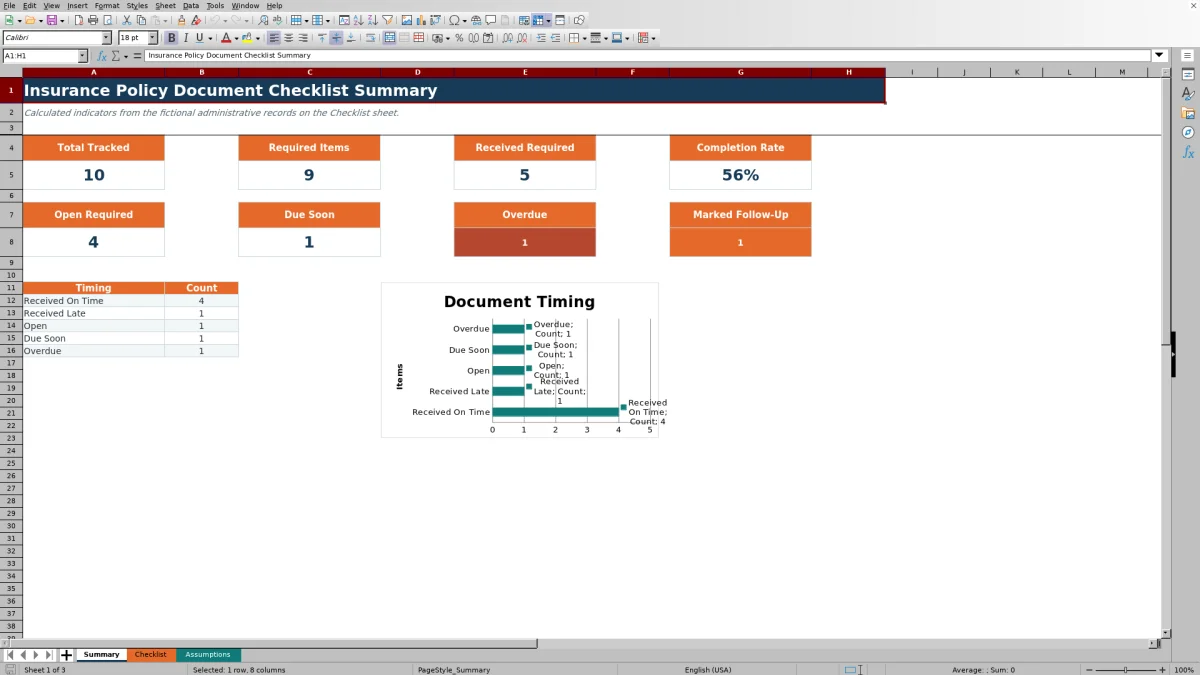
The Summary sheet reports total tracked records, required items, received required items, completion rate, open required items, due-soon items, overdue items, and records marked Needs Follow-Up. Its timing table and chart group Received On Time, Received Late, Open, Due Soon, and Overdue records. Staff can interpret a high open or overdue count as a reason to filter the Checklist by owner, policy reference, or document type and decide which request, correction, or review should be handled next.
Frequently asked questions
What documents can this insurance policy checklist track?
The supplied document choices include Application, Quote, Binder, Issued Policy, Signed Disclosure, Loss Run, ID Card, and Endorsement, with additional list slots available on the Assumptions sheet.
Does the workbook verify that a document is complete or valid?
No. It records administrative inputs and provides calculated alerts for human review. It does not authenticate documents, inspect external records, or determine compliance with carrier, contractual, regulatory, or legal requirements.
How does the Due Soon status work?
An unreceived required item with a due date is classified as Due Soon when its due date falls within the window stored in Assumptions. The supplied window is seven days and can be set from zero through the visible maximum of 60 days.
How many document records can the checklist hold?
The validated Checklist table runs from row 5 through row 104, providing 100 prepared document-entry rows with formulas in the Days Open, Timing, and Attention columns.
Why can timing results change after the file is reopened?
Open-item formulas use TODAY() to compare the current date with requested and due dates. As the current date advances, an item can move from Open to Due Soon or Overdue unless a received date or another applicable status is entered.
Editorial responsibility

Maya ChenClient and policy workflows

Ethan BrooksWorkbook structure and formula QA