The Insurance Premium Audit Tracker for Excel is an XLSX workbook for independent insurance agencies that need to schedule and follow insurance premium-audit requests and responses. It centralizes client, policy, insurer, requested-record, owner, status, contact, submission, result, and adjustment details for up to 100 audits.
The workbook combines a working register with automatic date calculations, status-based alerts, default next steps, summary metrics, and a status chart. These elements support review-ready follow-up while keeping the underlying audit details visible to the agency operator.
How this workbook can help
- Centralizes premium-audit requests, deadlines, contacts, submissions, results, and adjustment amounts in one working register.
- Helps agency operators prioritize overdue, due-soon, follow-up, and awaiting-response items.
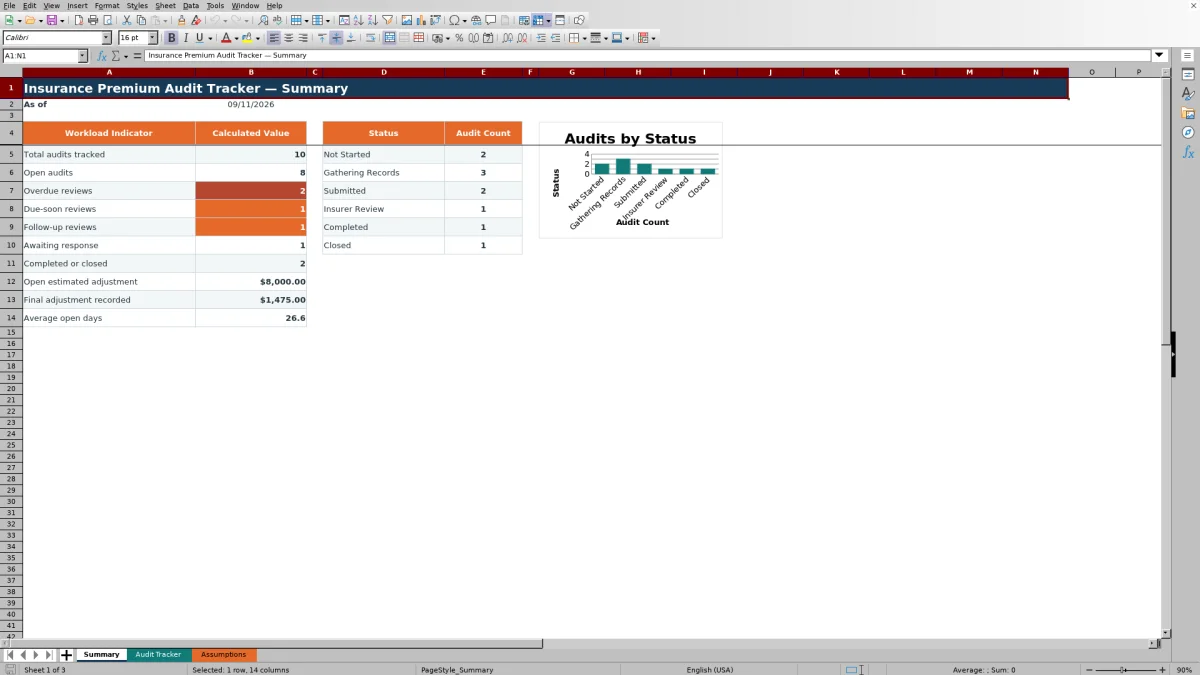
- Provides a current workload view with open-audit counts, status totals, adjustment totals, and average open days.
- Promotes consistent handling through controlled status choices, assigned owners, default next steps, and configurable timing parameters.
What is in the file
How to get started
1. Review the setup
Open the Assumptions sheet before entering live records. Review the status mappings, default next steps, open or closed designations, audit types, owners, insurers, 14-day due-soon window, 10-day follow-up interval, and allowed input ranges.
2. Enter each audit request
On Audit Tracker, replace the fictional examples as appropriate and enter the audit ID, client, policy reference, insurer, policy-term end, request date, response due date, audit type, requested records, owner, status, and notes. Add an estimated adjustment if one is available.
3. Maintain activity dates
Update Last Contact, Records Submitted, and Result Received as activity occurs. Record the final adjustment when the result is available, and leave the calculated columns from Days to Due through Next Step intact.
4. Review alerts and decide
Filter the tracker by owner, status, or alert, then use Summary to review open work, deadline conditions, status counts, and adjustment totals. Assign the next contact or documentation task based on the displayed alert and next step.
Organize the premium-audit workload
Premium-audit requests can involve different insurers, policy references, due dates, record requirements, and agency owners. The workbook addresses that situation by creating a single working register for the administrative facts needed to follow each request. The Audit Tracker also provides filters across all 22 columns, allowing an operator to isolate a particular owner, insurer, status, or alert without separating the records into unrelated lists.
The calculated fields distinguish entered facts from workflow outputs. Days to Due uses the response deadline for open audits, Days Open measures elapsed time from the request date through the result date or current date, and Open? comes from the status mapping on Assumptions. This structure makes it easier to see why an item appears in the current workload.
Move each request through a consistent process
Start by recording the request and its response due date, then identify the audit type, requested records, assigned owner, and current status. As the agency gathers and sends records, update Last Contact and Records Submitted. When the insurer provides the outcome, enter Result Received and Final Adjustment before moving the audit to a completed or closed status.
The selected status supplies both the Open? result and a default next step. For example, Gathering Records points the operator toward reviewing outstanding records, while Submitted points toward checking insurer acknowledgment. The alert formula then considers status, dates, submission activity, and the timing parameters to indicate what should be reviewed next.
Practical example: from submitted records to follow-up
Situation: fictional audit FIC-AUD-003 is marked Submitted, shows records submitted on July 18, 2026, and lists August 25, 2026, as the last contact date. Its estimated adjustment is -$450, but no result or final adjustment has been recorded. Action: if the workbook recalculates on September 4, 2026, the operator reviews the row after the configured 10-day follow-up interval has elapsed.
Result: the open designation remains Yes, the alert becomes Follow up — review, and the default next step is to check insurer acknowledgment. Interpretation: the negative estimated amount remains only an estimate because the final adjustment field is blank, and the absence of a result means the audit is still active. Next decision: the assigned owner can contact the insurer, document the new contact date, and wait to record the final adjustment until the result is received.
Common errors and solutions
An unrecognized or pasted status can produce a status-check message because Open? and Next Step rely on the status list. Resolve it by selecting one of the configured statuses or correcting the Assumptions mapping. A submitted audit without a Records Submitted date can produce a submitted-date check; enter the actual date rather than changing the calculated alert.
A completed or closed audit may still require review if Result Received or Final Adjustment is missing. Add the documented result date and final amount, including a valid zero when appropriate. If Days to Due or Days Open is blank, check the request and response dates and confirm they fall within the configured date limits. If a calculated field was overwritten, restore its row formula from an intact adjacent prepared row.
Comparison with external tracking methods
The Excel workbook functions as one complete operational method: a detailed register, controlled choices, timing calculations, alerts, next steps, summary measures, and a chart are maintained together. External alternatives can still be more suitable when their operating conditions match the agency's needs.
| Method | Workflow coverage | Ongoing upkeep | More suitable when |
|---|---|---|---|
| Insurance Premium Audit Tracker for Excel | Combines request details, dates, owners, statuses, calculated alerts, next steps, adjustments, and summary reporting. | Requires staff to update each audit and preserve the prepared formulas. | More suitable when an agency needs a portable, structured process without configuring a larger platform. |
| Paper or manual checklist | Can document basic tasks and signoffs but does not calculate dates or aggregate workload automatically. | Requires manual filing, counting, and deadline review. | More suitable when volume is very low or a physical record is required by an established procedure. |
| Blank spreadsheet | Offers flexible rows and columns but has no built-in status mapping, alert logic, validation, or summary design. | Requires the agency to create and maintain its own controls and calculations. | More suitable when the need is temporary, narrowly scoped, and does not require a repeatable workflow. |
| CRM or agency management system | May connect activities, client records, documents, communications, and reporting across agency operations. | Requires system configuration, permissions, training, and continued data governance. | More suitable when the existing platform already supports premium-audit workflows and cross-system integration is important. |
| Carrier-provided report | Reflects the carrier's available audit data but may omit internal owners, agency notes, or requests from other insurers. | Depends on carrier refresh schedules and available report fields. | More suitable when the agency is reviewing one carrier and the supplied report contains every field needed for follow-up. |
The appropriate choice depends on audit volume, integration requirements, reporting scope, and who maintains the information. The workbook is designed for agency-controlled follow-up rather than replacing carrier systems or a fully configured agency platform.
Use the summary to make the next decision
The Summary sheet converts tracker entries into a daily review view using the current date. It reports total audits, open audits, completed or closed audits, overdue reviews, due-soon reviews, follow-up reviews, awaiting-response items, open estimated adjustments, recorded final adjustments, and average open days. The accompanying chart shows counts for the six configured statuses.
Use those results as a queue rather than as proof that every underlying record is complete. A high open count may call for workload reassignment, an overdue count may call for immediate deadline review, and an awaiting-response count may call for insurer contact. After taking action, update the relevant tracker dates or status so the next recalculation reflects the new situation.
Frequently asked questions
What is the Insurance Premium Audit Tracker for Excel used for?
It is used to schedule and follow insurer premium-audit requests, requested records, response deadlines, agency contacts, submissions, results, and estimated or final adjustments. It also summarizes open work and identifies records that need review.
How many premium audits can the workbook track?
The Audit Tracker has 100 prepared record rows, covering rows 5 through 104. Each row includes input fields and five formula-driven workflow fields.
How do the audit alerts work?
Alerts evaluate the selected status, open designation, response due date, last contact date, records-submitted date, result date, final adjustment, and timing parameters. Because the formulas use the current date, overdue, due-soon, and follow-up conditions can change when Excel recalculates.
Can the status, owner, insurer, and audit-type choices be changed?
Yes. Those source lists are maintained on the Assumptions sheet and feed the dropdown validation on Audit Tracker. Status changes should retain a corresponding default next step and open or closed designation so the calculated fields continue to work as intended.
Does this workbook replace insurer instructions or professional review?
No. It is an administrative tracking workbook. Agency operators should continue to follow policy terms and insurer instructions and obtain appropriate insurance, accounting, or legal review when an audit issue requires professional judgment.
Editorial responsibility

Maya ChenClient and policy workflows

Ethan BrooksWorkbook structure and formula QA