This insurance policy change history Excel workbook gives independent agencies a chronological servicing record for endorsements and other administrative policy changes. Each row captures the change ID, policy and account references, relevant dates, change type, description, transaction reference, premium impact, owner, status, and completion date.
Calculated elapsed days, summary indicators, status counts, and human review prompts help staff monitor activity without treating the workbook as a carrier system or policy document. The XLSX includes 100 prepared entry rows, editable administrative thresholds, standardized lists, filters, date and amount validation, conditional formatting, and a status chart.
How this workbook can help
- Keeps policy servicing events in one dated register that staff can filter and sort.
- Separates entered operational details from calculated elapsed days and review alerts.
- Summarizes record volume, open work, completed work, premium changes, turnaround time, and missing transaction references.
- Lets an agency adjust internal follow-up and premium-review thresholds without changing the record layout.
What is in the file
How to get started
1. Review the administrative settings
Open the Assumptions sheet and confirm the follow-up age and premium-change review amount. You can also replace the listed status and change-type values to align the available selections with agency procedures.
2. Enter each servicing event
Use one event per row in the Change History sheet. Complete the change ID, policy reference, fictional or actual account identifier appropriate to your internal procedures, dates, change type, description, transaction reference, premium change, owner, and status.
3. Update progress and completion
Change the status as work progresses and enter a completed date when applicable. The workbook calculates elapsed days from the request date to the completed date, or to the current date when no completed date has been entered.
4. Review alerts and summary results
Check the Review Alert column for records that need attention, then use filters to focus on an owner, status, date, or change type. Consult the Summary sheet for aggregate indicators and status counts before deciding which records require follow-up.
What the policy change history records
The Change History sheet records one administrative servicing event per row. Its fields cover the change ID, policy reference, account, effective date, request date, change type, description, transaction reference, premium change, owner, status, completed date, calculated elapsed days, and review alert. This structure supports a chronological operating record while preserving separate references for the policy and servicing transaction.
A workflow for endorsements and servicing changes
Staff can begin with a requested change, assign an owner, update the status as work moves through review or outside follow-up, and record the completed date when applicable. Available statuses are Requested, In Review, Awaiting Client, Awaiting Carrier, Completed, and Withdrawn. Available change types include address, vehicle, driver, location, coverage limit, mortgagee or loss payee, cancellation, reinstatement, and other service changes.
Interpreted practical example
Situation: a fictional delivery account requests that a van be added on June 12, 2026, with a June 15 effective date. Action: the agency enters change ID CHG-FIC-0003, the policy and transaction references, Vehicle Add/Remove as the change type, a $425.50 premium increase, the assigned owner, and a June 14 completed date. Result: the row calculates two elapsed days, the completed-record count increases, and the net premium change includes $425.50. Interpretation: the register shows that the servicing work was completed two days after the request and that the entered transaction affected the aggregate premium total. Next decision: confirm that the external carrier documentation and agency file support the completed entry, then direct attention to the next open or alerted record.
Common errors and practical solutions
The Review Alert column can prompt staff when a policy reference, request date, status, or required completion date is missing, or when entered dates need checking. Correct the source field rather than overwriting the calculated alert. If the Summary sheet reports a record without a transaction reference, return to column H and enter the applicable reference when one exists. If an open record has aged past the agency threshold or its premium change reaches the review amount, verify the entry, document the follow-up outside the formula cells, and decide whether the owner or status should change.
Comparison with manual logs and agency systems
The workbook operates as a complete method consisting of a structured event register, calculated review fields, editable assumptions, and an aggregate summary. The appropriate method depends on record volume, integration needs, and existing agency controls.
| Method | What it provides | More suitable when |
|---|---|---|
| This Excel workbook | A prepared change register, validation lists, elapsed-day formulas, review prompts, summary indicators, status counts, and a chart in one XLSX. | More suitable when an agency needs a consistent standalone operational log with configurable internal thresholds and no claimed carrier integration. |
| Paper or manual log | A basic chronological record that depends on staff to calculate aging, find omissions, and compile totals. | More suitable when record volume is very low and the agency has an established physical-file control process. |
| Blank spreadsheet | A flexible grid whose fields, controls, formulas, and summaries must be designed and maintained by the user. | More suitable when an agency needs a custom structure that differs substantially from the fields and workflow in this workbook. |
| CRM or agency management system | Potentially integrated client records, activities, documents, permissions, reporting, and carrier workflows, depending on the system. | More suitable when the agency requires multiuser controls, system integrations, document retention, automated activities, or enterprise reporting. |
| Carrier-provided report | A carrier-specific view of transactions or policy activity using that carrier's data and definitions. | More suitable when the decision depends on carrier-confirmed policy status, issued endorsements, billing, or official transaction details. |
Reading the Summary sheet
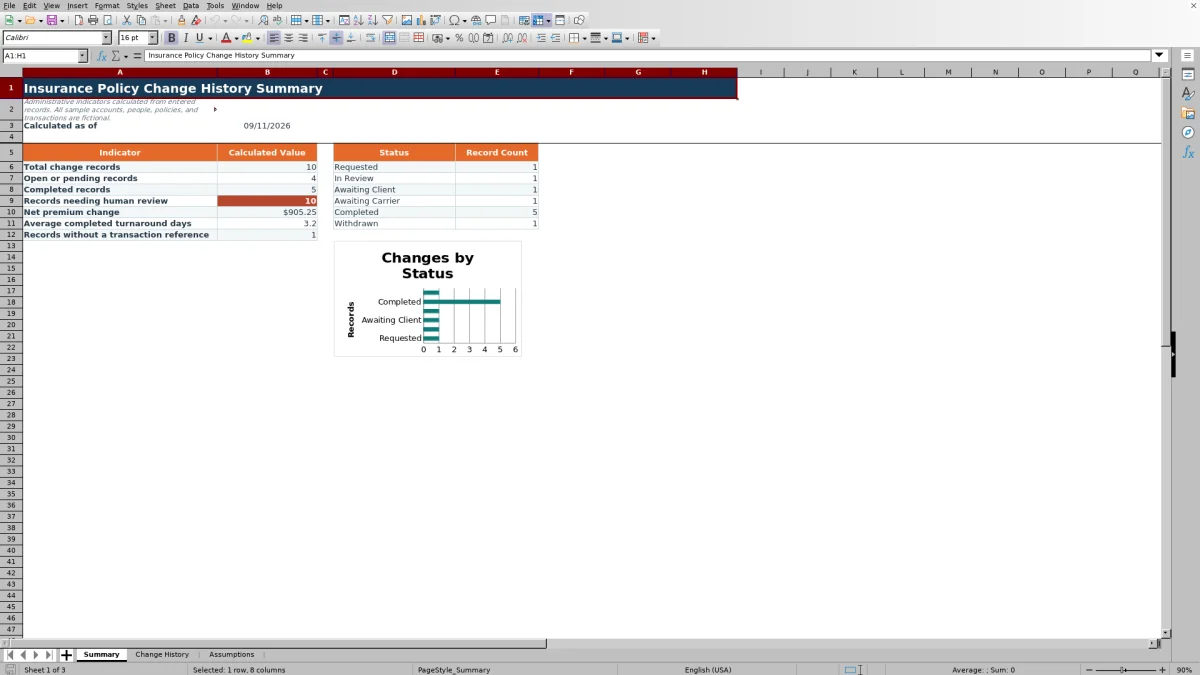
The Summary sheet calculates total records, open or pending records, completed records, records with a review alert, total entered premium change, average elapsed days for completed records, and records without a transaction reference. It also counts records for each status listed on the Assumptions sheet and charts those counts. Open or pending records are entries whose status is neither Completed nor Withdrawn.
Using assumptions without confusing them with policy rules
The Assumptions sheet starts with a seven-day follow-up age and a $1,000 premium-change review amount. These editable values generate internal prompts; they do not determine pricing, coverage, compliance, or carrier action. The status table marks Completed and Withdrawn as closed and the other four statuses as open. Agencies should treat all workbook results as administrative aids and verify official policy outcomes through the applicable carrier and agency records.
Frequently asked questions
What is an insurance policy change history Excel workbook?
It is a structured XLSX for administrative tracking of endorsements and other policy servicing events. This workbook records event details, calculates elapsed days, produces review prompts, and summarizes entered activity.
How many change records can the workbook hold?
The Change History sheet contains 100 prepared entry rows, covering rows 5 through 104. Each prepared row includes formulas for elapsed days and review alerts.
Does the workbook update an insurance policy or confirm carrier action?
No. It is an administrative record and review tool. It does not apply an endorsement, change coverage, determine pricing or compliance, or replace carrier-issued documentation and official agency records.
What can cause a review alert?
The formulas evaluate entered information such as the policy reference, request date, status, completion date, date sequence, record age, and premium change against the workbook's administrative settings. An alert is a prompt for a person to review the row, not an official carrier status.
Can the statuses, change types, and thresholds be adjusted?
Yes. The Assumptions sheet contains editable follow-up and premium-review thresholds, six status entries, and nine change-type entries. Replace values within the prepared lists carefully because the Change History validations and formulas refer to those fixed ranges.
Editorial responsibility

Maya ChenClient and policy workflows

Ethan BrooksWorkbook structure and formula QA