This insurance agency marketing budget Excel workbook helps independent agency operators plan and monitor planned and actual marketing spend by date, channel, and campaign. It also connects spending with leads, quotes, and new policies so operators can interpret acquisition costs rather than review expenses in isolation.
The XLSX includes a Budget Plan for campaign records, a Summary with annual, monthly, and channel views, and an Assumptions sheet for the planning year, channel limits, and cost-per-lead targets. Its included sample entries are fictional, and its review alerts are prompts for manual checks rather than substitutes for financial approval.
How this workbook can help
- Organizes marketing spending by campaign, channel, owner, status, and date in one planning structure.
- Connects actual spending with leads, quotes, and new policies to support practical performance reviews.
- Summarizes annual, monthly, and channel results without requiring operators to build the core formulas from scratch.
- Flags missing, duplicate, or out-of-year record details for manual investigation and correction.
What is in the file
How to get started
Step 1: Set the reporting period and channel assumptions
Open the Assumptions sheet and confirm the planning year. Review the eight channel names, annual budget limits, and target cost-per-lead amounts. The plan start and end dates calculate automatically from the entered year.
Step 2: Replace the fictional campaign records
On the Budget Plan sheet, replace the sample entries with agency records. Give each record a unique ID, select a spend date and channel, identify the campaign and owner, choose a status, and enter planned spend. Use the Notes column for context that may affect later review.
Step 3: Record actual results
As campaigns progress, enter actual spend, leads, quotes, and new policies. The workbook calculates plan remaining, cost per lead, and cost per new policy when the required values are available.
Step 4: Review results and resolve alerts
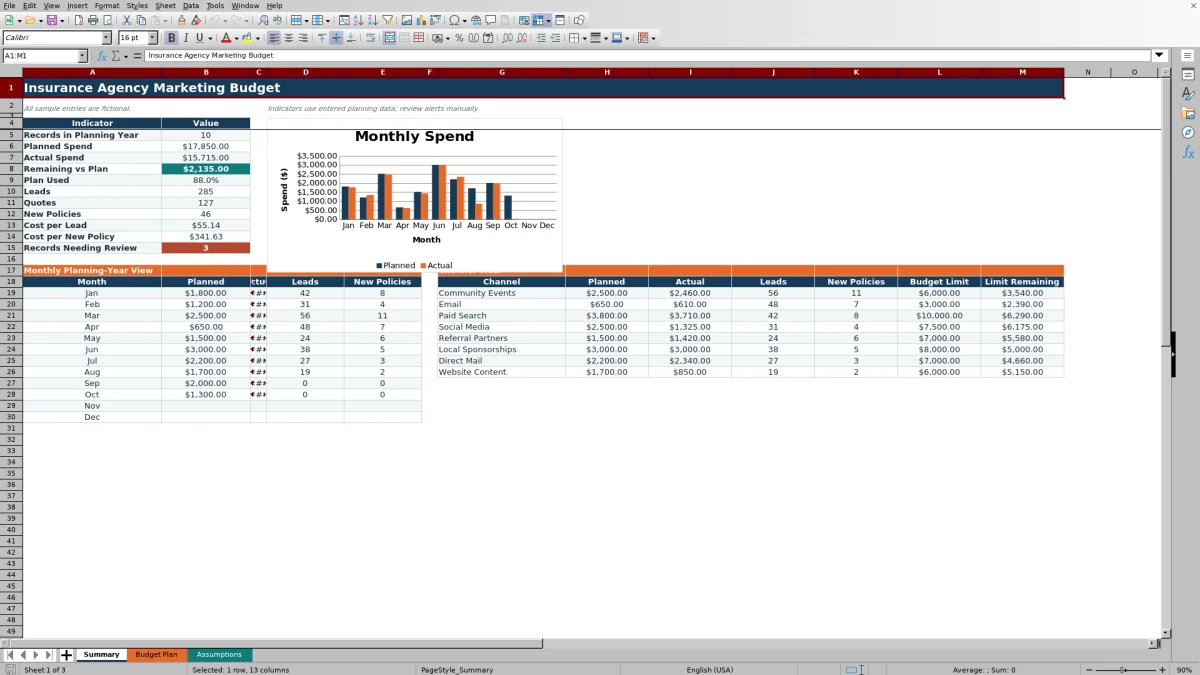
Use the Summary sheet to assess annual totals, monthly movement, channel limits, and the planned-versus-actual chart. Check review alerts on the Budget Plan sheet and correct missing identifiers, dates, channels, statuses, duplicate IDs, or dates outside the selected year.
Create a controlled annual marketing budget
The Budget Plan provides 100 prepared planning rows for dated marketing records. Each row can identify the channel, campaign, owner, status, planned spend, actual spend, leads, quotes, new policies, and notes. Independent agency operators can use one row for a discrete campaign or spending activity, then filter the plan across columns A through P when reviewing a specific month, owner, status, or channel.
Set channel limits and performance targets
The Assumptions sheet controls the planning year and supports eight configurable channel rows. The supplied channels are Community Events, Email, Paid Search, Social Media, Referral Partners, Local Sponsorships, Direct Mail, and Website Content. Operators can replace those labels and set an annual budget limit and target cost per lead for each one. The workbook calculates the plan start and end dates from the selected year, which the Summary uses for annual reporting.
Read monthly and channel performance
The Summary presents annual indicators for planned spend, actual spend, remaining budget, percentage of plan used, leads, quotes, new policies, cost per lead, cost per new policy, and records needing review. Its monthly and channel views provide two useful perspectives: the 12-month section shows when spending and results occurred, while the channel section shows where budget and outcomes accumulated. A chart compares monthly planned and actual spending.
Interpreted practical example
Situation: A fictional Paid Search record dated January 15 shows $1,800 in planned spend, $1,760 in actual spend, 42 leads, 19 quotes, and 8 new policies. Action: The operator records those results in one Budget Plan row and reviews the calculated fields. Result: The campaign is $40 under its row-level plan, with an approximate cost per lead of $41.90 and cost per new policy of $220. Interpretation: The cost per lead is $13.10 below the supplied Paid Search target of $55, while the quote and policy counts show that lead volume alone does not describe the full outcome. Next decision: Review the complete Paid Search channel total and the quality of the resulting policies before increasing, holding, or reallocating later-month spending.
Common errors and practical solutions
A missing record ID can weaken record control; assign a unique ID before relying on the row. A duplicate ID triggers a review prompt; compare both records and rename or remove the duplicate as appropriate. A missing spend date, channel, or status prevents complete classification; enter the omitted value using the applicable input field. A record dated outside the planning year may not appear in the expected annual totals; correct the date or change the planning year if the record belongs to another budget period. If a cost metric is blank, confirm that actual spend and the relevant nonzero lead or new-policy count have been entered.
Comparison with external planning alternatives
The workbook is a complete operational method for entering campaign budgets, updating results, checking records, and interpreting annual, monthly, and channel totals. The appropriate option depends on the agency's workflow and reporting needs.
| Method | More suitable when | What to consider |
|---|---|---|
| Insurance agency marketing budget Excel workbook | More suitable when an agency needs a defined campaign-level budget process with monthly and channel summaries. | Supports 100 prepared records and requires staff to maintain spending and outcome data manually. |
| Blank spreadsheet | More suitable when an operator wants to design every field, formula, and report around a highly specific internal process. | Offers flexibility, but summaries, calculations, validation, and alerts must be created and tested separately. |
| CRM or agency management system | More suitable when lead activity, customer records, policy servicing, and producer workflows need to remain in an operational system of record. | Marketing budget structures and channel cost calculations may require configuration or exported data. |
| Carrier-provided report | More suitable when the immediate question concerns production or policy results for a particular carrier. | It may not consolidate agency-paid marketing costs, cross-carrier campaigns, or planned budgets. |
| Paper or manual checklist | More suitable when activity is very limited and offline documentation is the primary need. | It does not automatically calculate acquisition costs or produce monthly and channel summaries. |
For agencies that already use a CRM or agency management system, the Excel workbook can serve as a focused budget-planning layer while the operational platform continues to manage prospects, customers, and policies.
Turn each review into the next budget decision
Follow the same sequence during each review: identify the current spending situation, update campaign results, read the calculated totals, interpret performance against the plan and channel targets, and document the next decision. That decision may be to maintain a campaign, revise later-month spending, investigate an alert, or compare policy outcomes before changing channel allocation. This sequence keeps the workbook focused on operational decisions rather than static expense reporting.
Frequently asked questions
What information should an agency enter in the Budget Plan?
Enter a unique record ID, spend date, channel, campaign, owner, status, planned spend, actual spend, leads, quotes, new policies, and any useful notes. Plan remaining, cost per lead, cost per new policy, and the review alert are calculated fields.
Can the workbook be used for a year other than 2026?
Yes. Change the planning year in the Assumptions sheet. The plan start and end dates calculate from that value, and the Summary uses those dates when producing annual and monthly views.
How does the workbook calculate acquisition costs?
Cost per lead divides actual spend by leads, while cost per new policy divides actual spend by new policies. The corresponding result remains blank when the required values are missing or the outcome count is zero.
Why might a campaign not appear in the expected Summary totals?
Check whether its spend date falls within the start and end dates for the selected planning year. Also verify that the record contains the date, channel, status, spending values, and outcome data needed for the relevant summary calculation.
Does this workbook replace a CRM or agency management system?
No. It is designed for marketing budget planning and performance review. A CRM or agency management system is more suitable when the agency needs prospect management, customer records, policy servicing, or other operational workflows.
Editorial responsibility

Maya ChenClient and policy workflows

Ethan BrooksWorkbook structure and formula QA