This Excel workbook helps independent insurance agencies measure first-response timing from the recorded inquiry date and time to the first agency response. It provides space for 100 lead records and calculates response hours, source-specific target hours, target results, and review alerts.
The XLSX also summarizes total, responded, and pending leads; average valid response hours; on-target performance; and results by inquiry source. Agency operators can configure the reporting cutoff, accepted timestamp range, source targets, lines of business, owners, and lead statuses to reflect their administrative workflow.
How this workbook can help
- Measures elapsed clock hours between each inquiry and its first recorded agency response.
- Separates responded leads from pending leads so operators can focus follow-up activity.
- Compares valid response times with configurable targets for five inquiry sources.
- Surfaces late, pending, incomplete, or inconsistent records that require human review.
What is in the file
How to get started
1. Configure the assumptions
Open the Assumptions sheet and update the reporting cutoff, accepted timestamp range, maximum target hours, inquiry sources, response targets, lines of business, owners, and lead statuses.
2. Enter each inquiry
On the Leads sheet, add a unique Lead ID, inquiry date and time, prospect alias, inquiry source, line of business, assigned owner, status, and any useful notes. Use the provided dropdown lists where available.
3. Record the first response
Enter the First Response Date/Time after the agency makes its first recorded response. The workbook calculates Response Hours, retrieves Target Hours for the selected source, evaluates Target Met?, and displays a Review Alert when follow-up or correction may be needed.
4. Review results and choose the next action
Use the Summary sheet to review totals, average valid response hours, on-target rate, items needing review, and source-level performance. Then decide whether to contact pending prospects, correct timestamps, investigate late responses, or revise an administrative target.
What the Excel tracker measures
The tracker measures elapsed clock hours from Inquiry Date/Time to First Response Date/Time. A response time is calculated only when both timestamps are present, the response is not earlier than the inquiry, and the response does not occur after the reporting cutoff. Because the calculation uses clock hours, it does not remove nights, weekends, or holidays.
Practical insurance lead example
Situation: A fictional phone inquiry is recorded at 10:00 AM on September 2, 2026, and the agency records its first response at 10:20 AM. Action: The operator enters both timestamps and selects Phone Inquiry. Result: The workbook calculates 0.33 hours and retrieves the 0.50-hour default target. Interpretation: Because 0.33 is less than or equal to 0.50, the record is marked on target. Next decision: The operator can continue the sales process while using the Summary sheet to determine whether phone inquiries are consistently receiving timely responses.
Reading the Summary results
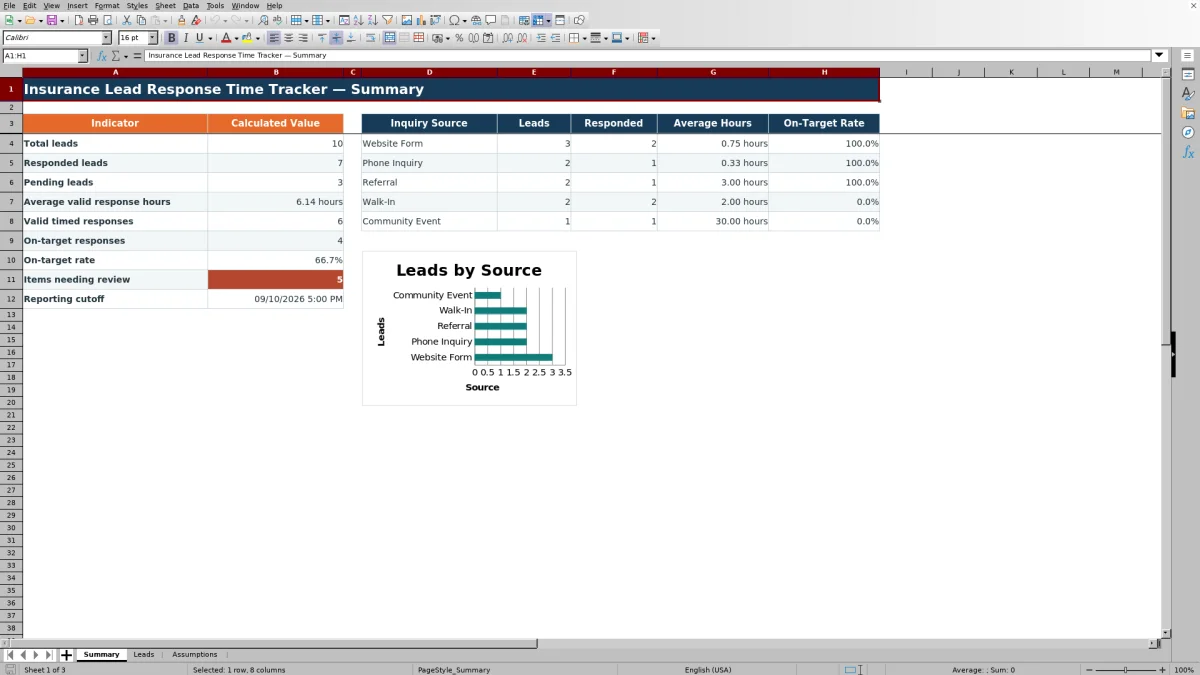
The Summary sheet reports total leads, responded leads, pending leads, average valid response hours, valid timed responses, on-target responses, on-target rate, items needing review, and the reporting cutoff. It also shows lead count, responded count, average hours, and on-target rate for each of the five configured inquiry sources. The accompanying chart compares lead counts by source rather than response speed.
Common errors and solutions
If an inquiry timestamp is missing, enter it before interpreting response performance. If the inquiry occurs after the reporting cutoff, verify the inquiry or update the cutoff when appropriate. A Check response time alert indicates that the response is earlier than the inquiry or later than the reporting cutoff; correct the timestamp rather than treating the blank response-hours result as valid.
If the target is missing, confirm that the selected inquiry source exactly matches an entry on the Assumptions sheet and that the source has a valid target. For a late response, review the lead and the agency workflow. For Pending past target, prioritize human follow-up and confirm that a response was not made but left unrecorded.
Comparison with other lead-tracking methods
The workbook is one complete operational method: operators configure targets, record inquiries and responses, calculate elapsed hours, review exceptions, and monitor summary results in one XLSX. The appropriate choice depends on workflow size, integration needs, and reporting scope.
| Method | What it provides | More suitable when | Key limitation |
|---|---|---|---|
| This Excel workbook | Structured lead entry, timestamp validation, source targets, calculated response hours, review alerts, and summary reporting | More suitable when an agency wants a standalone, reviewable process for up to 100 lead rows without implementing a larger system | It requires manual data entry and measures clock hours rather than business hours |
| Paper or manual log | A simple handwritten record of inquiries and follow-up | More suitable when lead volume is very low and no calculated reporting is needed | Elapsed time, target results, and aggregate metrics must be calculated separately |
| Blank spreadsheet | Flexible cells for an agency-designed log | More suitable when the agency needs an ad hoc layout and is prepared to build and test its own formulas and controls | It does not inherently include the validated formulas, alerts, lists, or summary structure in this workbook |
| CRM or agency management system | Potential integration with lead capture, activities, communications, assignments, and broader sales reporting | More suitable when the agency needs automation, multiuser workflows, system integrations, or capacity beyond this workbook | Available timing fields and reports depend on the specific system and its configuration |
| Carrier-provided report | Reporting based on activity visible to a particular carrier | More suitable when the decision concerns that carrier's submissions or lead program | It may not represent every inquiry source or the agency's complete cross-carrier workflow |
The Excel method can also serve as a defined interim process while an agency evaluates whether a CRM or agency management system should become the system of record.
Configuring targets and operating lists
The Assumptions sheet contains five inquiry-source slots with target hours, five line-of-business values, four assigned-owner values, and five lead statuses. Default source targets are 1 hour for Website Form, 0.50 hour for Phone Inquiry, 4 hours for Referral, 1 hour for Walk-In, and 24 hours for Community Event. These are editable administrative goals, so operators should replace them with agency-approved values rather than interpret them as legal, carrier, or contractual requirements.
Turning results into the next decision
Begin with the situation shown by total, responded, and pending leads. Take action by reviewing records with alerts and validating timestamps or targets. Observe the result in response hours and target status. Interpret whether an issue reflects slow follow-up, missing data, or an unsuitable administrative target. Then make the next decision: contact the prospect, correct the record, coach the assigned owner, investigate a source-level pattern, or revise the workflow assumption with agency approval.
Frequently asked questions
How does the Excel workbook calculate response time?
It subtracts the inquiry timestamp from the first-response timestamp, converts the difference to hours, and rounds the result to two decimal places. The result remains blank when required timestamps are missing or fail the workbook's date checks.
Does the tracker calculate business hours?
No. It calculates elapsed clock hours, so nights, weekends, and holidays remain part of the measured interval.
What does a pending lead mean?
A pending lead has a Lead ID and inquiry information but no recorded first-response timestamp. If elapsed time through the reporting cutoff exceeds the applicable source target, the workbook can identify it as Pending past target.
Can an agency change the response targets?
Yes. Target hours are editable on the Assumptions sheet for the five configured inquiry sources. The allowed values range from 0.01 hour through the configurable maximum target, which is initially 168 hours.
Can the lead log hold more than 100 records?
The validated workbook provides 100 entry rows, from row 5 through row 104. Expanding it requires extending the formulas, validation, formatting, filter range, and Summary references so added records are included correctly.
Editorial responsibility

Maya ChenClient and policy workflows

Ethan BrooksWorkbook structure and formula QA