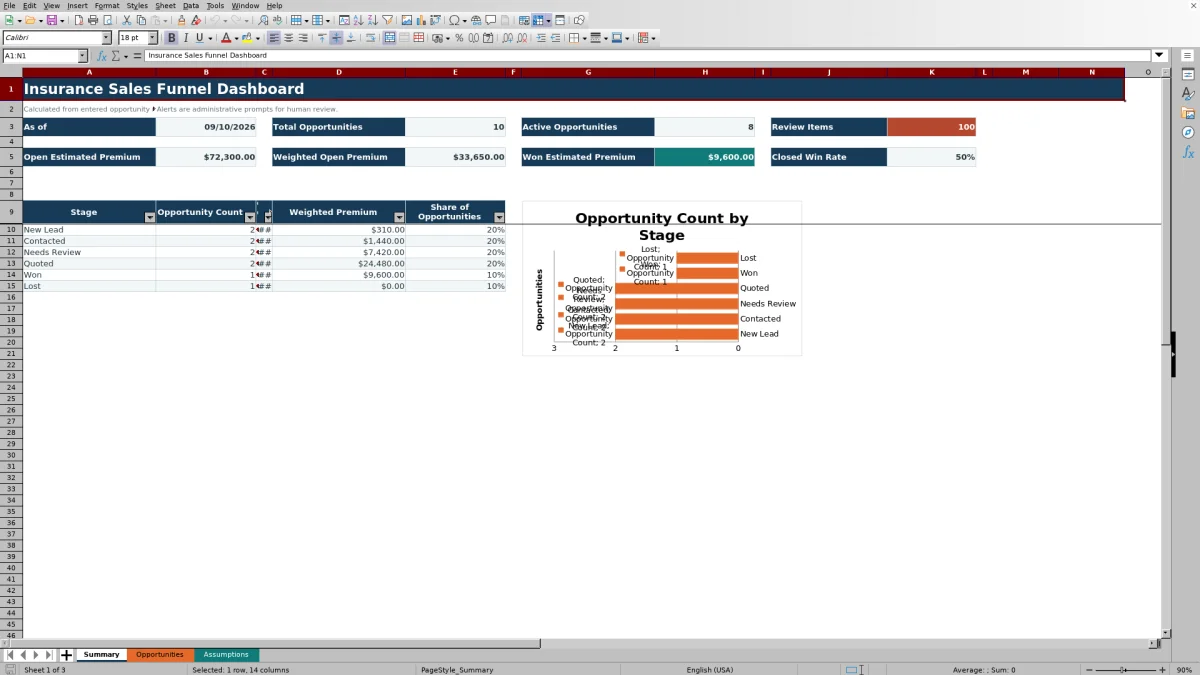
This insurance sales funnel dashboard is an Excel workbook for independent agencies that need to monitor opportunity counts and value by stage. It organizes as many as 100 prepared opportunity rows and summarizes estimated premium, probability-weighted premium, active opportunities, won premium, review items, and closed win rate.
The XLSX combines a Summary dashboard, an Opportunities register, and editable Assumptions. Formulas calculate stage probability, weighted premium, days in stage, and administrative follow-up prompts from the information entered by the agency; those prompts still require human review.
How this workbook can help
- See opportunity volume, estimated premium, and weighted premium at each of the six configured pipeline stages.
- Separate active pipeline value from Won and Lost outcomes while monitoring the closed win rate.
- Identify open records that have passed an expected close date or exceeded the target age for their current stage.
- Standardize stages, owners, lines of business, lead sources, probabilities, and input limits across routine pipeline reviews.
What is in the file
How to get started
1. Configure the assumptions
Open the Assumptions sheet and review the six stages in funnel order, their probabilities, target days in stage, lines of business, owners, lead sources, and input limits. Keep Won and Lost as the final two stage rows because dashboard formulas use them as closed outcomes.
2. Enter opportunity records
Use the yellow input cells on the Opportunities sheet for the opportunity ID, dates, prospect or business, line of business, owner, stage, estimated premium, expected close date, lead source, and notes. Select list values where validation is provided and assign a unique ID to each record.
3. Recalculate and resolve alerts
Allow Excel to recalculate the workbook. Review the calculated probability, weighted premium, days in stage, and follow-up alert columns. Correct incomplete inputs and investigate open records marked Past close date or Review stage age.
4. Interpret the dashboard and decide
Use the Summary sheet to compare counts with estimated and weighted premium by stage. Review active pipeline value, won premium, closed win rate, and the count of review items before assigning follow-up work or updating an opportunity stage.
Situation: Insurance opportunities need a consistent pipeline view
An independent agency may have prospects at different points in the sales process, with premium values that are not equally likely to close. This insurance sales funnel dashboard places those records in New Lead, Contacted, Needs Review, Quoted, Won, or Lost. The Summary sheet then shows total and active opportunity counts, review items, open estimated premium, weighted open premium, won estimated premium, and closed win rate. The stage table adds opportunity share so an operator can see whether records and value are concentrated in one part of the funnel.
Action: Establish a repeatable opportunity review
Start by confirming the stage probabilities and target days on the Assumptions sheet. Enter each opportunity on the Opportunities sheet, using the validated selections for line of business, owner, stage, and lead source. During a review, filter the table by owner, stage, expected close date, or alert. Update the stage-entered date when an opportunity moves so the Days in Stage calculation remains meaningful, and let the formulas refresh before using the dashboard totals.
Result: Read opportunity count and premium together
Opportunity count indicates workload and funnel distribution, while estimated premium indicates potential value. Weighted premium adds a probability-based planning view by multiplying estimated premium by the probability assigned to the current stage. These measures answer different questions: a stage can contain many small opportunities or a few large ones, and its weighted value can remain modest when its assigned probability is low. Because Won and Lost are excluded from active and open-premium calculations, open pipeline results remain separate from closed outcomes.
Interpreted practical example
Situation: fictional opportunity FIC-OPP-0002 is in Contacted with $7,200 of estimated premium, a stage-entered date of September 6, 2026, and an expected close date of September 30, 2026. Action: the workbook looks up the 20% Contacted probability. Result: it calculates $1,440 weighted premium, which contributes to weighted open premium while the record remains open. Interpretation: the agency has $7,200 of stated potential value but only $1,440 in probability-weighted planning value under the current assumption. If the workbook recalculates after September 30 while the record is still open, Past close date takes priority as the alert. Next decision: the assigned owner can contact the prospect, revise the expected close date, or move the record to the stage that reflects its current status.
Common errors and solutions
A blank estimated premium can leave weighted premium blank even though the opportunity still contributes to record counts; enter the available estimate or treat the record as incomplete during review. Stage text pasted outside the validated list can prevent the probability lookup from returning a value; select the stage from the configured list and confirm that its spelling matches the Assumptions sheet. Duplicate opportunity IDs conflict with the custom uniqueness rule; assign a distinct identifier before relying on record-level tracking. If formulas in columns L through O are replaced, protect the calculated columns operationally and restore the matching formulas from an intact prepared row. Date validation enforces configured boundaries but does not establish that every entered date follows a logical chronology, so verify created, stage-entered, and expected-close dates during data review.
Comparison and next decision
The workbook is one complete operational method: configure assumptions, enter opportunities, calculate weighted values and aging, review alerts, and interpret the Summary. The appropriate choice depends on record volume, collaboration requirements, integration needs, and the scope of available data.
| Method | More suitable when | Operational trade-off |
|---|---|---|
| This Excel workbook | More suitable when an agency wants a local, structured review for as many as 100 prepared opportunity rows with editable stage assumptions and no system implementation project. | It provides formulas, validations, alerts, and a summary, but collaboration and workflow automation depend on how the agency manages the file. |
| Paper or manual list | More suitable when the opportunity volume is very small and the immediate need is a brief discussion aid rather than calculated reporting. | It requires manual totals, weighting, aging checks, and version control. |
| Blank spreadsheet | More suitable when the agency needs an ad hoc layout and is prepared to design its own fields, formulas, validation, and review process. | It offers flexibility but starts without the workbook's configured funnel calculations and controls. |
| CRM or agency management system | More suitable when multiple users need permissions, activity history, automated tasks, integrations, or pipeline capacity beyond the prepared workbook rows. | It may require configuration, licensing, training, and data migration. |
| Carrier-provided report | More suitable when the review is limited to opportunities or production information available from that carrier. | It may not provide one agency-controlled view across carriers, owners, and locally defined stages. |
Next decision: use the workbook when its local Excel workflow and prepared capacity match the agency's review process; consider a CRM or agency management system when shared automation, integrations, permissions, or larger-scale pipeline management become central requirements.
Frequently asked questions
What does the insurance sales funnel dashboard track?
It tracks opportunity IDs, prospects or businesses, owners, lines of business, stages, estimated premium, key dates, lead sources, and notes. It also calculates stage probability, weighted premium, days in stage, and follow-up alerts.
How many opportunities can the Excel workbook hold?
The Opportunities sheet contains 100 prepared data rows, from row 5 through row 104. Formulas and validation rules are already applied across those rows.
How is weighted premium calculated?
The workbook looks up the probability assigned to the selected stage and multiplies it by estimated premium. For example, $7,200 at a 20% stage probability produces $1,440 of weighted premium.
What causes a follow-up alert?
An open opportunity receives Past close date when its expected close date is before the current date. If that condition does not apply, it receives Review stage age when its days in stage exceed the target configured for the selected stage. Won and Lost records do not receive these alerts.
Does this workbook replace a CRM, agency management system, or professional judgment?
No. It is a structured Excel method for administrative opportunity tracking and pipeline review. Its alerts are prompts for human follow-up, and its probability-weighted values are planning calculations rather than underwriting, coverage, compliance, or revenue determinations.
Editorial responsibility

Maya ChenClient and policy workflows

Ethan BrooksWorkbook structure and formula QA