This Excel workbook gives independent insurance agencies a structured way to perform lost quote analysis by reason, carrier, product, and producer. It records the quoted premium, competitor premium, decision timing, review status, and notes for as many as 100 lost quotes.
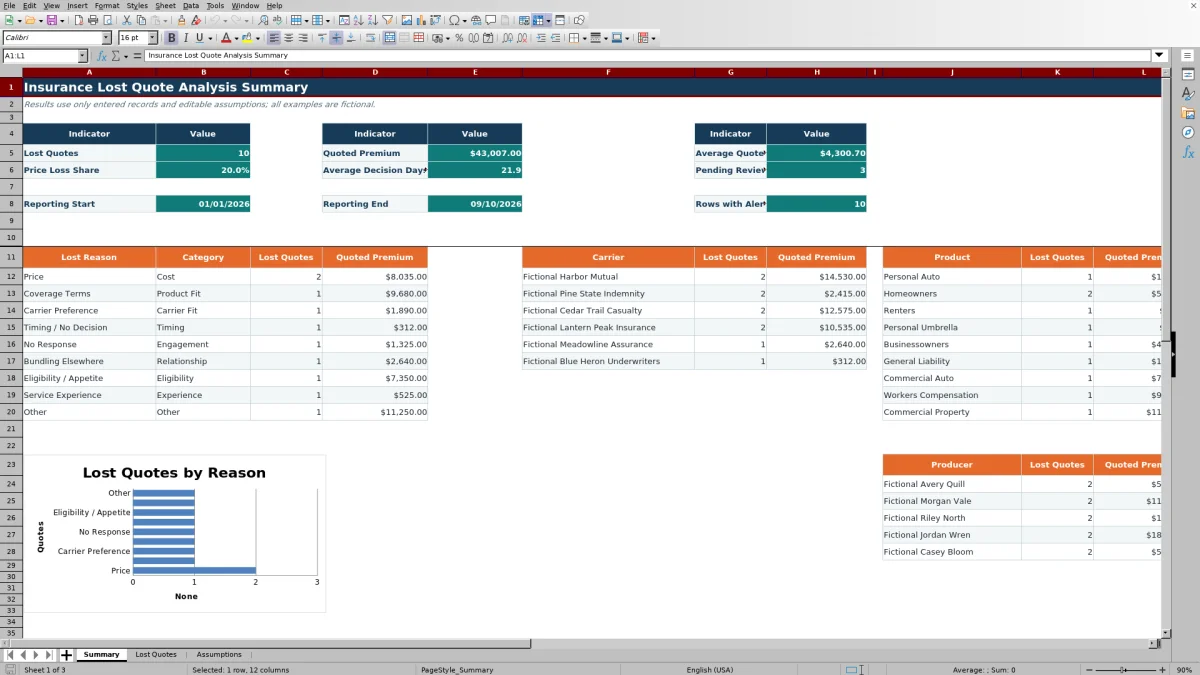
The Summary sheet reports results for an editable date range, while the Lost Quotes sheet calculates reason categories, premium gaps, decision days, and review alerts. The Assumptions sheet controls reporting dates, entry limits, classification lists, and the long-decision threshold.
How this workbook can help
- Connects individual lost-quote records with agency-level counts and quoted premium totals.
- Standardizes products, carriers, producers, reasons, reason categories, and review statuses through editable lists.
- Helps producers distinguish price losses from product-fit, carrier-fit, timing, and other configured categories.
- Identifies incomplete or unusual records that require human review before management uses the results.
What is in the file
How to get started
Step 1: Set the analysis controls
Open Assumptions and confirm the reporting period, allowed entry dates, maximum premium, long-decision threshold, and classification lists. Summary results use Lost Date rather than Quote Date.
Step 2: Enter each lost quote
Use one row per quote in Lost Quotes. Enter the Quote ID, dates, prospect, product, carrier, producer, quoted premium, lost reason, review status, and notes. Add a competitor premium when it is known, especially when Price is selected as the reason.
Step 3: Resolve calculated alerts
Review the calculated category, premium gap, decision days, and Review Alert. Correct missing inputs, reversed dates, unmatched reasons, unusually long decision periods, or missing competitor premiums for price losses.
Step 4: Interpret the Summary
Review the KPI blocks and the reason, carrier, product, and producer sections. Use both lost-quote counts and quoted premium totals so that frequent small losses are not confused with fewer high-premium opportunities.
What the Excel workbook analyzes
The workbook treats a lost quote as an operational record rather than only a final disposition. Each record can identify the prospect, product, quoted carrier, producer, annual premium, stated loss reason, competitor premium, review status, and decision notes. Calculated columns then classify the reason, subtract competitor premium from quoted premium, measure elapsed days from quote to loss, and identify records that need review.
The Summary counts records with a nonblank Quote ID and a Lost Date inside the inclusive reporting period. It also totals quoted annual premium and organizes results by the classification lists maintained on Assumptions.
Create consistent lost-reason classifications
Lost Reason is selected from the list in Assumptions, and the workbook uses an exact-match lookup to return the corresponding Reason Category. For example, the supplied Price reason maps to Cost, while Carrier Preference maps to Carrier Fit. Maintaining consistent labels prevents similar outcomes from being split across spelling variations.
If an agency changes an existing reason or category, the updated mapping flows into calculated categories and the reason analysis. If the agency needs to extend a list beyond its existing referenced range, the associated validation, lookup, and Summary ranges also need to be extended.
Practical example: interpreting a price loss
Situation: The fictional FQ-001 record shows a $4,850 Businessowners quote from Fictional Harbor Mutual, a $4,200 competitor premium, and a Lost Reason of Price. Action: The producer records the December 20, 2025 Quote Date, January 1, 2026 Lost Date, required classifications, Reviewed status, and decision note. Result: The workbook maps Price to Cost, calculates a $650 premium gap and 12 decision days, and returns no review alert because the required fields are present, the dates are ordered correctly, the reason is recognized, the decision period is below 45 days, and a competitor premium is entered. Interpretation: This record supports a price-specific explanation and shows the agency quote was $650 above the stated competitor premium, but one observation does not establish a broader carrier or product pattern. Next decision: Review other Price losses for the same carrier, product, and producer before deciding whether market selection, quoting practices, or follow-up procedures warrant closer examination.
Common errors and practical solutions
“Check required inputs” means at least one field required by the alert formula is blank; complete the quote and lost dates, prospect, product, carrier, producer, quoted premium, lost reason, and review status. “Check date order” means Lost Date precedes Quote Date; correct the dates after checking the source record. “Check reason list” means the entered reason does not exactly match the configured list; select or add the intended standardized reason. “Check long decision time” means calculated decision days exceed the Assumptions threshold; verify the dates and document the extended timeline. “Check competitor premium” appears when Price is selected without a competitor premium; enter the known amount or review whether Price is the appropriate reason.
A rejected date or premium entry usually falls outside the limits configured on Assumptions. Adjust the source value if it is incorrect, or revise the applicable limit when agency policy supports the change. Alerts request human review and should not be treated as underwriting or coverage conclusions.
Comparison with alternative tracking methods
The workbook is one complete operational method: staff enter standardized lost-quote records, formulas calculate review fields, and the Summary organizes the results. The appropriate alternative depends on record volume, integration needs, and the availability of consistent data.
| Method | More suitable when | Operational trade-off |
|---|---|---|
| This Excel workbook | It is more suitable when an agency needs a focused, editable process for up to 100 records with defined classifications, alerts, and summary calculations. | Entry is manual, source ranges are fixed, and the workbook does not provide system integration. |
| Paper or manual notes | It is more suitable when the volume is very low and staff only need to document isolated conversations. | Consistent classification, aggregation, premium calculations, and date-based reporting require additional manual work. |
| Blank spreadsheet | It is more suitable when the agency needs an unrestricted layout and is prepared to design its own fields, controls, formulas, and review process. | Without added validation and formulas, inconsistent labels and incomplete records are harder to identify. |
| CRM or agency management system | It is more suitable when the organization requires connected prospect activity, permissions, workflow automation, or reporting across a larger operating system. | Lost-reason fields and reports still need deliberate configuration, user adoption, and data-quality oversight. |
| Carrier-provided report | It is more suitable when the immediate question concerns submissions or outcomes for that specific carrier. | It may not present a unified agency view across carriers, producers, products, and locally recorded loss explanations. |
Agencies can also use the workbook as a controlled review method alongside another system, provided staff avoid creating conflicting versions of the same record.
Interpret counts, premium, timing, and review status
Lost Quotes measures frequency, while Quoted Premium measures the annual premium associated with those opportunities. Average Quoted Premium provides context for typical record size, and Price Loss Share identifies the percentage of in-period records whose exact Lost Reason is Price. These measures answer different questions and should be read together.
Average Decision Days describes elapsed time between Quote Date and Lost Date for the included records. Pending Reviews indicates unresolved review workflow, while Rows with Alerts identifies records with a calculated data-quality or timing concern. An alert can remain relevant regardless of whether a record has been assigned a review status.
Capacity, scope, and the next agency decision
The Lost Quotes sheet provides rows 5 through 104, giving the workbook a 100-record input capacity. Summary formulas, validation rules, calculated columns, and the filter use fixed ranges ending at row 104. Adding more rows requires extending all related references rather than inserting data below the existing range without further changes.
The workbook is designed for administrative sales analysis, not for underwriting, coverage comparison, or proof of why a prospect selected another option. After reviewing the segment results, the next agency decision may be to investigate a recurring reason, audit pending reviews, discuss a carrier or product pattern with producers, or improve how loss explanations and competitor premiums are collected.
Frequently asked questions
What information should be entered for each lost quote?
Enter a Quote ID, Quote Date, Lost Date, prospect or organization, product, quoted carrier, producer, quoted annual premium, lost reason, review status, and decision notes. Enter the competitor premium when known; the alert formula specifically checks for it when the lost reason is Price.
How does the workbook assign a reason category?
The Reason Category formula uses an exact-match lookup against the Lost Reason and Reason Category columns on Assumptions. An unrecognized reason produces a check message and a review alert rather than silently assigning a category.
Why might a record be missing from the Summary?
The Summary requires a nonblank Quote ID and a Lost Date on or after the report start date and on or before the report end date. Check those fields first, then confirm that the product, carrier, producer, and reason labels match the configured classifications used by the applicable breakdown.
Can the workbook hold more than 100 lost quotes?
The supplied input area supports 100 records in rows 5 through 104. Additional capacity requires coordinated changes to formulas, validation ranges, calculated columns, the AutoFilter range, and Summary references.
Does this workbook replace a CRM or agency management system?
No. It provides a focused manual process for recording, classifying, reviewing, and summarizing lost quotes. A CRM or agency management system may be more suitable when the agency needs integrated prospect histories, automated workflows, permissions, or broader operational reporting.
Editorial responsibility

Maya ChenClient and policy workflows

Ethan BrooksWorkbook structure and formula QA