The Insurance Sales Forecast Excel workbook helps an independent insurance agency turn opportunity records into a weighted premium and commission forecast. It applies editable stage probabilities and line-of-business commission rates to opportunities marked Open, then summarizes the results for a selected forecast period.
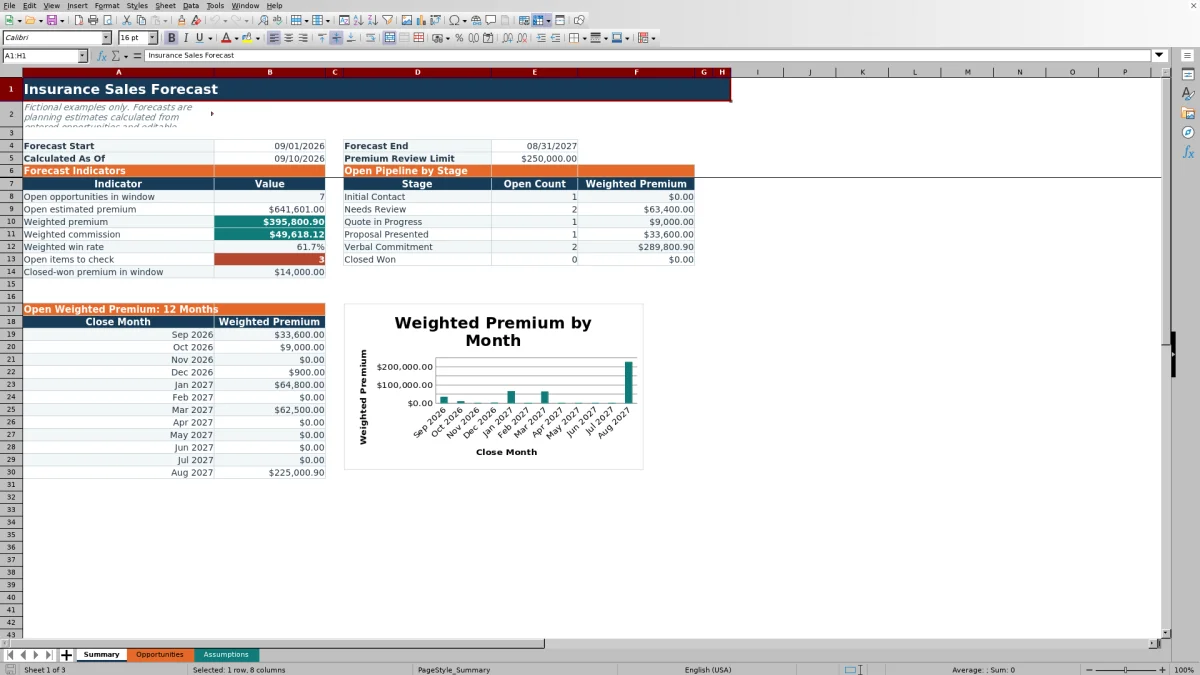
The XLSX includes Summary, Opportunities, and Assumptions worksheets. It provides 100 prepared opportunity rows, review prompts, a pipeline breakdown by stage, and a 12-month weighted-premium chart. Its outputs are planning estimates, so agency staff should verify premium figures, commission rates, statuses, and close dates before making production or staffing decisions.
How this workbook can help
- Creates a consistent forecast from opportunity-level premium estimates, stages, statuses, and target close dates.
- Helps producers and sales managers prioritize open opportunities by weighted premium and expected commission contribution.
- Surfaces missing, stale, or unusually large entries for human review before they distort planning discussions.
- Separates editable assumptions from opportunity inputs and summary outputs, making forecast logic easier to review.
What is in the file
How to get started
1. Define the situation and forecast period
Open the Assumptions worksheet and set the forecast window, review interval, and premium review limit. Confirm that the stage probabilities and line-of-business commission rates reflect the agency's current planning assumptions.
2. Enter or update each opportunity
On the Opportunities worksheet, record the opportunity ID, prospect, target close date, line of business, estimated annual premium, stage, owner, status, last-reviewed date, and notes. Use the available lists for line of business, stage, owner, and status.
3. Review the calculated result
Check the calculated win probability, weighted premium, estimated commission rate, weighted commission, and review flags. Weighted values populate only when the required inputs are valid and the opportunity is marked Open.
4. Interpret the forecast
Use the Summary worksheet to examine open opportunity count, open estimated premium, weighted premium, weighted commission, weighted win rate, items to check, closed-won premium, stage mix, and the 12-month monthly outlook.
5. Make the next decision
Choose which opportunities need producer follow-up, corrected data, management review, or a revised close date. Update the underlying records rather than manually overriding calculated forecast outputs.
How the weighted insurance sales forecast works
The workbook treats open opportunities as the active forecast population. For each valid Open record, estimated annual premium is multiplied by the probability assigned to its stage. The resulting weighted premium is then multiplied by the commission rate assigned to its line of business. Summary formulas apply the selected forecast dates when reporting pipeline totals.
This method does not claim that an individual account will produce the weighted amount. It converts multiple uncertain opportunities into a consistent planning view that agency operators can compare over time.
Practical example with interpretation
Consider the fictional Blue Lantern Bakery opportunity included in the workbook. It has an estimated annual premium of $48,000, an Open status, a Proposal Presented stage with a 70% probability, and a Commercial Package commission rate of 13%. The workbook calculates weighted premium of $33,600 and weighted commission of $4,368.
The decision signal is not that the agency has already earned $4,368. The result indicates how this opportunity contributes to the probability-weighted plan under the current assumptions. Because its September 19, 2026 target close date falls inside the sample forecast window, it contributes to the applicable summary period. The next decision is whether the producer should advance the opportunity, revise its expected close date, or confirm that the premium estimate and stage still reflect current information.
Common forecast errors and their solutions
An opportunity with a status other than Open will not produce weighted premium or weighted commission; confirm the status when an active deal appears missing. A stage or line of business that does not match an assumptions-list entry can leave a lookup result blank; select a listed value or update the corresponding assumptions list. A missing last-reviewed date can trigger a review prompt, while an old date can produce an overdue flag; record the actual review date after a human check.
If a forecast total appears incomplete, verify that target close dates fall between the forecast start and end dates. If the review flag says to check the premium estimate, confirm whether the entered amount exceeds the editable premium review limit. A zero premium is allowed by the input validation and may represent a lower-bound example, but it contributes zero dollars to weighted results.
Comparison with other insurance pipeline methods
The workbook is a complete operating method for entering opportunities, applying common assumptions, reviewing exceptions, and reading a summarized forecast. The comparison below explains when it or an external alternative is more suitable.
| Method | More suitable when | Operational consideration |
|---|---|---|
| Insurance Sales Forecast Excel workbook | More suitable when an agency needs a transparent, file-based process for up to 100 opportunity rows with editable probabilities, commission rates, review prompts, and summary reporting. | Staff must maintain the file and verify inputs; the workbook has no external connectivity. |
| Blank spreadsheet | More suitable when the agency needs an unstructured scratchpad or a one-time calculation with no standard forecast workflow. | Formulas, controls, review rules, and reporting structure must be designed and maintained manually. |
| CRM or agency management system | More suitable when multiple users need centralized records, permissions, activity history, integrations, or workflow automation. | Configuration, licensing, data governance, and system-specific reporting may require additional resources. |
| Carrier-provided report | More suitable when the decision concerns business submitted to that carrier and the carrier's own recorded status or production data. | It may not provide a consolidated view across carriers or reflect the agency's full opportunity pipeline. |
Reading stage and monthly forecast views
The stage summary reports the count and weighted premium of Open opportunities for each stage listed in Assumptions. This helps operators distinguish a large early-stage pipeline from a smaller group of opportunities closer to commitment. The 12-month chart groups Open weighted premium by target close month, providing a timing view rather than only a single total.
When one month is unusually high, inspect the supporting opportunity dates and stages before planning around that amount. A concentration of early-stage premium requires a different follow-up plan from the same weighted amount supported by later-stage opportunities.
Using review controls for data quality
The editable review interval determines when an Open opportunity's last-reviewed date becomes overdue. The premium review limit identifies estimates that warrant an additional human check. The Review Flag can also identify missing or invalid review dates and a missing review-interval assumption.
These controls are prompts, not external tracking or compliance determinations. Agency staff should investigate the underlying record, document any needed context in Notes, and update the actual input only after confirming the information.
Turning interpretation into the next pipeline decision
After reviewing totals, stage mix, monthly timing, and flagged records, connect each finding to a next pipeline decision. Assign follow-up for high-value opportunities, validate large premium estimates, move stale target dates, and revisit assumptions when actual results consistently differ from the weighted plan.
Keep closed, held, won, and lost records accurately classified so the open forecast remains focused on active opportunities. Treat weighted commission as a planning estimate rather than booked revenue, and verify commission arrangements before using the output for budgets or producer expectations.
Frequently asked questions
Which opportunities are included in weighted premium and commission?
The workbook calculates weighted premium and weighted commission only for opportunities marked Open. Summary forecast formulas also use the selected forecast start and end dates when reporting the applicable pipeline window.
Can the stage win probabilities be changed?
Yes. The Assumptions worksheet contains editable probabilities for Initial Contact, Needs Review, Quote in Progress, Proposal Presented, Verbal Commitment, and Closed Won. Changes flow through the opportunity calculations and summary results.
How are estimated commission rates assigned?
The workbook looks up the editable commission rate associated with the selected line of business. The included assumption list covers Personal Auto, Homeowners, Commercial Package, General Liability, Workers' Compensation, and one additional prepared list row.
What does a Review Flag mean?
A Review Flag prompts a human check when an entered premium exceeds the review limit, an Open opportunity lacks a usable review date, the review interval is missing, or the last review is overdue. It does not represent external monitoring or a coverage determination.
Does this Excel workbook connect to a CRM, carrier, or agency management system?
No. The workbook has no external connectivity. Opportunity details must be entered or updated in the XLSX, and users should verify the information against the agency's applicable source records.
Editorial responsibility

Maya ChenClient and policy workflows

Ethan BrooksWorkbook structure and formula QA