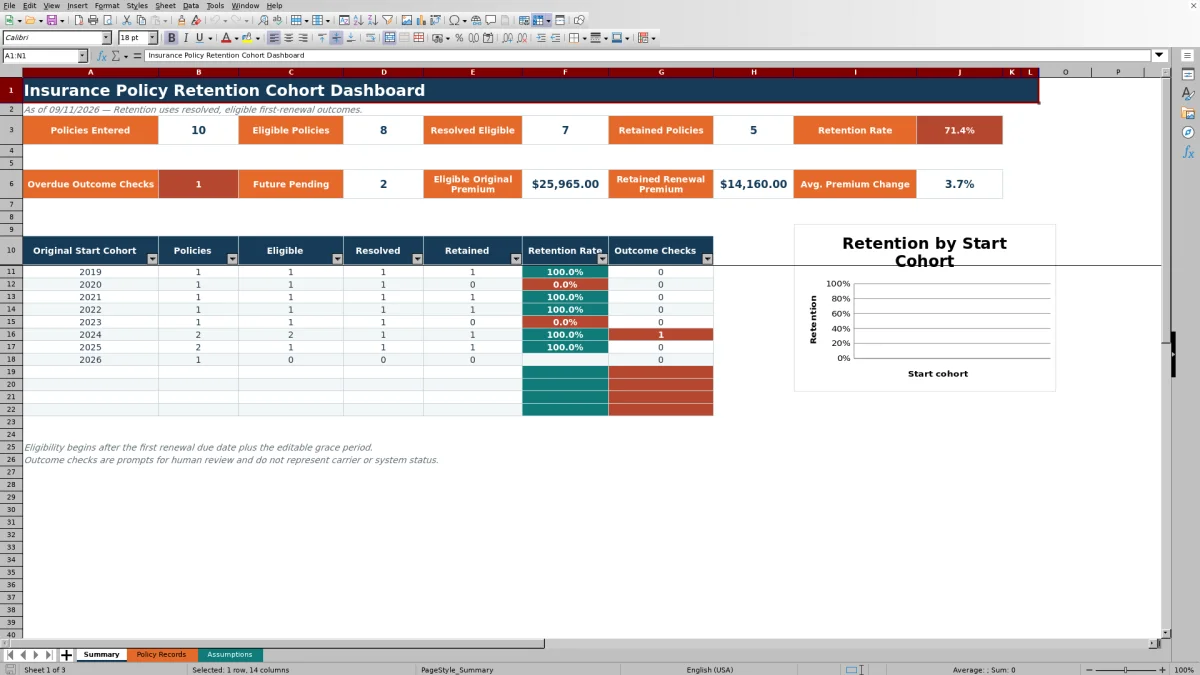
This Excel workbook helps independent insurance agency operators compare first-renewal retention by the calendar year in which each original policy started. Policy-level records feed a Summary dashboard with eligibility counts, resolved outcomes, retained policies, premium measures, annual cohort rates, and a cohort chart.
The XLSX calculates retention from resolved eligible policies, not from every policy entered. An editable as-of date, standard policy term, and grace period determine eligibility, while pending or missing outcomes remain outside the resolved denominator and may generate review prompts.
How this workbook can help
- Separates policies that have reached their first-renewal measurement point from policies whose renewal date is still in the future.
- Compares first-renewal retention consistently across original policy start-year cohorts.
- Surfaces overdue or incomplete outcomes that agency staff should review before interpreting the dashboard.
- Connects policy-count retention with original premium, retained renewal premium, and average premium change context.
What is in the file
How to get started
1. Set the measurement conditions
Open Assumptions and confirm the as-of date, 12-month standard policy term, 30-day outcome grace period, number of cohort years shown, retention highlight threshold, premium limit, and earliest allowed record date. Adjust editable values when the agency's administrative process requires different settings.
2. Enter one record per original policy
On Policy Records, complete the highlighted inputs for policy reference, original start date, line of business, service owner, original annual premium, renewal outcome, outcome date, renewal annual premium when applicable, and administrative notes. The workbook calculates cohort year, first renewal due, eligibility, retained status, and premium change.
3. Resolve record-level checks
Review the Review Alert column for required-input issues, date-order problems, overdue outcomes, or missing renewal details. Correct the underlying input rather than overwriting calculated cells; these alerts are administrative prompts and not carrier or system statuses.
4. Interpret the dashboard and decide
Use Summary to move from the current situation to action, result, interpretation, and next decision: identify unresolved eligible records, update them, review the resulting cohort rates, assess whether differences reflect operations or data completeness, and then choose which cohort or records need follow-up.
Define eligibility before reading cohort retention
A policy enters the eligible population only when its calculated first renewal due date plus the editable grace period is on or before the as-of date. With the supplied settings, the first renewal due date is 12 months after the original start date and eligibility begins after another 30 days. This structure prevents future renewals from being treated as losses merely because no outcome exists yet.
The resolved denominator includes eligible policies classified as retained Yes or No. Renewed policies become retained Yes, while Not Renewed and Canceled Before Renewal become retained No. Pending or blank outcomes are unresolved and remain outside the retention-rate denominator.
Practical example of an interpreted cohort result
Situation: suppose one start-year cohort contains 12 eligible policies, but only 10 have resolved first-renewal outcomes. Action: agency staff confirm that eight resolved policies renewed and two did not. Result: the dashboard calculates a 80% retention rate from 8 retained divided by 10 resolved, not from all 12 eligible policies. Interpretation: the rate describes known outcomes, while the two unresolved policies still affect confidence in the cohort's completeness. Next decision: review those two records and determine whether their outcomes should be updated before using the cohort for operational planning.
Use premium measures as supporting context
The Summary sheet reports eligible original premium, retained renewal premium, and average premium change for retained policies with the required premium values. At the record level, premium change is calculated as renewal annual premium minus original annual premium, divided by original annual premium.
These measures add context but do not replace policy-count retention. A cohort can retain a high percentage of policies while producing a different premium pattern because policy sizes and renewal pricing vary. Agency operators should read the count-based rate and premium measures together before deciding where account review is warranted.
Common record errors and practical solutions
Required-input alert: add the missing original start date, line of business, service owner, or original annual premium. Date-order alert: correct an outcome date entered before the original start date. Overdue-outcome alert: investigate an eligible policy whose outcome is blank or Pending, then record the confirmed status. Renewed-detail alert: enter the applicable outcome date and renewal annual premium. Duplicate-reference validation: verify whether the entry is a duplicate or assign the correct unique policy reference.
After corrections, return to Summary and confirm that eligible, resolved, retained, and outcome-check counts changed as expected. If a value still appears inconsistent, inspect the policy row and the Assumptions settings before drawing a conclusion from the cohort rate.
Comparison with external policy-retention tracking methods
The workbook is a complete operational method spanning measurement assumptions, policy inputs, eligibility calculations, review alerts, cohort summaries, and a chart. The comparison below explains which option is more suitable when a particular operating condition applies.
| Method | More suitable when | Operational consideration |
|---|---|---|
| This Excel cohort workbook | An agency needs a controlled, reviewable first-renewal cohort process for up to 100 policy records. | Includes defined eligibility logic, validated inputs, record alerts, premium context, a cohort table, and a chart; staff still need to maintain outcomes. |
| Blank spreadsheet | The task is a one-time or highly customized analysis and the user can build and test every formula and control. | Offers flexibility, but eligibility rules, validations, alerts, summaries, and documentation must be created separately. |
| Agency management system or CRM report | Renewal outcomes are already captured consistently at scale and the system can report the agency's required cohort and eligibility definitions. | May reduce duplicate entry, but available fields, first-renewal logic, and unresolved-outcome handling depend on system configuration. |
| Carrier-provided report | The agency needs carrier-specific results based on the carrier's own definitions and reporting schedule. | Useful for reconciliation, but definitions and timing may differ across carriers and may not provide a unified agency-level cohort view. |
| Paper or manual log | The record count is very small and no calculated cohort analysis is required. | Simple to start, but totals, eligibility, exception review, and historical comparisons require manual consolidation. |
Interpret cohort differences without overstating the result
A lower displayed rate can indicate more nonrenewals, but it can also appear alongside incomplete outcome work. Review each cohort's policy, eligible, resolved, retained, and outcome-check counts before attributing a difference to service performance, customer behavior, pricing, or market conditions.
For a mature cohort with few unresolved outcomes, the rate provides a clearer description of recorded first-renewal results. For a cohort with many outcome checks, the next operational decision is usually to improve record completeness before comparing it with other years.
Work within the workbook's operating boundaries
The Policy Records sheet provides 100 entry rows, from row 5 through row 104. The current Assumptions setting displays eight cohort years on Summary, and the chart references those eight displayed cohort positions. Input controls include date limits, a maximum annual premium, list-based selections, and a uniqueness check for policy references.
The workbook is an administrative analysis tool rather than a carrier status feed. Sample records and service-owner names are fictional, review alerts require human follow-up, and results depend on accurate policy inputs and appropriate assumptions.
Frequently asked questions
What is the denominator for the retention rate?
The denominator is the number of eligible policies with resolved retained outcomes of Yes or No. Eligible policies with blank or Pending outcomes are not included until their first-renewal outcome is resolved.
How does the workbook decide whether a policy is eligible?
It calculates the first renewal due date by adding the Standard Policy Term in months to the Original Start Date. The policy becomes eligible when that due date plus the Outcome Grace Days is on or before the As-of Date.
How are canceled policies treated?
An eligible policy recorded as Canceled Before Renewal receives a retained result of No and enters the resolved denominator. A future policy that has not reached the eligibility date does not enter that denominator.
Can the agency change the available lines of business and service owners?
Yes. The Assumptions sheet contains the stable lists used by the Policy Records validation controls. Agency staff can edit those lists while keeping entered values consistent with the available choices.
What should staff do when an outcome check appears?
Open the corresponding Policy Records row, confirm the source information, and correct the missing or inconsistent input. An overdue-outcome message is a prompt for human review and does not represent a carrier or agency management system status.
Editorial responsibility

Maya ChenClient and policy workflows

Ethan BrooksWorkbook structure and formula QA