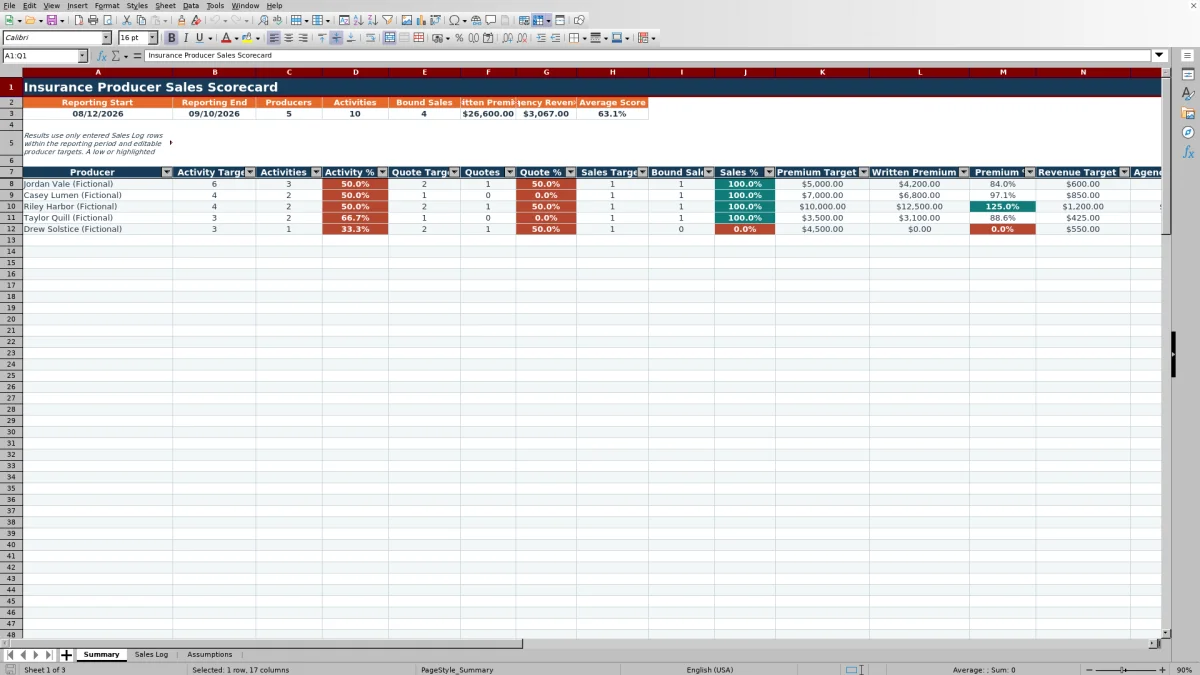
This insurance producer sales scorecard is an Excel workbook for comparing producer results with activity and production targets during a selected reporting period. It summarizes activities, quotes, bound sales, written premium, agency revenue, attainment percentages, and overall scores from the workbook’s Sales Log and Assumptions sheets.
Independent insurance agency operators can use the XLSX to identify where recorded activity is ahead of or behind an entered target, verify which records fall within the reporting period, and prepare focused coaching conversations. Scores and highlights support human review; they do not assess coverage quality, employment performance, compensation, legal compliance, or client suitability.
How this workbook can help
- Compare each producer’s recorded activity and production with separate activity, quote, sales, written premium, and agency revenue targets.
- See reporting-period totals for producers, activities, bound sales, written premium, agency revenue, and average score in one summary.
- Identify target gaps that may warrant record correction, follow-up planning, or a producer coaching conversation.
- Separate editable assumptions and targets from the activity log and formula-driven summary, reducing the need to rebuild calculations for each review period.
What is in the file
How to get started
1. Set the reporting period and limits
Open Assumptions and enter the Reporting Start and Reporting End dates. Review the score attainment cap, allowed log-date range, maximum written premium per row, maximum agency revenue per row, and target limits before entering operational data.
2. Enter producers and targets
Add each producer to the ProducerTargetsTable and enter the applicable activity, quote, sales, written premium, and agency revenue targets. Leave a target blank when that measure is not part of the producer’s scorecard rather than entering an unintended value.
3. Record sales activity consistently
In Sales Log, enter one administrative activity per row. Select the producer, activity type, line of business, and status from the controlled lists. For a completed transaction intended to count as a bound sale, use Activity Type “Bound Sale” and Status “Bound,” then enter the appropriate written premium and agency revenue amounts.
4. Review results and choose a response
Check Period Check for Included, Outside Period, or Check Date results. Then review the Summary sheet’s actuals, attainment percentages, conditional-formatting cues, and overall scores. Confirm the underlying rows before deciding whether the next action is correcting data, following up on open opportunities, revising targets, or discussing activity pacing with a producer.
From Sales Log Entries to the Producer Scorecard
The workbook uses a reporting-period control to determine which dated Sales Log entries contribute to Summary results. The start and end dates are maintained on Assumptions, while the Period Check formula labels each dated log row as Included, Outside Period, or Check Date.
For each configured producer, Summary counts in-period activities with an entered activity type. It separately counts Quote rows, counts qualifying bound sales, and sums qualifying written premium and agency revenue. This creates a traceable path from the entered administrative record to the producer result without implying a connection to a CRM, agency management system, carrier portal, or accounting platform.
How Activity and Production Metrics Are Interpreted
Activities represent in-period Sales Log rows assigned to a producer with an activity type entered. Quotes are rows whose Activity Type is Quote. Bound Sales require both Activity Type “Bound Sale” and Status “Bound.” Written Premium and Agency Revenue are summed only from rows meeting those same bound-sale conditions.
Each attainment percentage divides the actual result by its corresponding positive target. If an applicable target is blank or not positive, the associated percentage is left blank rather than presenting a misleading attainment result. The Overall Score combines applicable target-attainment results and references the editable Score Attainment Cap on Assumptions. A high score indicates recorded performance against entered targets; it does not establish sales quality, coverage appropriateness, profitability, or regulatory compliance.
Practical Example: Turning an Activity Gap into a Decision
Situation: An agency has a fictional producer with an activity target of 6 for the selected period. Action: The manager verifies that four Sales Log rows contain dates within the reporting period, the exact producer name, and entered activity types. Result: Summary reports 4 Activities and an Activity % of 66.7% because 4 divided by 6 equals approximately 66.7%.
Interpretation: The percentage places the result in context by showing that recorded activity is below the entered target. It does not explain why the gap exists or prove that the producer underperformed. The manager should check for omitted entries, incorrectly dated records, or inconsistent producer names before drawing a conclusion. Next decision: If the data is complete, the agency can discuss whether follow-up activity should be scheduled, whether pipeline conditions affected the period, or whether the target needs review.
Common Entry Errors and Their Solutions
Producer mismatch: A pasted producer name that differs from the name on Assumptions may not roll up to the intended Summary row. Solution: Select the producer from the validated list or correct the producer record on Assumptions. Use exact list values for consistent attribution.
Date exception: A row marked Outside Period does not contribute to the current scorecard. Solution: Correct the activity date if it was entered incorrectly, or revise the reporting dates on Assumptions when the review period itself is wrong. A Check Date result calls for verifying that Excel recognizes the entry as a valid date.
Incomplete bound-sale classification: A row with only Bound Sale as its activity type or only Bound as its status does not satisfy both production conditions. Solution: Review the transaction and, when factually appropriate, use Activity Type “Bound Sale” together with Status “Bound.” Missing or unintended targets can also produce blank percentages, so confirm each producer’s target settings before interpreting the score.
Comparison with a Blank Spreadsheet, CRM, and Carrier Report
The most appropriate method depends on whether the agency needs a configurable local scorecard, an enterprise system of record, a carrier-specific reconciliation, or a simple temporary record. The Excel workbook is more suitable when the agency wants to compare manually entered producer activities and production with editable targets using a defined structure.
| Method | More suitable when | Operational trade-off |
|---|---|---|
| Insurance Producer Sales Scorecard Excel workbook | More suitable when an agency needs a structured, local process for entering activities, setting producer-specific targets, checking reporting-period inclusion, and reviewing calculated attainment. | Data is entered and maintained manually, and the validated workbook does not show an external system connection. |
| Blank spreadsheet | More suitable when the need is temporary or highly specialized and the user is prepared to design fields, formulas, controls, and review rules from the beginning. | Offers flexibility but does not start with this workbook’s target structure, controlled lists, bound-sale conditions, or prepared score formulas. |
| CRM or agency management system | More suitable when the agency requires a centralized system of record, multiuser workflows, permissions, integrations, automated synchronization, or broader client and policy administration. | May require configuration, licensing, implementation, and reporting expertise beyond a standalone workbook. |
| Carrier-provided production report | More suitable when the primary task is reconciling carrier-specific production or reviewing figures maintained by that carrier. | May not include the agency’s outbound calls, meetings, referral requests, custom producer targets, or activity pacing across carriers. |
Using the Review Cycle for the Next Management Decision
A practical review begins with the situation shown on Summary, moves to the supporting Sales Log rows, confirms the resulting calculation, and then interprets the result in operational context. Managers should distinguish a data-quality problem from an activity, pipeline, or production issue before deciding on a response.
For example, an Outside Period label may call for a date correction rather than coaching. A quote gap with accurate data may call for reviewing prospect movement or scheduled follow-ups. A premium result below target may warrant examining the qualifying bound-sale rows, but it should not be treated as a coverage recommendation or a standalone judgment about producer performance. The next decision should follow verified records and an agency-led review of relevant circumstances.
Frequently asked questions
What counts as an activity on the Excel scorecard?
An activity is an in-period Sales Log row assigned to a producer with an activity type entered. The available activity types shown on Assumptions are Outbound Call, Meeting, Quote, Bound Sale, and Referral Request.
What conditions make a transaction count as a bound sale?
The activity date must fall within the reporting period, Activity Type must be Bound Sale, and Status must be Bound. The same conditions control which rows contribute to written premium and agency revenue totals.
Can each insurance producer have different targets?
Yes. Assumptions provides separate Activity, Quote, Sales, Written Premium, and Agency Revenue target fields for each producer. The prepared target table supports up to 100 producer rows.
Why is an attainment percentage or overall score blank?
A percentage can remain blank when the producer row is blank or the corresponding target is unavailable or not positive. The overall score also remains blank when no applicable positive targets are available. Review the producer and target entries on Assumptions before interpreting the result.
Does the workbook synchronize with a CRM or agency management system?
No external connection is shown in the validated XLSX manifest. Sales activities, premium amounts, revenue amounts, targets, and assumptions are maintained within the workbook, so users should establish their own process for reconciling it with operational systems and carrier records.
Editorial responsibility

Maya ChenClient and policy workflows

Ethan BrooksWorkbook structure and formula QA