This insurance quote comparison worksheet is a three-sheet Excel workbook for organizing carrier proposals tied to one prospect decision. Independent agency teams can record quote dates, policy type, term, premium, fees, limits, deductible, comparability, owner, status, and notes in a consistent register.
The XLSX calculates annualized cost, difference from the lowest cost, cost rank, and days to expiration. It also identifies records requiring review and summarizes activity, pricing indicators, and the first quote marked Selected. These administrative comparisons support producer and account manager review but do not replace an analysis of coverage, exclusions, endorsements, or carrier terms.
How this workbook can help
- Normalizes premiums and fees across different policy terms by calculating an annualized cost.
- Keeps pricing, limits, deductibles, comparability, ownership, status, and notes together for one prospect.
- Surfaces expiration timing and incomplete or inconsistent entries before the agency makes a decision.
- Provides summary indicators and selected-quote details without requiring a separate manual recap.
What is in the file
How to get started
1. Configure the assumptions
Open the Assumptions sheet and update the prospect name, target effective date, date boundaries, expiration alert window, maximum quote term, and editable assumptions or validation-list choices used by the agency.
2. Enter each carrier proposal
Use one quote per row on the Quotes sheet. Complete the identifying information, dates, term, premium, fees, limits, deductible, comparability, owner, status, and notes.
3. Review calculations and alerts
Check annualized cost, difference from the lowest cost, cost rank, days to expiration, and the Review Alert column. Resolve data issues before treating the comparison as decision-ready.
4. Record and review the decision
Change the preferred record's status to Selected after reviewing both price and coverage terms. Then use the Summary sheet to confirm the first selected quote and evaluate the overall comparison indicators.
Situation: Multiple Carrier Quotes for One Prospect
An independent agency may receive proposals with different term lengths, premiums, fees, limits, deductibles, effective dates, and expiration dates. Reading each proposal separately makes it difficult to see whether a lower price reflects a true cost difference or materially different terms. This workbook creates one prospect-level record for the administrative comparison while retaining the fields needed for a coverage-focused review.
Action: Enter and Normalize Quote Information
The agency enters each carrier proposal on the Quotes sheet and marks whether its terms are comparable. The workbook calculates annualized cost as term premium plus numeric fees, multiplied by 12 and divided by the term in months. It then calculates the difference from the lowest populated annualized cost and assigns an ascending cost rank. This action makes quotes with different term lengths easier to evaluate on a common time basis without treating cost as the only decision factor.
Result: Review Pricing, Timing, and Workflow Status
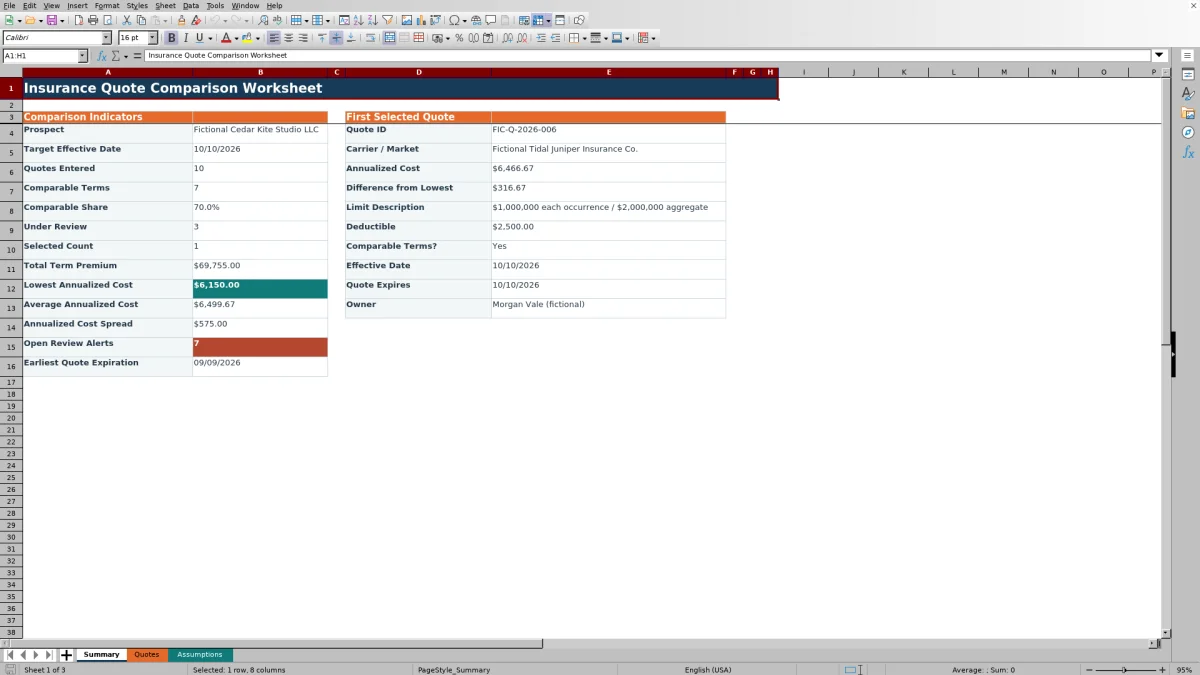
The Summary sheet reports quotes entered, comparable quotes, comparable share, quotes under review, selected count, total term premium, lowest and average annualized cost, annualized cost spread, open review alerts, and earliest quote expiration. It also retrieves the quote ID, carrier, pricing, limits, deductible, comparability, dates, and owner for the first record marked Selected. The result is a concise operational view that producers and account managers can use before discussing the available options with the prospect.
Interpretation: Practical Quote Comparison Example
In the fictional sample, Blue Acorn Mutual has a 12-month premium of $6,400 and no fee, producing a $6,400 annualized cost. Copper Finch has a $6,180 premium plus a $250 fee, producing $6,430, while Lantern Prairie has a $6,550 premium plus a $100 fee, producing $6,650. Blue Acorn is the lowest-cost example and is marked comparable, but its September 24 expiration precedes the October 10 target effective date. The practical interpretation is that its price position is favorable among the sample entries, yet the agency should request an extension or refreshed quote before relying on it for the proposed effective date.
Next Decision: Select Only After Reviewing Terms
After resolving timing and data issues, the producer should compare limits, deductibles, exclusions, endorsements, carrier conditions, and other proposal details outside the cost calculation. If the agency chooses a quote, its status can be changed to Selected. Because the Summary sheet returns the first matching record, maintaining only one selected quote gives the clearest result. If no proposal remains valid or sufficiently comparable, the next decision may be to obtain revised terms rather than select the lowest current cost.
Common Errors and Solutions
A populated quote ID with missing or nonnumeric term months or term premium can trigger the Review Alert field; enter a valid term within the configured maximum and a nonnegative numeric premium. Missing quote, effective, or expiration dates should be completed within the allowed date boundaries. If an effective or expiration date is earlier than the quote date, verify the source proposal and correct the entry. If multiple rows are marked Selected, retain the intended selection and change the others to an appropriate workflow status. When quotes have materially different limits or deductibles, mark comparability accurately and explain the difference in Notes rather than relying on cost rank alone.
Comparison With External Quote-Review Methods
The workbook functions as one complete operational method: structured entry, validation, normalization, ranking, alert review, status tracking, and summary output. The alternatives below may be more suitable when their stated conditions apply.
| Method | Primary strength | Limitation | More suitable when |
|---|---|---|---|
| This Excel workbook | Provides a repeatable prospect-level workflow with calculated costs, validation, alerts, statuses, and a summary. | Requires manual entry and does not replace review of the source proposals. | More suitable when an agency needs a consistent side-by-side administrative comparison without configuring another system. |
| Paper or manual notes | Allows flexible annotations during calls or proposal review. | Requires manual arithmetic and makes ranking, expiration monitoring, and handoff less consistent. | More suitable when only one or two simple quotes require a temporary discussion record. |
| Blank spreadsheet | Can be designed around unusual fields or a specialized line of business. | Starts without formulas, validations, alerts, or a defined workflow. | More suitable when the agency needs a highly customized one-time analysis and has staff available to build and test it. |
| CRM or agency management system | Centralizes account activity, documents, assignments, and communications. | May require configuration to reproduce this workbook's prospect-level cost calculations and comparison layout. | More suitable when integration, permissions, audit history, and organization-wide record retention are the main requirements. |
| Carrier-provided report | Reflects the carrier's source terms and presentation. | Usually covers one market and does not provide a neutral multi-carrier workflow. | More suitable when validating a specific carrier's proposal or documenting the original quoted terms. |
The appropriate method depends on quote volume, system access, documentation requirements, and whether the agency needs a reusable multi-carrier comparison or a source-specific record.
Frequently asked questions
What does the annualized cost calculation include?
Annualized cost includes the term premium plus fees when the fee is numeric, multiplied by 12 and divided by the policy term in months. It is an administrative normalization and not a coverage recommendation.
How many carrier quotes can the workbook hold?
The Quotes sheet provides 100 entry rows, from row 4 through row 103.
Does the lowest annualized cost identify the recommended quote?
No. The lowest-cost calculation does not evaluate exclusions, endorsements, carrier conditions, coverage quality, or whether the quoted terms meet the prospect's needs. Those factors require separate review.
What happens if more than one quote is marked Selected?
The Summary sheet displays the first Quotes row whose status is Selected. For a clear prospect decision, the agency should keep only the intended quote at that status.
Can the agency update the dropdown choices and alert settings?
Yes. The Assumptions sheet contains editable policy types, quote statuses, comparability choices, owners, date boundaries, expiration alert days, and the maximum quote term used by the workbook's validation and formulas.
Editorial responsibility

Maya ChenClient and policy workflows

Ethan BrooksWorkbook structure and formula QA