This insurance website lead tracker is an Excel workbook for independent agencies that need one place to organize website lead activity from submission through contact, quoting, and final status. The Leads sheet holds up to 100 records and includes fields for source, product interest, contact preference, owner, status, activity dates, estimated annual premium, and notes.
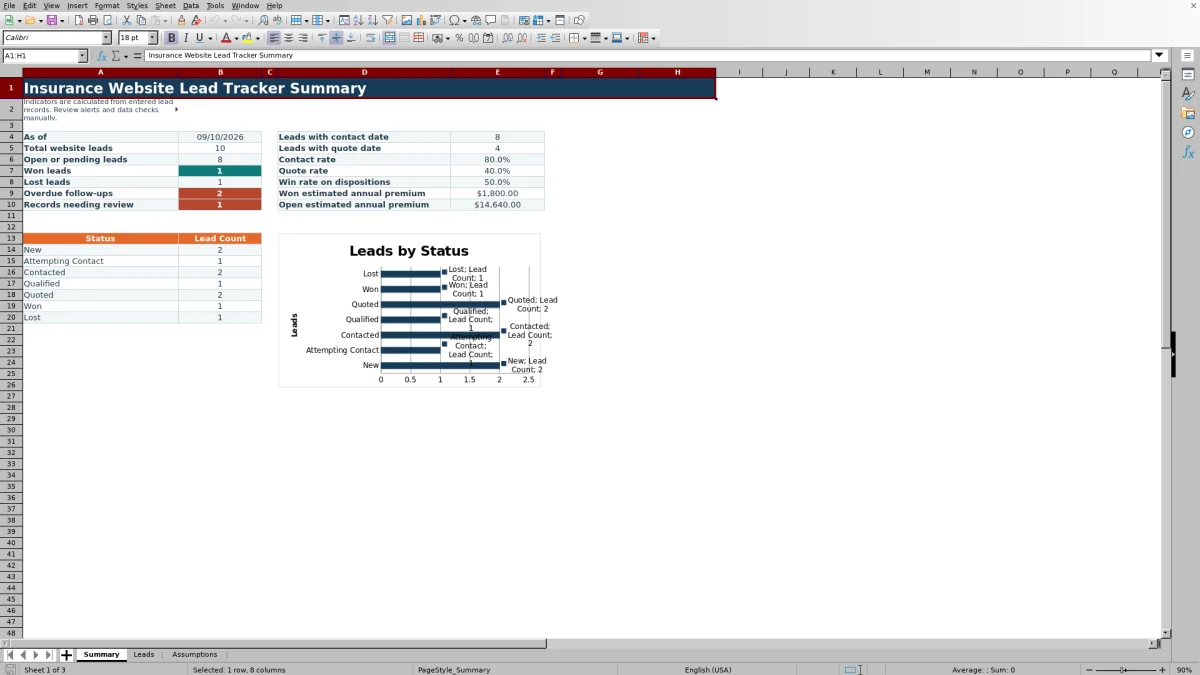
Formula-driven columns support follow-up and disposition review by calculating days open, classifying follow-up timing, and flagging records that may need correction. The Summary sheet reports pipeline counts, activity rates, won and open premium estimates, and leads by status, while the Assumptions sheet maintains selectable values and validation limits.
How this workbook can help
- Keeps website submissions, ownership, activity dates, quote progress, and dispositions in one structured register.
- Helps agency staff identify overdue follow-ups, missing follow-up dates, and records requiring review.
- Summarizes contact, quote, and disposition activity without requiring staff to calculate each metric manually.
- Allows the agency to maintain its own status, product, source, preference, owner, and operating-limit values.
What is in the file
How to get started
Step 1: Review the agency settings
Open the Assumptions sheet and review the statuses, stage types, products, lead sources, contact preferences, owners, and operating limits. Edit the yellow configuration cells as needed; these values feed the Leads sheet after workbook recalculation.
Step 2: Enter each website lead
Use the yellow input cells on the Leads sheet to record a unique Lead ID, submitted date, prospect name, product interest, source, preference, owner, and status. Add an estimated annual premium and operational notes when available.
Step 3: Update activity and follow-up dates
Record the last contact date, next follow-up, quote date, and disposition date as the lead advances. Review the Follow-Up Alert column for records classified as Set follow-up, Overdue, Due soon, Scheduled, Closed, or Check follow-up.
Step 4: Review results and decide what needs attention
Use filters on the Leads sheet to isolate owners, statuses, products, sources, or dates. Then review the Summary sheet for open leads, won and lost outcomes, contact and quote rates, overdue follow-ups, records needing review, and estimated annual premium totals.
The situation: website leads need a consistent operating record
Website inquiries can arrive through quote requests, contact forms, landing pages, referral pages, and blog inquiries. When those submissions are handled through disconnected emails or personal notes, an agency may have difficulty seeing who owns a lead, whether contact occurred, and what should happen next. This Excel tracker provides a common record for the lead ID, submitted date, prospect name, product interest, source, contact preference, owner, status, activity dates, estimated annual premium, and notes.
The action: maintain each lead through the sales workflow
Agency staff can move records through New, Attempting Contact, Contacted, Qualified, Quoted, Won, and Lost. The workbook associates each status with an open or closed stage type through its assumptions. Staff enter the dates that document contact, the next follow-up, a quote, and final disposition. Dropdowns help keep recurring values consistent, while date and premium validation apply the limits configured in the workbook.
The result: review follow-ups and pipeline indicators
The Days Open formula measures time from submission to disposition or, for an undisposed lead, to the current date. Follow-up logic marks closed records and classifies open records according to whether a follow-up is missing, overdue, due within the configured look-ahead period, or scheduled later. On the Summary sheet, the agency can review total, open, won, and lost leads; overdue follow-ups; records needing review; contact and quote counts and rates; disposition win rate; and estimated annual premium for won or open records.
Interpreted practical example
Situation: suppose an agency has entered 12 website leads, eight have a Last Contact Date, five have a Quote Date, two are Won, and one is Lost. Action: the producer updates the relevant dates and statuses, then reviews the recalculated Summary sheet. Result: the workbook reports a 66.7% contact rate, a 41.7% quote rate, and a 66.7% win rate on the three disposed leads. Interpretation: contact coverage is broader than quote activity, and the win rate reflects only Won and Lost records rather than all 12 submissions. Next decision: the agency can filter open leads to identify contacted or qualified prospects that have not yet reached the quote stage and assign the appropriate follow-up.
Common errors and practical solutions
The Data Check column can flag a duplicate Lead ID, a missing submitted date, a missing owner or status, and activity dates that precede submission. Resolve a duplicate by assigning a unique ID, complete missing ownership or status fields with the validated selections, and verify any date that appears earlier than the submitted date. If a date or premium entry is rejected, compare it with the earliest accepted date, future follow-up horizon, or maximum annual premium on the Assumptions sheet. Formula alerts are administrative prompts, so staff should confirm the underlying record before acting.
Comparison with alternative lead-tracking methods
The appropriate method depends on lead volume, integration needs, reporting requirements, and the systems already used by the agency.
| Method | How it handles the work | More suitable when |
|---|---|---|
| This Excel workbook | Combines a 100-row lead register, validated selections, date and premium controls, formula-driven alerts, data checks, summary indicators, and a status chart. | More suitable when an agency wants a structured local workbook and can maintain the records through a shared Excel process. |
| Blank spreadsheet | Provides open-ended cells but requires the agency to design its own fields, validations, formulas, checks, and reporting. | More suitable when the agency needs a fully custom layout and has staff available to build and maintain spreadsheet logic. |
| CRM or agency management system | May centralize broader client activity, communications, permissions, automation, and integrations, depending on the selected system and configuration. | More suitable when multiple users need system-level workflow, communication history, access controls, or integrations beyond a standalone XLSX. |
| Carrier-provided report | Reflects information supplied by that carrier and may not consolidate leads from other carriers or agency-owned web forms. | More suitable when the immediate task is reviewing activity limited to one carrier's reporting environment. |
Interpretation and the next operating decision
Summary metrics should be read in context. Contact and quote rates use all entered Lead IDs as their denominator, while the disposition win rate uses Won and Lost leads only. Open estimated annual premium excludes both Won and Lost records, and won premium includes records marked Won. Because formulas use the current date, days-open and follow-up results can change when Excel recalculates. The next decision should come from the underlying records: assign overdue work, correct flagged data, advance qualified leads, or close leads whose outcomes are known.
Frequently asked questions
How many website leads can the Excel tracker hold?
The prepared lead-entry area covers rows 4 through 103, providing space for 100 lead records. Extending the range would also require review of formulas, validations, filters, conditional formatting, and Summary references.
What lead statuses are included?
The default statuses are New, Attempting Contact, Contacted, Qualified, Quoted, Won, and Lost. The Assumptions sheet stores these values and identifies each as an open or closed stage type.
How does the workbook identify overdue follow-ups?
For an open lead, the formula compares the Next Follow-Up date with the current date. It can return Set follow-up, Overdue, Due soon, or Scheduled; closed stages return Closed, and formula exceptions can return Check follow-up.
How are contact rate, quote rate, and win rate calculated?
Contact rate divides the number of populated Last Contact Date cells by total entered Lead IDs. Quote rate uses populated Quote Date cells over total leads. Win rate divides Won leads by the combined number of Won and Lost leads.
Does this workbook replace a CRM or agency management system?
No. It is a structured Excel method for tracking up to 100 website leads and reviewing administrative indicators. A CRM or agency management system may be more suitable when the agency needs communication integrations, broader customer records, detailed permissions, or multi-system automation.
Editorial responsibility

Maya ChenClient and policy workflows

Ethan BrooksWorkbook structure and formula QA