This Insurance Win Loss Register is an Excel workbook for maintaining a decision-level record of quoted opportunities. Independent insurance agency operators can record the account, line of business, owner, quote and decision dates, quoted premium, outcome, decision reason, and quoted market for each opportunity.
The XLSX turns those entries into review-ready metrics for opportunity counts, win rates, quoted premium, pending business, and average decision time. Calculated review flags help operators identify records that need a human check, while editable assumptions keep administrative limits and list choices aligned with the agency's workflow.
How this workbook can help
- Maintains a consistent decision-level record across 100 available opportunity rows.
- Shows count-based and premium-based win results alongside pending opportunity totals.
- Measures days to decision and reports separate average decision times for wins and losses.
- Prompts human review of missing required inputs, duplicate IDs, invalid values, premium exceptions, and stale pending items.
What is in the file
How to get started
1. Configure the administrative settings
Open the Assumptions sheet and review the stale-pending threshold, minimum and maximum quoted premium, and allowed date range. Update the lines of business, owners, decision reasons, and quoted markets used by the entry lists.
2. Record each quoted opportunity
On the Register sheet, enter one opportunity per row in the pale yellow cells. Assign a unique opportunity ID and complete the account, line of business, owner, quote date, quoted premium, and current outcome.
3. Complete the decision details
When an opportunity is decided, select Won or Lost and enter its decision date, decision reason, and quoted market as applicable. Pending and Withdrawn are also available outcomes.
4. Resolve records that need review
Check the calculated Days to Decision and Review Flag columns. Correct missing required inputs, duplicate IDs, invalid dates or amounts, out-of-range premiums, and pending items that require follow-up under the configured threshold.
5. Interpret results and choose the next action
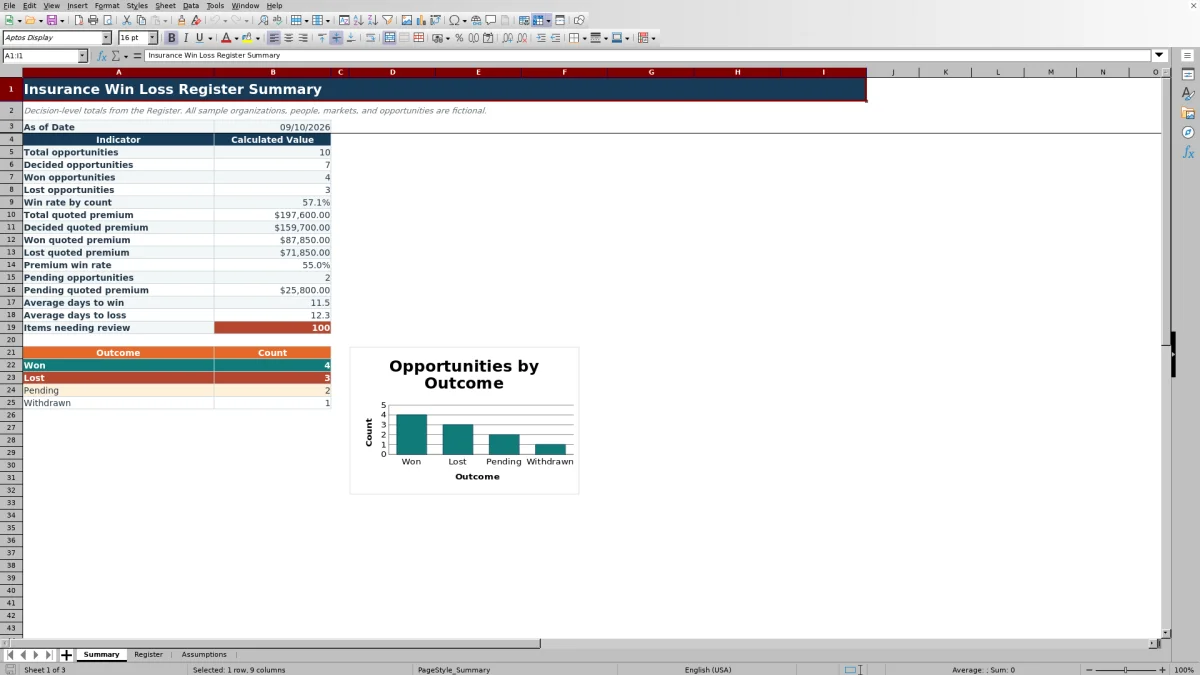
Use the Summary sheet to compare wins with losses by count and quoted premium, assess decision speed, review pending volume, and identify items that need attention. Use those findings to choose which opportunities, reasons, owners, or markets warrant the next agency review.
Establish a Consistent Decision Record
The workbook addresses a common agency situation: quote outcomes are often spread across producer notes, emails, and separate reports. The Register brings the relevant decision fields into one row per opportunity. Opportunity IDs provide a reference point, while the account, line of business, owner, dates, premium, outcome, reason, and market provide the context needed for a later sales review.
Understand the Summary Calculations
Total opportunities count nonblank opportunity IDs in Register rows 5 through 104. Decided opportunities are the combined Won and Lost counts, so Pending and Withdrawn records do not enter the count-based win-rate denominator. Premium win rate similarly compares won quoted premium with the combined won and lost quoted premium. The Summary also reports total and pending quoted premium, average days to win or loss, nonblank review flags, and counts for all four available outcomes.
Practical Example From Quote to Next Decision
This interpreted example uses the first two fictional sample rows. Situation: one opportunity has a $14,250 quoted premium and was won after 14 days for service experience, while another has a $28,750 quoted premium and was lost after 21 days for competitive price. Action: the operator records both outcomes, decision dates, reasons, and premiums. Result: as a standalone two-opportunity illustration, the count win rate is 50%, but the premium win rate is approximately 33.1% because the lost opportunity carried more premium. Interpretation: equal win and loss counts can conceal a larger premium gap. Next decision: review whether competitive-price losses in comparable business recur before changing prospect strategy or market selection.
Interpret Count, Premium, and Timing Together
No single metric explains sales performance by itself. Count-based win rate shows how often decided opportunities are won, while premium win rate reflects the relative size of those decisions. Average days to win and average days to loss add timing context. If count win rate is stable but premium win rate falls, larger opportunities may be contributing disproportionately to losses; if decision times lengthen, the agency can examine pending work and decision reasons before choosing a response.
Common Entry Errors and Solutions
A nonblank review flag calls for a human check rather than declaring an official insurance status. For “Check required input,” complete the required account, line of business, owner, quote date, premium, and outcome fields. For “Check duplicate ID,” assign a unique opportunity ID. For a date or amount warning, replace text or malformed values with valid Excel dates or numbers. For a premium warning, confirm the amount or adjust the administrative minimum and maximum only when the agency's workflow requires different boundaries. When a pending item exceeds the configured stale-pending age, verify its current status and decide whether follow-up or an outcome update is appropriate.
Comparison With Other Tracking Methods
The comparison treats the Excel workbook as one complete register-and-summary method rather than comparing its worksheets with one another. Each option is more suitable when the stated operating condition applies.
| Method | How it works | More suitable when | Operational trade-off |
|---|---|---|---|
| Insurance Win Loss Register Excel workbook | Combines structured opportunity entry, validation, calculated review fields, summary metrics, and an outcome chart in one XLSX. | An agency needs a controlled 100-row decision register without implementing another business system. | Entry and list maintenance remain manual, and the register has a fixed validated range. |
| Blank spreadsheet | Starts with unrestricted cells and fields created by the operator. | The review is temporary or the agency needs fields that differ substantially from this register. | Formulas, validation, review checks, and summary logic must be built and maintained separately. |
| CRM or agency management system | Stores opportunities within a broader multiuser workflow and may connect sales activity with other records. | The agency requires permissions, integrations, automation, activity history, or capacity beyond a standalone file. | Configuration, access, cost, and reporting depend on the selected system. |
| Carrier-provided report | Reports activity available from a particular carrier's records. | The immediate task is reconciling or reviewing business associated with that carrier. | It may not provide one agency-wide view across markets or include the agency's internal decision reasons. |
| Paper or manual notes | Captures decisions without spreadsheet formulas or validation. | Volume is very low and only a basic contemporaneous record is needed. | Aggregation, duplicate detection, premium analysis, and decision-time calculations require manual work. |
The appropriate choice depends on opportunity volume, collaboration needs, system access, and the amount of control required over data entry and reporting.
Turn Review Findings Into the Next Decision
Use a consistent review sequence: identify the operating situation, correct or complete the underlying rows, observe the recalculated result, interpret count, premium, timing, and reason data together, and then choose the next action. That action may be following up on stale pending opportunities, investigating repeated loss reasons, checking larger lost premiums, or confirming that owner and market lists still match the agency's current workflow.
Frequently asked questions
What is an insurance win loss register?
It is a decision-level sales record used to document quoted insurance opportunities and whether they were won, lost, remain pending, or were withdrawn. It can also retain premium, timing, ownership, reason, and market information for review.
Does the Excel workbook calculate insurance sales win rate?
Yes. The Summary sheet calculates win rate by opportunity count and premium win rate from records whose outcomes are Won or Lost.
Can the register track opportunities that have not been decided?
Yes. Pending opportunities and their quoted premium are summarized separately. An editable stale-pending-days assumption supports administrative review of older pending items.
How many opportunities can be entered?
The validated Register area contains 100 opportunity rows, extending from row 5 through row 104.
Can the dropdown values and administrative limits be changed?
Yes. The Assumptions sheet contains the outcomes, lines of business, owners, decision reasons, quoted markets, date boundaries, premium boundaries, and stale-pending threshold. The supplied outcome values are Won, Lost, Pending, and Withdrawn.
Editorial responsibility

Maya ChenClient and policy workflows

Ethan BrooksWorkbook structure and formula QA