This Insurance Call Outcome Log is an Excel workbook for recording inbound and outbound insurance sales calls, including the account, call purpose, outcome, owner, duration, and policy or quote reference.
The three-sheet XLSX connects a 100-row Call Log with editable assumptions and a formula-driven Summary. It helps an independent agency document next actions and follow-up dates, identify overdue work, and review call activity without treating the file as a replacement for an agency management system or required compliance records.
How this workbook can help
- Keeps call outcomes and assigned follow-up work together in a consistent row-based record.
- Helps producers and managers distinguish overdue actions, items due today, upcoming work, and closed records.
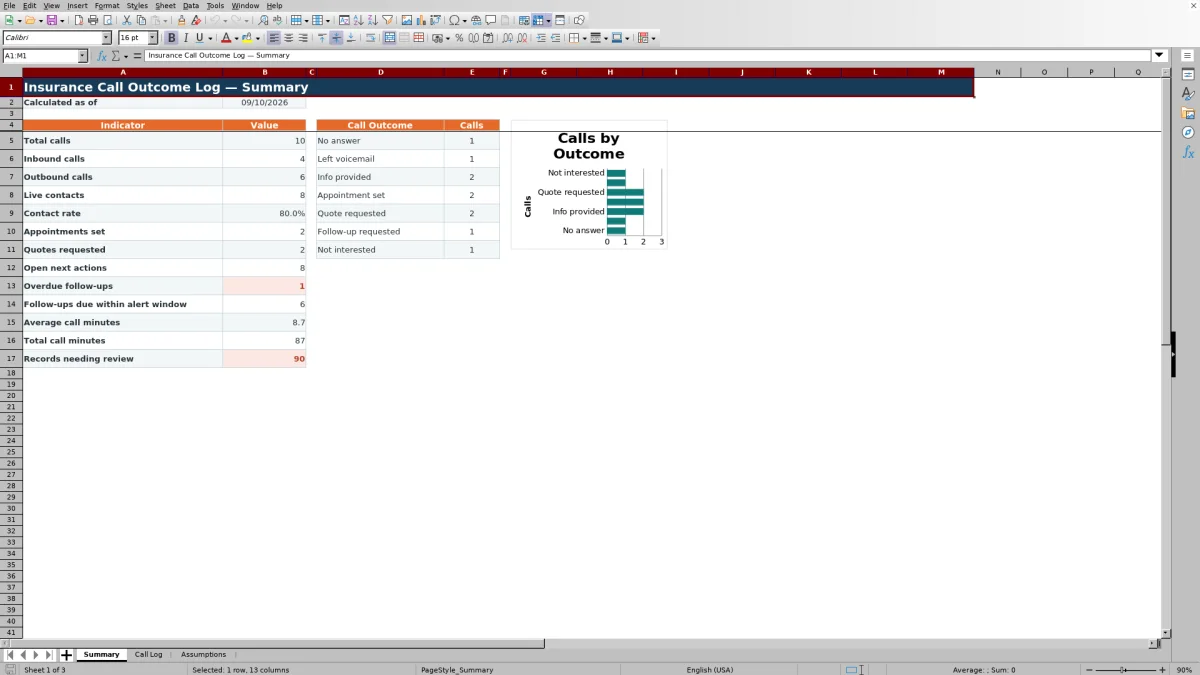
- Provides a concise operating view of contact rate, appointments, quote requests, open actions, and call time.
- Flags incomplete or inconsistent entries so the agency can correct records before relying on summary results.
What is in the file
How to get started
1. Review the setup choices
Open the Assumptions sheet and confirm the available directions, purposes, outcomes, statuses, owners, seven-day follow-up alert window, allowed dates, and 480-minute duration limit. Edit only the visible choice and setting cells that should apply to the log.
2. Record each call
Enter one call per row in the Call Log, beginning in row 5. Assign a unique call ID, select the direction and outcome, identify the account and owner, enter the duration, and document any next action and follow-up date.
3. Resolve calculated warnings
Review Days Since Call, Follow-Up Timing, and Data Check. Correct missing required fields, duplicate call IDs, invalid dates, or durations outside the configured limit until completed records display Ready.
4. Use the summary for the next decision
Review total and live calls, contact rate, appointments, quote requests, open actions, overdue items, upcoming follow-ups, call minutes, and records needing review. Assign the next work, then update the Call Log status when an action is completed or no further action is required.
What the Insurance Call Log Records
Each Call Log row captures a call ID, call date, direction, contact or account, policy or quote reference, purpose, outcome, owner, duration in minutes, next action, follow-up date, and status. The final three columns calculate days since the call, follow-up timing, and data quality. The layout supports 100 entries in rows 5 through 104, with filters across all 15 columns and the headers frozen for review.
How Follow-Up Timing Works
The timing formula treats Completed and No Further Action records as Closed. An otherwise active record with no follow-up date is labeled Needs date. A date before today is Overdue, today is Due today, a date within the configured seven-day alert window is Due soon, and a later date is Scheduled. Because these classifications use TODAY(), they can change whenever Excel recalculates the workbook.
Practical Example: Interpreting an Open Appointment
Situation: fictional call FIC-CALL-2026-003 records an outbound renewal call on September 3, 2026, with an Appointment set outcome, an Open status, and a September 15 follow-up date. Action: the owner reviews this open appointment follow-up after the scheduled date. Result: if the status remains Open and the workbook date is later than September 15, Follow-Up Timing reports Overdue and the Summary includes it in overdue follow-ups. Interpretation: setting an appointment documents a successful call outcome, but it does not close the related action. Next decision: complete the renewal preparation, reschedule the follow-up if appropriate, or change the status to Completed or No Further Action when the work is closed.
Common Entry Errors and Solutions
The Data Check column creates a review queue for entries that are not Ready. Add a missing call ID, call date, direction, account, purpose, outcome, owner, duration, or status when prompted; replace a duplicate call ID with a unique value. Enter call duration as a whole number from 0 through 480. Keep call dates between January 1, 2021, and December 31, 2036, and leave a follow-up date blank or enter one that is on or after the call date and inside the same allowed range. After correcting the source cells, allow Excel to recalculate before relying on the Summary count of records needing review.
Comparison With Other Call-Tracking Methods
The complete workbook method combines Call Log entry, Assumptions-controlled choices, calculated checks, follow-up classification, and Summary review. The table compares that operating method with realistic external alternatives rather than comparing its worksheets only with one another.
| Method | Structure and controls | Follow-up visibility | When it is more suitable |
|---|---|---|---|
| Insurance Call Outcome Log workbook | Uses fixed fields, dropdown choices, date and duration validation, calculated checks, and a 100-row entry area. | Classifies open work by timing and summarizes overdue and upcoming follow-ups. | More suitable when a small team needs a consistent, file-based call process and formula-driven review without implementing another system. |
| Blank spreadsheet | Allows flexible columns but starts without the workbook's configured choices, formulas, or validation rules. | Depends on manually created filters, formulas, or visual review. | More suitable when the need is temporary, highly customized, or limited to an informal list. |
| CRM or agency management system | May support shared records, permissions, integrated account history, workflow automation, and broader reporting, depending on the product and setup. | May provide assigned activities and automated reminders rather than workbook-based timing labels. | More suitable when several users need concurrent access, system integrations, automated workflows, or long-term account history. |
| Paper call sheet | Works without a computer but provides no formulas, validation, filtering, or automatic totals. | Requires manual review and usually requires later re-entry for reporting. | More suitable when staff need short-term offline capture and have a defined process for transferring the record afterward. |
Reading the Summary Metrics
Total calls count nonblank call IDs. Inbound and outbound totals use the configured direction values. Live contacts combine information provided, appointment set, quote requested, follow-up requested, and not interested outcomes; contact rate divides that live-contact count by total calls. The Summary also reports appointments, quote requests, open next actions, overdue and near-term follow-ups, average and total call minutes, records needing review, and counts for all seven configured outcomes.
Maintaining Assumptions and Data Boundaries
The Assumptions sheet contains the visible lists used for direction, purpose, outcome, status, and owner, along with the follow-up alert window, allowed date range, and maximum call duration. Existing validation ranges point to specific cells, so changing values inside those ranges updates the available choices, while adding entries beyond the configured cells may require the validation references and related formulas to be extended. Agencies should also replace the fictional sample records before operational use and maintain required records in their designated systems.
Frequently asked questions
What information should be entered for each insurance call?
Enter a unique call ID, date, inbound or outbound direction, contact or account, purpose, outcome, owner, duration, and status. Add the policy or quote reference when available, and document the next action and follow-up date when more work is required.
How does the workbook identify overdue follow-ups?
An Open record with a nonblank follow-up date earlier than TODAY() is counted as overdue on the Summary and labeled Overdue in the Call Log. Dates equal to today are Due today, dates within the configured alert window are Due soon, and later dates are Scheduled.
What does Ready mean in the Data Check column?
Ready indicates that the row passed the workbook's calculated checks for required information and configured limits. A different message identifies the next issue to correct, such as a missing value, duplicate call ID, or invalid duration or date.
Can the dropdown choices and operating limits be changed?
Yes. The Assumptions sheet exposes choices for direction, purpose, outcome, status, and owner, plus date, alert-window, and duration settings. Edit the existing cells carefully because Call Log validation and Summary formulas refer to defined cell ranges.
Does this Excel workbook replace a CRM or agency management system?
No. It is a structured file-based log for recording calls and reviewing follow-up work. A CRM or agency management system is more suitable when the agency requires concurrent multiuser access, integrated customer history, automated activities, permissions, or system-level compliance and retention controls.
Editorial responsibility

Maya ChenClient and policy workflows

Ethan BrooksWorkbook structure and formula QA