This Excel workbook helps an independent insurance agency record when issued policy documents were delivered and, when required, acknowledged by the client or insured. Its 100-row delivery log captures policy references, document descriptions, delivery details, acknowledgment details, assigned owners, and notes.
The workbook calculates elapsed days, follow-up due dates, and review statuses from the recorded information and editable assumptions. A Summary sheet reports delivery activity, open follow-ups, acknowledgment results, exceptions requiring review, and status counts, while the formulas remain prompts for human review rather than proof that delivery or acknowledgment occurred.
How this workbook can help
- Keeps policy delivery and acknowledgment details together in a consistent agency record.
- Calculates elapsed time and method-based follow-up dates without requiring separate deadline tracking.
- Surfaces pending delivery, overdue follow-up, missing information, and date conflicts for staff review.
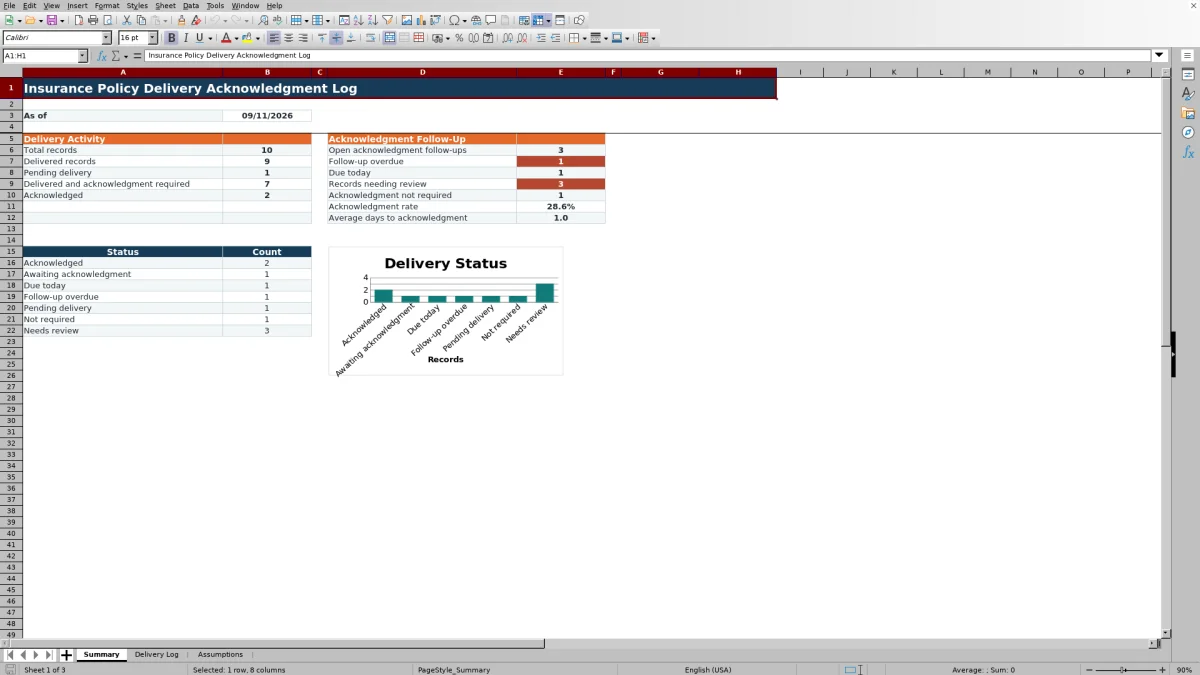
- Provides summary counts, an acknowledgment rate, average acknowledgment time, and a status chart for operational monitoring.
What is in the file
How to get started
1. Configure the agency lists
Open the Assumptions sheet and review the editable assumptions for delivery methods, follow-up day intervals, acknowledgment methods, policy types, and assigned owners. Keep edits within the existing list ranges and align the intervals with the agency's documented procedures.
2. Enter each delivery record
Use the pale yellow input cells in rows 5 through 104 of the Delivery Log. Assign a unique Record ID, identify the policy and insured, describe the issued documents, and enter the applicable dates, methods, acknowledgment requirement, owner, and notes.
3. Review calculated fields
Check Elapsed Days, Follow-Up Due, and Status after entering the source information. Investigate prompts such as Set requirement, Check dates, Check method, Check acknowledgment method, and Check acknowledgment date instead of treating them as final determinations.
4. Filter, follow up, and monitor
Use the Delivery Log filter to isolate overdue, due-today, pending, or incomplete records. Take the appropriate action, update the record with the outcome, and then use the Summary sheet to assess the resulting workload and decide which records need attention next.
What the Policy Delivery Log Records
Each Delivery Log row connects a unique Record ID with the policy reference, client or insured, issued policy documents, policy type, effective date, delivery date, and delivery method. It also records whether acknowledgment is required, the acknowledgment date and method, the assigned owner, and explanatory notes. This structure lets agency staff distinguish document issuance from delivery and distinguish delivery from acknowledgment.
How Follow-Up Dates and Statuses Work
For a delivered record that requires acknowledgment, the workbook adds the delivery method's Follow-Up Days value from the Assumptions sheet to the Delivery Date. Elapsed Days measures the interval from delivery to acknowledgment or, when acknowledgment remains open, from delivery through TODAY(). The Status formula then classifies the row as Acknowledged, Awaiting acknowledgment, Due today, Follow-up overdue, Pending delivery, Not required, or one of several review prompts for incomplete or inconsistent information.
Practical Example: Interpreting a Postal Mail Record
Situation: the fictional Morrow Glassworks Studio LLC record shows postal mail delivery on August 30, 2026, requires acknowledgment, and has no acknowledgment date. Action: staff confirm that Postal mail carries the listed 10-day follow-up interval. Result: the calculated due date is September 9, 2026; if the workbook is opened on September 10, 2026 with no acknowledgment recorded, the status becomes Follow-up overdue. Interpretation: the status means the recorded deadline has passed, not that the client failed to receive the documents. Next decision: the assigned owner should review the delivery evidence, contact the client if agency procedure calls for it, and record the acknowledgment outcome or a clarifying note.
Common Entry Errors and Solutions
The calculated statuses function as review prompts. A duplicate Record ID conflicts with the unique-ID validation, so assign a distinct identifier. Check dates means the acknowledgment date precedes the delivery date, so verify both source dates. Check acknowledgment method means an acknowledgment date exists without a method; Check acknowledgment date means a method exists without a date. Set requirement means the Yes or No selection is missing. Check method can arise when the delivery method does not produce a follow-up date, so select a listed method or update the applicable Assumptions entry and then confirm the calculation.
Comparison With Manual and System Alternatives
The workbook operates as a complete operational method by combining structured entry, list validation, date calculations, review statuses, filters, and summary reporting. The most suitable option depends on record volume, integration needs, source-document practices, and available systems.
| Option | More suitable when | Operational trade-off |
|---|---|---|
| This Excel workbook | An agency needs a repeatable standalone process for up to 100 prepared records, method-based follow-up dates, review statuses, and summary metrics. | Staff must enter and maintain the records, verify formula prompts, and retain supporting delivery evidence separately under agency procedure. |
| Paper or manual list | A very low-volume office needs an offline record and does not rely on automatic calculations or consolidated reporting. | Deadlines, exceptions, totals, and acknowledgment rates require manual review and calculation. |
| Blank spreadsheet | The agency needs a temporary ad hoc list and is prepared to design its own columns, validation, formulas, filters, and reporting. | Setup and testing remain the agency's responsibility, and inconsistent entries are more likely without controls. |
| CRM or agency management system | The agency requires integrated client records, document attachments, automated activities, permissions, or broader workflow reporting and has those capabilities configured. | Configuration, user access, and reporting behavior depend on the selected system and agency setup. |
| Carrier-provided report | The task is limited to delivery activity available from one carrier or portal and the carrier's report contains the required evidence. | It may not consolidate records across carriers or capture the agency's acknowledgment methods, owners, and follow-up rules. |
For agencies using this workbook, the Summary and Delivery Log should be treated as one process: record the event, review the calculated result, perform the follow-up, and update the same row.
Using the Summary for the Next Decision
The Summary sheet separates overall delivery activity from acknowledgment follow-up. Staff can review total and delivered records, pending delivery, acknowledged items, open follow-ups, overdue items, due-today items, records needing review, acknowledgment rate, and average days to acknowledgment. The status chart provides a visual count by category. These measures help determine whether the next action should focus on undelivered policies, overdue acknowledgments, records due today, or data-quality exceptions.
Controls, Capacity, and Human Review
The Delivery Log prepares rows 5 through 104, freezes the headings, applies an auto-filter across all 16 columns, and uses validation for IDs, dates, and controlled lists. Conditional formatting helps distinguish status conditions. These controls support consistent entry, but users still need to confirm source documents, determine whether acknowledgment is required, resolve contradictory dates, and follow the agency's retention and escalation procedures.
Frequently asked questions
How many delivery records can the workbook hold?
The Delivery Log contains 100 prepared record rows, covering rows 5 through 104. The formulas for Elapsed Days, Follow-Up Due, and Status are already present in those rows.
What statuses can the workbook assign?
The formula can return Acknowledged, Awaiting acknowledgment, Due today, Follow-up overdue, Pending delivery, Not required, Set requirement, Check dates, Check method, Check acknowledgment method, or Check acknowledgment date.
Can the agency change the follow-up period for each delivery method?
Yes. The Assumptions sheet pairs six listed delivery methods with editable Follow-Up Days values. The accepted values in that interval column range from 0 to 60.
Does the workbook itself prove that policy documents were delivered?
No. It records the dates, methods, acknowledgments, owners, and notes entered by users. The agency should verify those entries against its source evidence and retain supporting records according to its procedures.
What happens when acknowledgment is not required?
After delivery is recorded, selecting No in Acknowledgment Required causes the calculated status to show Not required. If the delivery date is still blank, the record remains Pending delivery.
Editorial responsibility

Maya ChenClient and policy workflows

Ethan BrooksWorkbook structure and formula QA