This Insurance Prospect Pipeline Excel workbook is an XLSX for tracking up to 100 opportunities through defined sales stages. The insurance prospect pipeline records ownership, source, line of business, activity dates, estimated annual premium, expected close dates, and notes in one working register.
Agency operators can use its formulas and editable assumptions to assess open value, probability-weighted value, stage movement, and follow-up priorities. The checks support human review rather than sending notices, and the Summary sheet turns entered records into practical indicators for the next sales decision.
How this workbook can help
- Keeps prospect ownership, stage, activity dates, estimated annual premium, expected close dates, and notes in one 100-row register.
- Applies editable stage probabilities to estimate weighted pipeline without changing prospect-level formulas.
- Surfaces past-due actions, actions due today, missing next actions, and possible inactivity for agency review.
- Summarizes open pipeline, won premium, high-value opportunities, near-term closes, and stage-level results.
What is in the file
How to get started
Step 1: Configure the workbook
Begin with the editable assumptions: update the review date, high-value threshold, near-term closing window, stage probabilities, and follow-up-day settings. Review the owner, source, and line-of-business lists used by the prospect dropdowns.
Step 2: Enter or update prospects
On the Prospects sheet, add the prospect inputs in the pale yellow cells. Record a unique prospect ID, organization, owner, stage, relevant dates, estimated annual premium, expected close date, and notes.
Step 3: Review calculated fields
Check the calculated review fields for Probability, Weighted Pipeline, Days Since Contact, and Follow-Up Check. Resolve missing stages or next actions and review records marked Past due, Due today, or Check inactivity.
Step 4: Decide what happens next
Use the summary indicators to examine open value, weighted value, won premium, near-term closes, and stage distribution. Assign the next human action, update the applicable date or stage, and repeat the review using the current review date.
The Operational Situation
Independent insurance agencies may have prospect details distributed across inboxes, notes, calendars, and informal lists. That makes it difficult to see who owns an opportunity, how much annual premium is estimated, where the prospect sits in the sales process, and whether the next action is late. This Excel workbook centralizes those fields in a 100-row register and applies one shared set of stages, probabilities, and follow-up timing assumptions.
Action: Build and Maintain the Pipeline
Set the review date and thresholds on the Assumptions sheet before reviewing the pipeline. Then enter each opportunity on the Prospects sheet, using the validated lists for line of business, source, owner, and stage. Dates are entered for acquisition, stage updates, last contact, next action, and expected close, while estimated annual premium supplies the value used by the pipeline formulas.
As a prospect moves, update its stage, stage-updated date, last-contact date, and next action. The workbook retrieves the probability associated with the selected stage and recalculates weighted pipeline without requiring the operator to edit the formula columns.
Result: Read the Summary Indicators
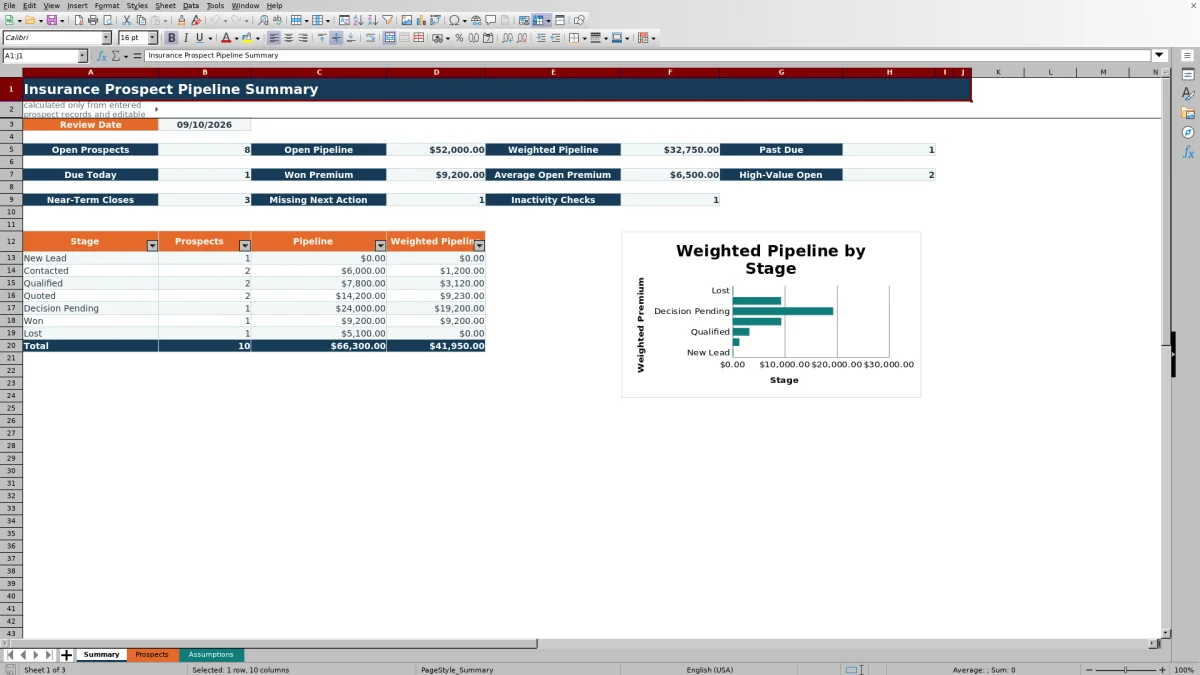
The Summary sheet reports open prospect count, open pipeline, weighted pipeline, past-due and due-today counts, won premium, average open premium, high-value open opportunities, near-term closes, missing next actions, and inactivity checks. Open calculations exclude records in Won or Lost, while won premium is reported separately.
A stage table shows prospect count, total pipeline, and weighted pipeline for each configured stage. The accompanying chart displays weighted pipeline by stage, helping an operator see where probability-adjusted value is concentrated without treating that value as a forecast certainty.
Interpreted Practical Example
Situation: the fictional Copper Kite Bicycle Studio record has a Quoted stage, an estimated annual premium of $12,400, a last-contact date of September 4, 2026, a next-action date of September 9, and an expected close date of September 20. Action: with the workbook review date set to September 10, the formulas apply the 65% Quoted probability and compare the activity dates with the current settings. Result: the weighted pipeline is $8,060, Days Since Contact is 6, and the record is marked Past due. It also meets the $10,000 high-value threshold and falls within the 14-day near-term closing window. Interpretation: this is a relatively substantial open opportunity with an approaching expected close, but its scheduled action is already late; the weighted amount is a probability-based planning value, not expected revenue. Next decision: the assigned owner should review the overdue action, confirm whether the September 20 close date remains reasonable, and update the stage or next-action date after contact.
Interpretation and the Next Sales Decision
Value and urgency answer different questions. Open Pipeline shows the entered annual premium estimate, while Weighted Pipeline adjusts that amount using the probability assigned to the current stage. Past Due and Due Today indicate timing, whereas High-Value Open and Near-Term Closes identify records that meet editable value or date conditions.
A practical review can begin with overdue and due-today actions, then move to missing next actions and inactivity checks. Within those groups, estimated and weighted values can help the agency decide where immediate human attention may have the greatest operational relevance. After the review, update the record so the next cycle reflects the latest stage and activity dates.
Common Errors and Solutions
Error: a stage is blank or does not match the configured list, leaving probability and weighted value unavailable. Solution: choose a valid stage from the dropdown or correct the stage list and its corresponding assumptions. Error: the review date is missing or stale, causing date-based checks to be unavailable or outdated. Solution: enter a valid current review date on the Assumptions sheet before evaluating follow-up status.
Error: a prospect ID is duplicated. Solution: assign a unique ID; the prospect ID range includes a custom uniqueness validation rule. Error: estimated annual premium is missing or not numeric, so weighted pipeline remains blank. Solution: enter a nonnegative numeric estimate when one is available and treat incomplete records separately until then. Error: a next-action date is missing for an open record. Solution: review the opportunity and enter a valid next-action date rather than interpreting the blank as no follow-up required.
Comparison with Alternative Tracking Methods
The workbook is a complete operating method built around a prospect register, shared assumptions, calculated review fields, and a summary. The alternatives below address different operating conditions rather than representing interchangeable worksheet components.
| Method | What it provides | More suitable when | Primary limitation |
|---|---|---|---|
| This Excel pipeline workbook | A ready 100-row register, editable stage assumptions, weighted values, follow-up checks, summary indicators, and a stage chart. | More suitable when an agency wants a locally managed, structured pipeline without implementing a larger system. | It does not provide automated notices, multiuser workflow controls, email synchronization, or system integrations. |
| Blank spreadsheet | An unrestricted grid that can be designed for a highly specific short-term list. | More suitable when only a small ad hoc list is needed and the user is prepared to build formulas, validations, and reporting. | Consistent stages, weighted calculations, and follow-up logic must be designed and maintained manually. |
| CRM or agency management system | Shared records, permissions, activity histories, workflow automation, and possible communication or policy integrations. | More suitable when several users need coordinated workflows, access controls, integrations, and ongoing activity logging. | Implementation, configuration, licensing, and training may be required. |
| Carrier-provided report | Carrier-specific submission, quote, or production information within that carrier's reporting scope. | More suitable when the immediate task is to verify activity or status for one carrier. | It may not provide a unified agency-wide view of prospects across carriers, sources, owners, and lines of business. |
Frequently asked questions
How many insurance prospects can the Excel workbook track?
The Prospects sheet provides 100 working rows, from row 5 through row 104. Each row includes input fields and formula-driven review columns.
How is weighted pipeline calculated?
The workbook retrieves the probability assigned to the selected sales stage and multiplies it by the prospect's estimated annual premium. If the stage or numeric premium is unavailable, the weighted value remains blank.
Can the stage probabilities and follow-up timing be changed?
Yes. The Assumptions sheet contains editable probabilities and follow-up-day values for New Lead, Contacted, Qualified, Quoted, Decision Pending, Won, and Lost.
Does the spreadsheet send automatic follow-up reminders?
No. Follow-Up Check values are administrative prompts for human review. They can identify conditions such as Past due, Due today, Set next action, or Check inactivity, but the XLSX does not send emails or notifications.
Is this workbook a replacement for a CRM or agency management system?
No. It is designed for structured spreadsheet-based pipeline management. A CRM or agency management system is more suitable when the agency needs shared activity histories, workflow automation, permissions, communication synchronization, or broader system integrations.
Editorial responsibility

Maya ChenClient and policy workflows

Ethan BrooksWorkbook structure and formula QA