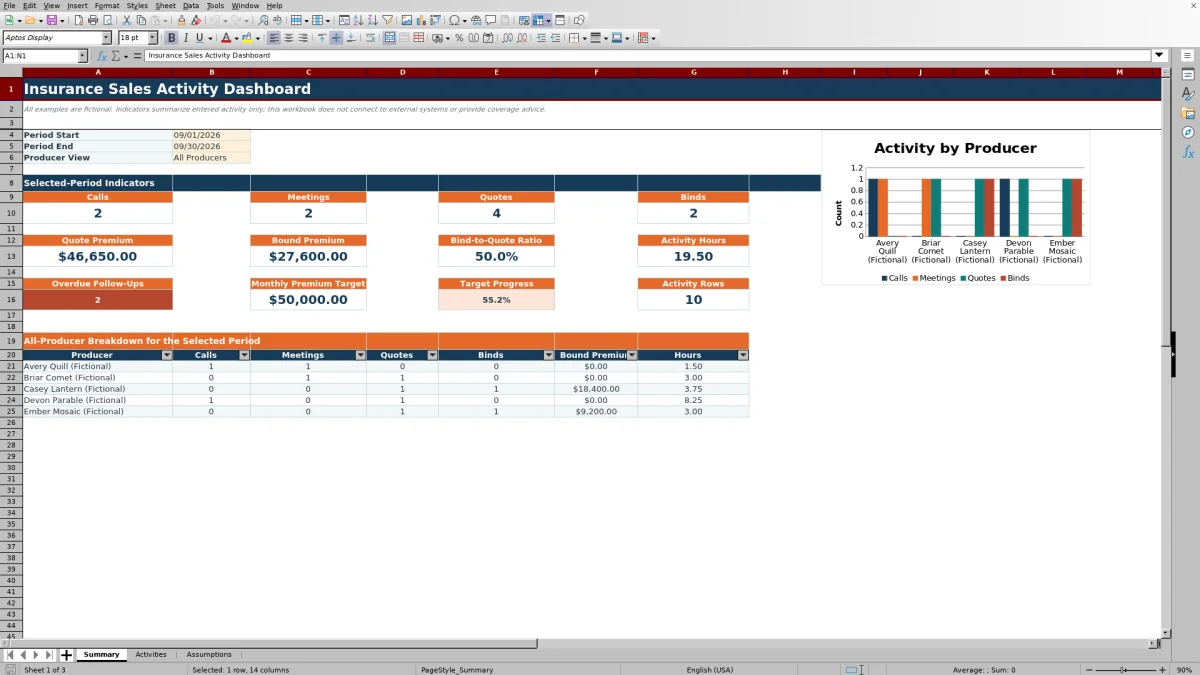
This insurance sales activity dashboard is an Excel workbook for independent agencies that need to summarize calls, meetings, quotes, binds, premium activity, and hours by producer and date range. The Summary sheet turns selected-period activity from the Activities log into operating indicators and a producer comparison.
Use the workbook to record sales work, monitor follow-up timing, compare producers, and review progress against an editable monthly bound premium target. Results reflect only the rows entered in the XLSX; it does not connect to external systems or provide coverage advice, and its included examples are fictional.
How this workbook can help
- Review calls, meetings, quotes, binds, premiums, and hours for a selected date range without manually recounting activity rows.
- Filter dashboard indicators for all producers or one listed producer, then use the all-producer breakdown for side-by-side review.
- Identify overdue follow-ups and interpret bind activity relative to quote activity and an editable monthly premium target.
- Improve entry consistency with controlled lists, date limits, numeric limits, follow-up formulas, filters, and conditional formatting.
What is in the file
How to get started
1. Configure the workbook
Open Assumptions and review the editable assumptions: as-of date, follow-up lookahead days, monthly bound premium target, date limits, maximum premium, and maximum activity hours. Replace the fictional producer and category lists when agency use requires different entries.
2. Record sales activity
On Activities, enter one activity per row in rows 6 through 105. Complete the activity date, producer, prospect or client, activity type, line of business, transaction reference, status, premium discussed, time, follow-up date, and notes as applicable. The Follow-Up Flag is formula-driven.
3. Set the reporting view
On Summary, choose the period start, period end, and producer view. Select All Producers for agency-level indicators or choose one producer for an individual view.
4. Interpret the results and decide
Read counts together with quoted premium, bound premium, hours, overdue follow-ups, the bind-to-quote ratio, and target progress. Then use the producer breakdown and chart to decide whether the next review should focus on follow-up timing, quote volume, bind activity, workload, or data quality.
A structured view of insurance sales activity
Independent agency sales records can become difficult to interpret when calls, meetings, quotes, binds, premium amounts, and follow-up dates are stored separately. This workbook provides one entry-to-review method: activities are recorded in a consistent log, assumptions control lists and alert timing, and the dashboard summarizes the selected period. It is designed for operational review rather than policy administration, accounting, or coverage analysis.
How the dashboard calculates its indicators
The Summary sheet counts activity rows by activity date and type, with an optional producer condition. Quote Premium adds Premium Discussed from rows classified as Quote, while Bound Premium adds that field from rows classified as Bind. Activity Hours totals the Time (Hours) field, and the bind-to-quote ratio divides the number of bind activity rows by the number of quote activity rows. These are activity-based measures, so they should not be interpreted as unique-client or unique-opportunity counts unless the agency's entry process enforces that convention.
Interpreted practical example
Situation: suppose an owner selects one month and All Producers, and the dashboard returns eight quote activity rows and two bind activity rows; these figures are illustrative, not asserted workbook results. Action: the owner reviews the calculated ratio and the underlying producer breakdown. Result: two binds divided by eight quotes produces a 25% bind-to-quote ratio. Interpretation: that conversion context shows the relationship between recorded quote and bind activities, but it does not establish that each bind came from one of those eight quotes. Next decision: inspect transaction references, statuses, and pending follow-up dates before deciding whether to prioritize quote follow-up, producer coaching, or data cleanup.
Common entry errors and practical solutions
Entry controls reduce common mistakes but still require review. If a date is rejected, enter a date within the earliest and latest activity limits or deliberately revise those limits on Assumptions. If a producer, activity type, line of business, or status is unavailable, update the corresponding stable list before entering the record. If premium or hours are rejected, check the configured maximum values and correct the entry rather than replacing it with an unrelated number.
A blank follow-up flag can mean that the activity row is empty, no follow-up date was entered, or the status is Bound or Declined. A zero dashboard count can result from the selected dates, producer filter, activity type, or missing activity date. The practical solution is to check those fields in that order and confirm that the Summary period includes the relevant activity date.
Comparison with manual tracking and agency systems
The appropriate method depends on record volume, collaboration requirements, integration needs, and the purpose of the review. The following comparison treats this workbook as one complete operational method rather than comparing its worksheets with one another. Consider operational fit before choosing a method.
| Method | More suitable when | Important tradeoff |
|---|---|---|
| This Excel workbook | More suitable when an agency wants a portable entry-to-dashboard process for up to 100 activity rows, controlled lists, follow-up flags, period filters, and producer review without external connectivity. | It depends on consistent manual entry and does not provide multiuser workflow, automatic synchronization, or system integrations. |
| Paper or a blank spreadsheet | More suitable when the need is temporary, the list is very small, and users accept manual counting and interpretation. | It normally requires users to create formulas, validation, alert logic, and reporting structure themselves. |
| CRM or agency management system | More suitable when multiple users need centralized history, permissions, automated workflows, integrations, or records beyond a 100-row activity log. | Implementation, administration, configuration, and licensing may be required. |
| Carrier-provided report | More suitable when the immediate task is to review or reconcile carrier-specific production data. | It may not present agency-wide calls, meetings, follow-ups, and cross-carrier sales activity in one consistent format. |
The workbook can support a focused internal review, while a CRM or agency management system is more suitable when the agency needs shared operational infrastructure and automated data exchange.
Understanding follow-up alerts
The Follow-Up Flag compares each entered follow-up date with the editable as-of date and lookahead period. An open item dated before the as-of date is labeled Overdue, an item within the lookahead window is labeled Due soon, and a later item is labeled Scheduled. Bound and Declined records do not receive those alerts, and records without a follow-up date remain blank. On Summary, the overdue count is also limited by the selected activity-date period and producer filter, so it is not an unrestricted list of every overdue date in the file.
Turning dashboard results into the next decision
Begin with All Producers and a date range aligned with the management question. Review volume, premium, hours, follow-up alerts, and conversion together; then narrow the producer view to investigate a notable result. For a like-for-like target discussion, use a monthly reporting period because the target is explicitly defined as a monthly bound premium target. Treat the dashboard as a prompt to inspect activity records and decide what to verify or address next, not as evidence of coverage quality, profitability, or compliance.
Frequently asked questions
What does the insurance sales activity dashboard summarize?
It summarizes entered calls, meetings, quotes, binds, quote premium, bound premium, activity hours, overdue follow-ups, target progress, and activity-row counts for a selected date range and producer view.
Can the dashboard show one producer instead of the whole agency?
Yes. Summary includes an All Producers option and individual producer choices sourced from the editable producer lists on Assumptions. The producer breakdown can display up to five listed producers.
How are overdue and due-soon follow-ups determined?
The formula compares the Follow-Up Date with the editable As-of Date and Follow-Up Lookahead Days. Open items before the as-of date are Overdue, items inside the future window are Due soon, and later items are Scheduled; Bound and Declined records receive no alert.
Does this Excel workbook replace a CRM or agency management system?
No. It is a self-contained activity-entry and reporting workbook with no connection to external systems. A CRM or agency management system is more suitable when the agency requires centralized multiuser records, automated workflows, integrations, permissions, or broader account administration.
How many activity records can the workbook hold?
The prepared entry area runs from row 6 through row 105 on Activities, providing space for 100 activity records with formulas and validations already applied.
Editorial responsibility

Maya ChenClient and policy workflows

Ethan BrooksWorkbook structure and formula QA