This insurance referral source tracker is an Excel workbook for recording leads and measuring referral-to-bind outcomes by source. Independent insurance agency operators can track each prospect from the date received through quoting, binding, or closure while keeping the lead owner, line of business, premium amounts, and policy or transaction reference together.
The XLSX summarizes referral volume, bound conversion, estimated and written premium, and average days to bind. Formula-driven alerts identify records that may need human review, but they do not confirm activity in a CRM, agency management system, carrier portal, email account, or other outside system.
How this workbook can help
- See referral volume, open opportunities, bound outcomes, written premium, and binding speed in one operating view.
- Compare conversion and premium results across as many as ten configured referral sources.
- Standardize entry with controlled lists for referral source, lead owner, line of business, and status.
- Identify incomplete or inconsistent records before using the results to guide source follow-up decisions.
What is in the file
How to get started
1. Configure the tracking rules
Open the Assumptions sheet and review the follow-up interval, accepted date range, maximum premium, referral sources, lead owners, lines of business, and status choices. The ten referral-source cells also supply the source rows shown on the Summary sheet.
2. Enter referral activity
On Referrals, use one row per lead and complete the applicable fields from Referral ID through Written Premium. Select list values where provided, use unique referral IDs, and leave the formulas in Days to Bind and Follow-Up Alert intact.
3. Resolve records needing review
Filter the Follow-Up Alert column to find missing statuses, incomplete bound details, questionable dates, absent quote dates, premium issues, or open referrals due for review. Verify each record against the agency's source information and correct the input rather than replacing the formula.
4. Review source outcomes
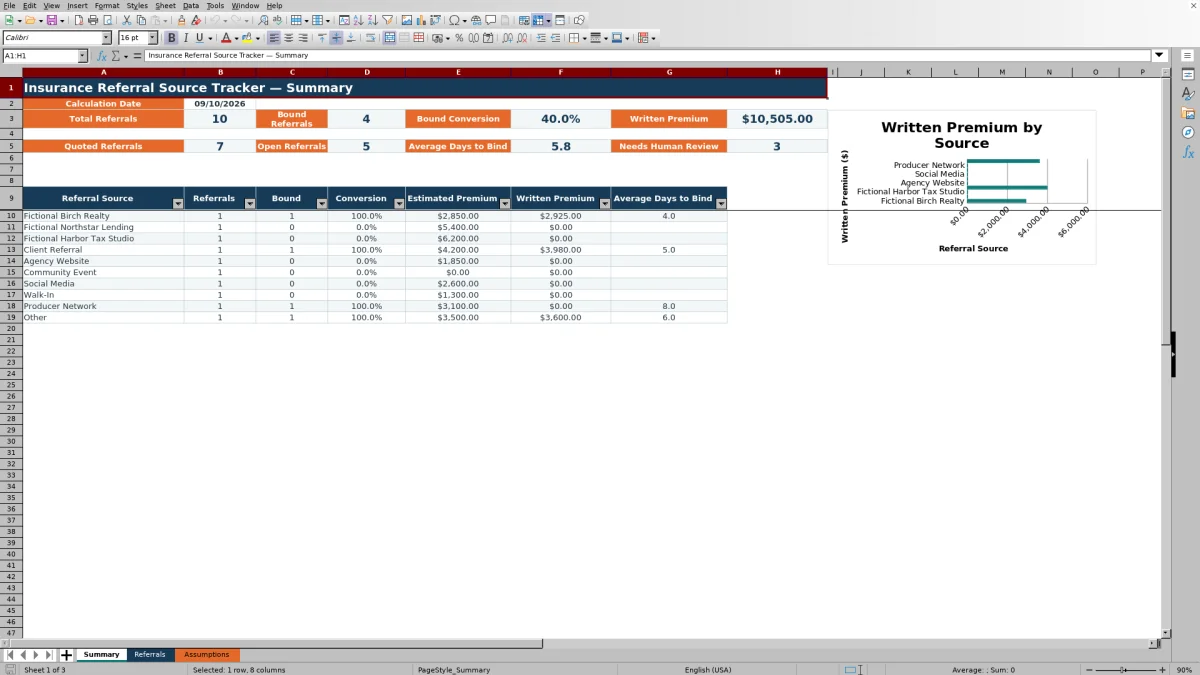
Use Summary to read total referrals, bound referrals, conversion, written premium, quote activity, open referrals, average days to bind, and the human-review count. Then compare the source rows and written-premium chart to decide which relationships or channels need follow-up.
Situation: Turn Referral Details Into Usable Pipeline Data
Referral information often arrives through clients, professional partners, websites, events, social media, walk-ins, and producer networks. When dates, ownership, status, and premium figures are stored inconsistently, an agency cannot reliably tell which sources are creating activity or producing bound business. This workbook provides a defined 100-row structure for capturing those details before reviewing source performance.
Action: Maintain a Consistent Referral Record
Each referral row includes an ID, date received, prospect or account, source, owner, line of business, status, contact dates, quote and bound dates, policy or transaction reference, and premium amounts. List validation supports consistent source, owner, line, and status entries; date and premium limits come from Assumptions; and a custom validation rule checks that populated referral IDs are unique within the prepared range.
Result: Read the Summary Metrics Correctly
Summary counts a referral when its Referral ID cell is populated and counts a bound referral when Status equals Bound. Bound conversion divides bound referrals by total referrals. Quoted Referrals counts rows containing a Quote Date, while Open Referrals includes New, Contacted, and Quoted statuses. Written Premium sums the entered written-premium values, and Average Days to Bind uses numeric results produced for eligible bound records.
Practical Example: Interpret One Bound Referral
Situation: the fictional Birch Realty referral shown in the workbook was received on August 11, 2026, with estimated premium of $2,850. Action: the record includes a Bound status, August 15 bound date, and $2,925 written premium. Result: the date formula returns four days to bind, and the completed bound details satisfy the bound-record checks. Interpretation: written premium is $75 above the estimate, but one record alone does not establish the source's typical value. Next decision: review that source's aggregate referrals, conversion, premium, and average binding time on Summary as additional records accumulate.
Errors and Solutions for Reliable Reporting
A duplicate Referral ID can be rejected by the uniqueness validation; assign a distinct ID. A date outside the configured range or a premium above the configured maximum can fail validation; confirm the source data or adjust a legitimate operating limit on Assumptions. A Bound record without a bound date, with dates in the wrong order, or without positive written premium can trigger a check message. A Quoted record without a quote date can also be flagged. In each case, correct the source record after verification instead of typing over Days to Bind or Follow-Up Alert.
Comparison With Alternative Referral Tracking Methods
The workbook should be considered as one complete operational method: configure assumptions, enter referral records, review formula alerts, and analyze the Summary. Each alternative is more suitable when its operating condition matches the agency's needs.
| Method | More suitable when | Operational trade-off |
|---|---|---|
| This complete Excel tracker | More suitable when an agency needs a controlled, local process for up to 100 referral records with source-level outcomes and no required system integration. | Provides ready-made calculations, validation, alerts, filters, and a chart, but users must enter and verify the records manually. |
| Paper log or blank spreadsheet | More suitable when referral volume is very low and the agency needs only a basic chronological list. | Allows flexible notes but does not provide this workbook's established validation rules, alert formulas, source summary, or conversion calculations unless the user builds them. |
| CRM or agency management system | More suitable when multiple users require centralized workflows, permissions, activity history, or integrations and the selected system is configured to provide them. | May reduce duplicate entry and support broader workflows, but implementation, configuration, licensing, and report design can be more involved. |
| Carrier-provided report | More suitable when the immediate question concerns production recorded by one carrier. | Can reflect carrier-side results but may omit referrals that never reached that carrier and may not provide an agency-wide comparison across sources. |
The choice depends on referral volume, collaboration needs, system access, and whether the agency requires cross-platform automation. This XLSX does not claim to exchange data with external systems.
Interpretation and the Next Source Decision
High referral volume does not necessarily indicate a productive source. Read volume with bound conversion, written premium, and average days to bind, while also checking the number of records needing review. A source with fewer leads may still warrant attention if its records convert consistently and produce meaningful written premium; a high-volume source with low conversion may call for a conversation about lead fit, response timing, or follow-up. Treat the results as operational evidence from the entered records, then decide whether to maintain outreach, investigate data quality, refine follow-up, or gather more observations.
Frequently asked questions
What does the insurance referral source tracker measure?
It measures total and bound referrals, bound conversion, written premium, quote activity, open referrals, average days to bind, and records needing review. It also breaks out referral count, bound count, conversion, estimated premium, written premium, and average days to bind for the configured sources.
How many referral records can the Excel workbook hold?
The prepared Referrals area contains 100 entry rows, from row 5 through row 104. Expanding beyond that range would require careful extension of formulas, validation, filters, and Summary references.
Can an agency customize the referral sources and other lists?
Yes. The Assumptions sheet contains ten referral-source slots, four lead-owner slots, seven line-of-business choices, and five status choices. Changes to the source list feed the ten source rows on Summary.
What can cause a Follow-Up Alert?
The formula can prompt review for a missing status, missing or inconsistent dates, a quoted record without a quote date, a bound record without valid written premium, or an open referral that meets its follow-up conditions. The message is a review prompt, not proof that an outside action did or did not occur.
Does this workbook connect to a CRM, agency management system, or carrier portal?
No external integration is evidenced in the XLSX manifest. Referral activity must be entered and verified in the workbook, and users should reconcile important outcomes with the agency's authoritative systems.
Editorial responsibility

Maya ChenClient and policy workflows

Ethan BrooksWorkbook structure and formula QA